Network Infrastructure Build
The backbone of every homelab: 10G switching, long-distance wireless links, and managed PoE. Building a network that actually works.
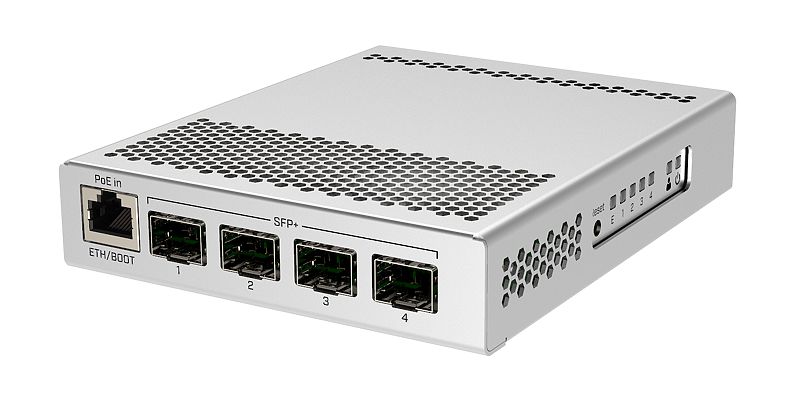
Table of Contents
- The Problem
- What We’re Building
- The Hardware
- Core Components
- Mikrotik CRS305-1G-4S+IN
- Ubiquiti US-24-250W
- Ubiquiti NanoBeam 5AC Gen2
- The Setup
- Mikrotik CRS305 Configuration
- UniFi US-24 Configuration
- NanoBeam Bridge Setup
- Network Topology
- Performance
- 10G Backbone (Mikrotik CRS305)
- 1G Distribution (UniFi US-24)
- NanoBeam Link
- Management and Monitoring
- UniFi Controller
- Mikrotik CLI
- Lessons Learned
- Future Upgrades
- Conclusion
The Problem
A network is like plumbing: invisible until it breaks, then it’s the only thing that matters.
My old setup was a mess of consumer routers, unmanaged switches, and WiFi extenders. It worked, sort of. But file transfers crawled, WiFi coverage was spotty, and I had no visibility into what was happening on my network.
I wanted:
- Speed — 10G backbone for server and NAS
- Coverage — WiFi everywhere in the house
- Visibility — Know what’s happening on my network
- Reliability — Enterprise gear, consumer context
Time to build a proper network.
What We’re Building
A three-tier network topology:
- Core Switch — Mikrotik CRS305-1G-4S+IN (10G backbone)
- Distribution Switch — Ubiquiti UniFi US-24 (PoE for access points)
- Long-distance Link — Ubiquiti NanoBeam (building-to-building)
This isn’t enterprise-grade, but it’s homelab-proper. Real gear, real management, real performance.
The Hardware
Core Components
| Component | Model | Price (Approx) |
|---|---|---|
| 10G Switch | Mikrotik CRS305-1G-4S+IN | $150 |
| PoE Switch | Ubiquiti US-24-250W | $200 (used) |
| Wireless Bridge | Ubiquiti NanoBeam 5AC Gen2 (pair) | $150 |
| SFP+ DAC | 10G cables | $20 each |
| Fiber SFP+ | Single-mode modules | $30 each (optional) |
Total: ~$570
Mikrotik CRS305-1G-4S+IN
The star of the show. Four SFP+ ports for 10G, plus one gigabit copper port for management.
| Feature | Spec |
|---|---|
| Ports | 4x SFP+ (10G) + 1x RJ45 (1G) |
| Throughput | 56 Gbps switching capacity |
| Management | Web, CLI, Winbox |
| Power | 6W |
| Size | Tiny — fits anywhere |
This is the cheapest way into 10G networking. Enterprise-grade switching for the price of a decent dinner.
Ubiquiti US-24-250W
Managed PoE switch for distribution:
| Feature | Spec |
|---|---|
| Ports | 24x Gigabit RJ45 (PoE+) |
| PoE Budget | 250W total |
| Management | UniFi Controller |
| Rack Mount | Yes (1U) |
Power over Ethernet means one cable for data and power. Perfect for access points and cameras.
Ubiquiti NanoBeam 5AC Gen2
Point-to-point wireless bridge:
| Feature | Spec |
|---|---|
| Range | Up to 25km (with clear LOS) |
| Throughput | 450+ Mbps real-world |
| Frequency | 5GHz |
| Power | PoE powered |
I use these for a building-to-building link. Cheaper than trenching fiber, faster than I expected.
The Setup
Mikrotik CRS305 Configuration
Out of the box, the CRS305 is a dumb switch. No IP, no management, just pass-through. To configure it:
- Connect via Winbox — Download Mikrotik’s Winbox app, connect via MAC address
- Set an IP — Give it an IP on your management VLAN
- Create a bridge — Bridge all ports together
- Enable management — Allow HTTP/SSH access
The CRS305 supports both switching and routing. For pure switching (which handles 10G line-rate), you want hardware offloading enabled.
UniFi US-24 Configuration
The UniFi switch requires a controller. Options:
- Hardware controller — UniFi Cloud Key (expensive)
- Software controller — Install on any Linux box (free)
- Cloud controller — UniFi’s cloud service (free for basic use)
After adopting the switch:
- Create networks — Management, IoT, Guest, etc.
- Configure ports — Assign VLANs per port
- Enable PoE — Per-port PoE control
The UniFi interface is beautiful. Real-time traffic graphs, device lists, topology maps — visibility that consumer routers can’t match.
NanoBeam Bridge Setup
This required line-of-sight between buildings:
- Mount both units — Aimed at each other
- Configure as AP/Station — One transmitter, one receiver
- Set frequency — Auto is fine, or lock to a clean channel
- Enable alignment tool — Audio feedback helps aim
My link crosses about 100 meters. Signal strength is -50dBm, which is excellent. Real-world throughput: 400+ Mbps in both directions.
Network Topology
                    ┌─────────────┐
                    │    ISP      │
                    │   Fiber     │
                    └──────┬──────┘
                           │
                    ┌──────▼──────┐
                    │  Mikrotik   │
                    │   CRS305    │
                    │   (10G)     │
                    └──────┬──────┘
                           │
           ┌───────────────┼───────────────┐
           │               │               │
    ┌──────▼──────┐ ┌──────▼──────┐ ┌──────▼──────┐
    │   Server    │ │   UniFi     │ │   NanoBeam  │
    │    (10G)    │ │   US-24     │ │   (Link)    │
    └─────────────┘ └──────┬──────┘ └──────┬──────┘
                           │               │
                      ┌────┴────┐     ┌────▼────┐
                      │ APs,    │     │ Remote  │
                      │ Cameras │     │ Building│
                      │ Clients │     └─────────┘
                      └─────────┘
Performance
10G Backbone (Mikrotik CRS305)
| Test | Result |
|---|---|
| iperf3 (server ↔ NAS) | 9.4 Gbps |
| File transfer (large) | 800 MB/s |
| File transfer (small) | 500 MB/s |
10G is the real deal. Large file transfers between server and NAS complete in seconds, not minutes.
1G Distribution (UniFi US-24)
| Test | Result |
|---|---|
| iperf3 (client ↔ server) | 940 Mbps |
| PoE output | 250W budget, ~60W used |
| Switching latency | ≈1ms |
The US-24 handles everything else. PoE powers access points and cameras without extra adapters.
NanoBeam Link
| Test | Result |
|---|---|
| iperf3 (building ↔ building) | 430 Mbps |
| Latency | ~1ms |
| Uptime | 99.9% |
400+ Mbps over wireless is impressive. It’s not 10G, but for extending network to another building, it’s perfect.
Management and Monitoring
UniFi Controller
The controller provides:
- Device health at a glance
- Client list with hostname/manufacturer
- Traffic graphs per port
- Alerts for disconnected devices
Mikrotik CLI
The CRS305 has full command-line access:
/interface bridge port print
/system resource print
/interface ethernet poe print
Less pretty than UniFi, but more powerful. Scripting, automation, deep configuration — it’s all there.
Lessons Learned
-
Buy SFP+ cables, not fiber. For short runs (under 5m), DAC (Direct Attach Copper) is cheaper and more reliable. Save fiber for long runs.
-
Plan your VLANs. It’s easier to segment from day one than to retrofit. Management, IoT, Guest, Trusted — keep them separate.
-
UniFi’s “free” controller requires setup. The software controller needs a server. Factor in the Docker container or VM.
-
NanoBeams need line-of-sight. Trees, buildings, hills — they all kill the signal. Survey before buying.
-
Enterprise gear = enterprise learning curve. Mikrotik’s documentation is… comprehensive. UniFi’s is better. Budget time for learning.
Future Upgrades
- More 10G ports — The CRS305 only has 4 SFP+. A CRS309 or CRS317 would add more.
- Fiber backbone — For longer runs between rooms/floors
- UniFi Dream Machine — Consolidate router + controller + switch
- Managed PoE for cameras — Per-port power scheduling
Conclusion
A proper network is invisible infrastructure. When it works, you forget it exists. When it doesn’t, everything falls apart.
This setup gives me:
- 10G for large transfers
- PoE for clean cable runs
- Visibility into network traffic
- Reliability I can count on
The Mikrotik CRS305 is the star — 10G switching for $150 is insane value. The UniFi switch adds management and PoE. The NanoBeams extend the network without trenching cable.
If your homelab is straining against consumer networking, upgrade. You won’t regret it.
Questions about the network? Hit me up on the contact page. I’m always happy to talk infrastructure.

If you liked this, check out...

Pi-hole Network Ad Blocker
Block ads on every device in your house with a $10 Raspberry Pi Zero. No browser extensions, no per-device setup, just sweet internet silence.
Homelab Server Rack Build
One rack to rule them all. A 25U server rack housing the Dell R620, switches, PDUs, and all the networking gear needed for a serious homelab.
Comments
Powered by GitHub Discussions