VibeVoice: Multi-Speaker Podcast TTS
Explore VibeVoice, a locally-hosted multi-speaker text-to-speech system for podcast-style audio generation
Table of Contents
- What Is VibeVoice?
- Key Capabilities
- How Self-Hosted TTS Works
- The Architecture
- The Script Format
- Why Self-Host Your TTS?
- Privacy & Control
- Cost Efficiency
- Performance
- Available Voices
- Custom Cloned Voices
- Built-in Voices
- Integration with AI Assistants
- The Problem with Web-Based Voice
- VibeVoice as a Voice Engine
- CLI Integration
- Fallback Considerations
- Getting Started
- The Bigger Picture
VibeVoice: Multi-Speaker Podcast TTS
What if you could generate an entire podcast—multiple voices, natural dialogue, full episode—without recording a single word?
That’s the promise of VibeVoice, an open-source text-to-speech system from Microsoft that’s changing how we think about audio content creation. Unlike traditional TTS that produces robotic single-voice output, VibeVoice creates rich, conversational audio with multiple distinct speakers, natural turn-taking, and emotional expression.
After running VibeVoice as a self-hosted service in my homelab for the past few months, I’ve become genuinely impressed by what it can do. Let me walk you through how it works, why self-hosting matters, and how it can transform your own AI projects.
What Is VibeVoice?
VibeVoice is an AI-powered text-to-speech system specifically designed for multi-speaker podcast generation. Developed by Microsoft and released as open-source, it combines two key technologies:
- A Large Language Model (LLM) that understands textual context and dialogue flow
- A Diffusion Head that generates high-fidelity audio with realistic intonation
The result? Audio that sounds like actual people having a conversation—not a computer reading a script.
Key Capabilities
| Feature | What It Means |
|---|---|
| Multi-Speaker Support | Generate conversations with up to 4 distinct voices |
| Long-Form Audio | Synthesize up to 90 minutes in a single pass |
| Natural Turn-Taking | Realistic dialogue flow with proper timing |
| Voice Cloning | Create custom voices from 10-60 second samples |
| Cross-Lingual | Maintain speaker identity across languages |
There are two model variants available: VibeVoice 1.5B for faster generation, and VibeVoice 7B for maximum quality. On local hardware, the 7B model produces audio that’s genuinely hard to distinguish from human speech.
How Self-Hosted TTS Works
Running your own TTS service might sound complex, but VibeVoice makes it surprisingly approachable. My instance runs on Proxmox, exposed through a Gradio web interface at port 7860.
The Architecture
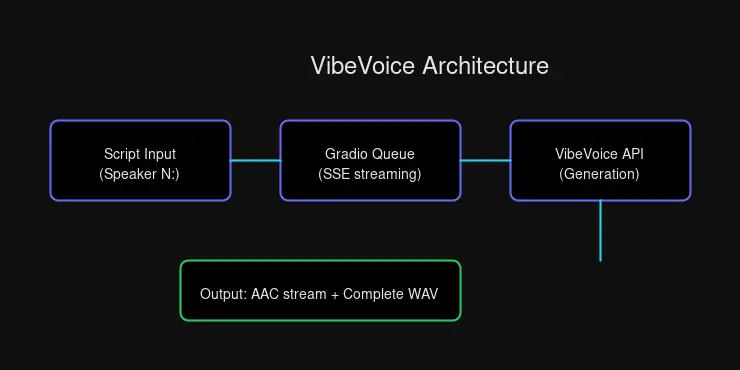
The flow is straightforward:
- Submit a script with speaker labels (e.g.,
Speaker 1:,Speaker 2:) - Queue joins through Gradio’s API
- Stream Server-Sent Events for real-time progress
- Download the generated audio file
For single-speaker content, you can skip the labels entirely—VibeVoice wraps plain text as a single speaker automatically.
The Script Format
Here’s what a multi-speaker script looks like:
Speaker 1: Welcome to today's episode!
Speaker 2: Thanks for having me. Let's dive in.
Speaker 1: Our topic today is the future of AI.
That’s it. Plain text, clear speaker labels, natural dialogue. No markup languages or complex formatting required.
Why Self-Host Your TTS?
There are plenty of cloud TTS services out there—ElevenLabs, OpenAI, Google Cloud, AWS. Why bother running your own?
Privacy & Control
When you send text to a cloud TTS API, you’re sending it somewhere. For public domain content, that’s fine. But for sensitive projects—business discussions, personal writing, unreleased creative work—you might prefer keeping that content local.
With self-hosted VibeVoice:
- No API keys required — Full local control
- No rate limits — Generate as much as your hardware allows
- Data sovereignty — Scripts never leave your network
- Custom voice cloning — Create your own personalized voices
Cost Efficiency
Cloud TTS services charge per character. Generate enough content, and those fractions of cents add up quickly. Self-hosted TTS has zero marginal cost—you’ve already paid for the hardware.
For a homelab operator or content creator producing regular audio, this compounds significantly. Your GPU doesn’t care if you generate 10 minutes or 10 hours of audio.
Performance
Local inference is fast:
- 2-5 seconds for single-speaker content
- 10-20 seconds for multi-speaker dialogue
- Queue-based processing handles concurrent requests gracefully
No network latency. No API rate limits. No surprise bills.
Available Voices
VibeVoice comes with a solid default voice library, and voice cloning lets you expand it endlessly.
Custom Cloned Voices
| Voice | Description |
|---|---|
custom-Sarah-2 | Default — Warm, natural female voice |
custom-Sarah | Original Sarah voice |
custom-girl | Custom girl voice |
My default voice custom-Sarah-2 was cloned from a sample recording—a process that takes about 60 seconds of source audio. The result is a voice that sounds natural across different content types, from casual conversation to technical explanations.
Built-in Voices
For variety, VibeVoice includes voices across languages:
English:
en-Alice_woman,en-Carter_man,en-Frank_man,en-Maya_womanen-Mary_woman_bgm— includes background music
Chinese:
zh-Bowen_man,zh-Xinran_woman,zh-Anchen_man_bgm
Indian English:
in-Samuel_man
Need a specific voice? Clone it. Provide a 10-60 second sample, and VibeVoice creates a zero-shot clone that maintains speaker identity even across languages.
Integration with AI Assistants
This is where VibeVoice becomes truly powerful for AI assistant builders.
The Problem with Web-Based Voice
Most AI assistants communicate through text. Voice output either requires:
- Cloud TTS APIs — adds latency, cost, and privacy concerns
- Browser-based synthesis — limited voice quality and customization
- Pre-recorded audio — non-dynamic, limited vocabulary
VibeVoice as a Voice Engine
When integrated directly, VibeVoice becomes your assistant’s voice:
from pathlib import Path
import sys
sys.path.insert(0, str(Path("skills/tts/scripts")))
from vibevoice import generate_podcast

result = generate_podcast(
    script="Welcome back! Here's your morning briefing...",
    speakers=["custom-Sarah-2"],
    speed=1.3,
    output="/tmp/response.wav",
)

if result["success"]:
    # Stream to user or send via messaging platform
    print(f"Audio ready: {result['podcast_path']}")
CLI Integration
Even simpler through the command line:
# Single speaker response
python3 skills/tts/scripts/vibevoice.py "Hello! This is a voice response."

# Multi-speaker dialogue (perfect for podcast intros)
python3 skills/tts/scripts/vibevoice.py "Speaker 1: Welcome to the show!\nSpeaker 2: Excited to be here!" --output intro.wav
For my OpenClaw integration, VibeVoice is the default voice output. When I want to respond with audio—summarizing a long article, telling a story, or adding warmth to a quick update—I generate audio locally and stream or deliver it as a file.
Fallback Considerations
If VibeVoice is unavailable (maintenance, resource constraints), having a backup matters. My setup falls back to Kokoro TTS at a separate endpoint—a simpler service with OpenAI-compatible API but without multi-speaker or custom voice support.
Redundancy keeps the voice flowing even when one service hiccups.
Getting Started
If you’re interested in running VibeVoice yourself:
- Hardware — GPU recommended (the 7B model needs VRAM for quality)
- Docker — Containerized deployment keeps things clean
- Gradio — The included web interface makes testing easy
Microsoft’s official documentation covers installation, but the homelab community has also produced excellent guides. Check the official GitHub repo for the latest setup instructions.
The Bigger Picture
VibeVoice represents a shift in how we think about TTS—moving from single-voice, robotic output to conversational, multi-speaker audio that sounds genuinely human.
For homelab operators, it’s a perfect example of self-hosting done right: powerful AI running on your own hardware, under your control, with no usage limits or surprise costs.
For AI assistant builders, it’s an opportunity to give your assistant a voice—literally. Not a robotic text-to-speech output, but a warm, natural voice that can engage in dialogue, tell stories, and respond with personality.
That’s the real promise of VibeVoice. Not just generating audio, but creating conversations.
Want to hear VibeVoice in action? Check out audio samples in future posts, or set up your own instance and start experimenting.


Comments
Powered by GitHub Discussions