Trivy Container Vulnerability Scanning for Homelab Security
Lock down your homelab with automated vulnerability scanning. Learn how Trivy finds CVEs, misconfigurations, and secrets in your containers—without the enterprise overhead.
Table of Contents
- Why Trivy for Homelabs?
- Key Features at a Glance
- Installation: Keep It Simple
- Option 1: Package Manager (Recommended)
- Option 2: Direct Binary Download
- Option 3: Docker (No Install Required)
- Basic Usage: From Zero to Security
- Scanning Container Images
- Scanning Your Local Code and Configurations
- Infrastructure as Code Scanning
- Kubernetes Cluster Scanning
- Generating an SBOM
- GitHub Actions: Automate Your Security
- Basic Container Scanning Workflow
- Infrastructure as Code Scanning
- Homelab Scanning Script: One Command to Rule Them All
- Private Registries: Scanning Your Own Images
- Air-Gapped Homelabs: Offline Scanning
- Best Practices for Homelab Security
- 1. Prefer Minimal Base Images
- 2. Pin Your Image Versions
- 3. Fail Builds on Critical Issues
- 4. Document Accepted Risks
- 5. Don’t Run Containers as Root
- 6. Scan Before You Build
- 7. Enable Caching for Speed
- 8. Combine Scans for Efficiency
- Trivy vs. The Alternatives
- Getting Started: Your Action Plan
- Resources
You’ve spent hours crafting the perfect Docker Compose stack. Traefik routing requests, Pi-hole blocking ads, Home Assistant automating your lights, maybe a media server or two. Your homelab is humming along beautifully.
But here’s the uncomfortable question: Do you know what vulnerabilities are lurking in those containers?
Every image you pull comes with a hidden cargo—outdated packages, known CVEs, sometimes even hardcoded secrets. The nginx container serving your reverse proxy might have a critical remote code execution bug. That cozy media server? Potentially exposing credentials in its environment variables.
Enterprise security teams have sophisticated scanners and dedicated staff. As a homelabber, you’re on your own—unless you have the right tool.
Enter Trivy, the open-source security scanner that’s become the de facto standard for container vulnerability detection. And the best part? It’s completely free, runs as a single binary, and takes about two minutes to set up.
Why Trivy for Homelabs?
Before we dive in, let’s address why Trivy specifically deserves a spot in your toolkit:
- Zero Infrastructure — No database server, no complex configuration. Download and run.
- All-in-One Scanning — Vulnerabilities, misconfigurations, secrets, and licenses in a single tool
- Free Forever — Apache 2.0 licensed, no enterprise features locked behind paywalls
- CI/CD Ready — Seamless GitHub Actions integration for automated scanning
- Fast & Lightweight — Auto-caching makes regular scanning practical even on modest hardware
When you’re running a dozen services on a single machine, you don’t need enterprise-grade complexity. You need something that works out of the box and tells you what’s wrong—clearly and quickly.
Key Features at a Glance
Trivy isn’t just a container image scanner. It’s a comprehensive security toolbelt:
Multi-Target Scanning:
- Container images (Docker and OCI formats)
- Filesystems and local directories
- Git repositories
- Kubernetes clusters (live scanning!)
- Virtual machine images
- Software Bill of Materials (SBOM)
Comprehensive Security Scanners:
- Vulnerability Detection — OS packages and language dependencies (npm, pip, Go modules, Maven, Cargo, Ruby gems)
- Misconfiguration Detection — Terraform, Kubernetes manifests, Dockerfiles, CloudFormation, Helm charts, Docker Compose
- Secret Detection — API keys, passwords, tokens, SSH keys, private keys
- License Compliance — SPDX license detection for supply chain transparency
SBOM Generation:
- Export CycloneDX and SPDX formats
- Track vulnerabilities over time
- Meet supply chain transparency requirements
Installation: Keep It Simple
For homelabs, the easiest path is the best path. Here’s how to get Trivy running in under a minute.
Option 1: Package Manager (Recommended)
macOS with Homebrew:
brew install aquasecurity/trivy/trivyLinux with apt:
sudo apt-get install wget apt-transport-https gnupg lsb-release
wget -qO - https://aquasecurity.github.io/trivy-repo/deb/public.key | sudo gpg --dearmor | sudo tee /usr/share/keyrings/trivy.gpg > /dev/null
echo "deb [signed-by=/usr/share/keyrings/trivy.gpg] https://aquasecurity.github.io/trivy-repo/deb $(lsb_release -sc) main" | sudo tee -a /etc/apt/sources.list.d/trivy.list
sudo apt-get update
sudo apt-get install trivy
Option 2: Direct Binary Download
curl -sfL https://raw.githubusercontent.com/aquasecurity/trivy/main/contrib/install.sh | sh -s -- -b /usr/local/bin v0.58.0Option 3: Docker (No Install Required)
If you don’t want to install anything locally:
docker run --rm -v /var/run/docker.sock:/var/run/docker.sock:ro \
  -v $HOME/.cache:/root/.cache/ \
  aquasec/trivy:latest image nginx:latest
Verify your installation:
trivy --versionThat’s it. No database setup, no configuration files, no enterprise license keys. You’re ready to scan.
Basic Usage: From Zero to Security
Let’s run through the most common scanning scenarios you’ll encounter in a homelab.
Scanning Container Images
The bread and butter of Trivy—checking your Docker images for known vulnerabilities.
# Scan any public image
trivy image nginx:latest

# Scan from a specific registry
trivy image docker.io/library/nginx:latest

# Filter by severity (focus on what matters)
trivy image --severity HIGH,CRITICAL nginx:latest

# Only show vulnerabilities with known fixes
trivy image --ignore-unfixed nginx:latest

# JSON output for scripts and automation
trivy image -f json -o results.json nginx:latest
Understanding the severity levels helps prioritize your remediation:
| Severity | What It Means |
|---|---|
| CRITICAL | Active exploits exist. Patch immediately. |
| HIGH | Serious vulnerabilities. Address soon. |
| MEDIUM | Moderate risk. Plan remediation. |
| LOW | Minor issues. Fix when convenient. |
| UNKNOWN | Severity not yet determined. |
Scanning Your Local Code and Configurations
Before you build that image, scan your source code and IaC files:
# Comprehensive scan of a directory
trivy fs --scanners vuln,secret,misconfig .

# Secrets only (find those accidentally committed API keys)
trivy fs --scanners secret .

# Scan a specific dependency file
trivy fs --scanners vuln package.json
Infrastructure as Code Scanning
Misconfigurations are often more dangerous than vulnerabilities. Trivy catches them:
# Scan Terraform configurations
trivy config ./terraform/

# Scan Kubernetes manifests
trivy config ./k8s-manifests/

# Scan your Dockerfile
trivy config Dockerfile
Kubernetes Cluster Scanning
If you’re running Kubernetes in your homelab (k3s, k8s, microk8s, etc.):
# Scan your entire cluster
trivy k8s --report summary

# Target a specific namespace
trivy k8s -n production --report summary

# Focus on vulnerabilities only
trivy k8s --scanners vuln --report summary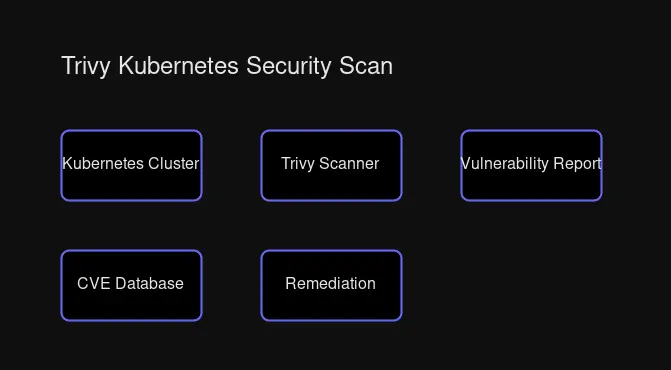
Generating an SBOM
For supply chain transparency or compliance:
# CycloneDX format
trivy image --format cyclonedx --output sbom.json nginx:latest

# SPDX format
trivy image --format spdx-json --output sbom-spdx.json nginx:latest
GitHub Actions: Automate Your Security
If your homelab projects live on GitHub, you can automate vulnerability scanning on every push and pull request.
Basic Container Scanning Workflow
Create .github/workflows/trivy.yml:
name: Trivy Container Scan

on:
  push:
    branches: [main]
  pull_request:
    branches: [main]
  schedule:
    - cron: '0 6 * * 1'  # Weekly scan Monday 6 AM UTC

jobs:
  trivy-scan:
    runs-on: ubuntu-latest
    steps:
      - name: Checkout code
        uses: actions/checkout@v4

      - name: Build Docker image
        run: docker build -t myapp:${{ github.sha }} .

      - name: Scan image with Trivy
        uses: aquasecurity/trivy-action@master
        with:
          image-ref: 'myapp:${{ github.sha }}'
          format: 'table'
          exit-code: '1'
          severity: 'CRITICAL,HIGH'
          ignore-unfixed: true
The exit-code: 1 ensures your pipeline fails when critical vulnerabilities are found—forcing you to address them before merging.
Infrastructure as Code Scanning
For projects with Terraform, Kubernetes, or Dockerfiles:
name: Trivy IaC Scan

on:
  push:
    branches: [main]
  pull_request:

jobs:
  iac-scan:
    runs-on: ubuntu-latest
    steps:
      - uses: actions/checkout@v4

      - name: Run Trivy IaC scanner
        uses: aquasecurity/trivy-action@master
        with:
          scan-type: 'fs'
          scan-ref: '.'
          severity: 'HIGH,CRITICAL'
          exit-code: '1'
          scanners: 'vuln,secret,misconfig'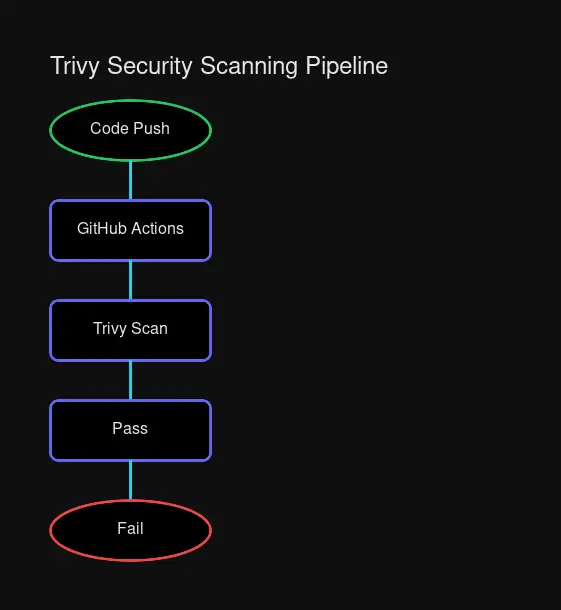
Homelab Scanning Script: One Command to Rule Them All
Here’s a practical script to scan all your running containers at once:
#!/bin/bash
# scan-homelab.sh - Comprehensive container vulnerability scanner

LOG_DIR="/var/log/trivy"
mkdir -p "$LOG_DIR"

echo "=== Homelab Security Scan - $(date) ==="
echo

# Get all running container images (unique)
CONTAINERS=$(docker ps --format '{{.Image}}' | sort -u)

if [ -z "$CONTAINERS" ]; then
    echo "No running containers found."
    exit 1
fi

echo "Containers to scan:"
echo "$CONTAINERS" | while read img; do echo "  - $img"; done
echo

# Scan each image
for img in $CONTAINERS; do
    echo "━━━━━━━━━━━━━━━━━━━━━━━━━━━━━━━━━━━━━━━━━━━━━━━━━━━━━━"
    echo "Scanning: $img"
    echo "━━━━━━━━━━━━━━━━━━━━━━━━━━━━━━━━━━━━━━━━━━━━━━━━━━━━━━"

    trivy image \
        --severity HIGH,CRITICAL \
        --ignore-unfixed \
        --format table \
        "$img"

    # Also save JSON for analysis
    trivy image \
        --severity HIGH,CRITICAL \
        --ignore-unfixed \
        --format json \
        --output "$LOG_DIR/$(echo $img | tr '/:' '_').json" \
        "$img" 2>/dev/null

    echo
done

echo "=== Scan complete. JSON results saved to $LOG_DIR ==="
Make it executable and run it:
chmod +x scan-homelab.sh
./scan-homelab.sh
For scheduled scanning, add a cron job:
# Weekly vulnerability scan (Sunday 2 AM)
0 2 * * 0 /path/to/scan-homelab.sh >> /var/log/trivy/weekly-scan.log 2>&1
Private Registries: Scanning Your Own Images
Homelabs often use private registries (Harbor, self-hosted Docker Registry, cloud services). Trivy handles these with environment variables:
# Docker Hub
TRIVY_USERNAME=user TRIVY_PASSWORD=pass trivy image your-image:tag

# AWS ECR
aws ecr get-login-password | docker login --username AWS --password-stdin <account>.dkr.ecr.<region>.amazonaws.com
trivy image <account>.dkr.ecr.<region>.amazonaws.com/your-image:tag

# GCR (Google Container Registry)
gcloud auth configure-docker
trivy image gcr.io/project/image:tag
Air-Gapped Homelabs: Offline Scanning
For completely offline environments, Trivy supports air-gapped scanning:
# Download vulnerability database (run on internet-connected machine)
trivy image --download-db-only

# Transfer cache to air-gapped machine
# Then scan without updating
trivy image --skip-update --offline nginx:latest
This is invaluable for secure homelabs with strict network segmentation.
Best Practices for Homelab Security
1. Prefer Minimal Base Images
Alpine and Distroless images have far fewer packages—and far fewer vulnerabilities:
# Compare for yourself
trivy image alpine:3.19
trivy image ubuntu:22.04
The Ubuntu image will typically have dozens more vulnerabilities simply because it includes more packages.
2. Pin Your Image Versions
latest tags are a moving target. You don’t know what you’re getting:
# Bad: "latest" can change anytime
trivy image nginx:latest

# Good: explicit version
trivy image nginx:1.25.3-alpine
3. Fail Builds on Critical Issues
Make security a gate, not an afterthought:
# In CI/CD or build scripts
trivy image --exit-code 1 --severity CRITICAL your-image:tag
If critical vulnerabilities exist, the build fails. Period.
4. Document Accepted Risks
You can’t fix everything immediately. Use .trivyignore to document accepted vulnerabilities:
# .trivyignore
# CVE-2020-1234 - No fix available, mitigated by network isolation
CVE-2020-1234

# CVE-2021-5678 - Low risk in homelab context, will fix in quarterly update
CVE-2021-5678
5. Don’t Run Containers as Root
Trivy can detect this, but build it right from the start:
FROM alpine:3.19
RUN adduser -D appuser
USER appuser
# Your app runs as non-root
6. Scan Before You Build
Check your base image before investing time:
# Quick pre-build check
trivy image --severity HIGH,CRITICAL alpine:3.19
If the base image has critical vulnerabilities, choose a different one.
7. Enable Caching for Speed
Trivy caches the vulnerability database automatically. For Docker, mount the cache:
docker run --rm \
  -v /var/run/docker.sock:/var/run/docker.sock:ro \
  -v $HOME/.cache:/root/.cache/ \
  aquasec/trivy:latest image nginx:latest
8. Combine Scans for Efficiency
Why run multiple tools when one does it all:
# Comprehensive single pass
trivy fs --scanners vuln,secret,misconfig,license .
Trivy vs. The Alternatives
Trivy isn’t the only scanner, but it’s uniquely suited for homelabs:
| Feature | Trivy | Snyk Container | Grype | Clair |
|---|---|---|---|---|
| Cost | Free (Apache 2.0) | Freemium | Free (Apache 2.0) | Free (Apache 2.0) |
| Setup | Single binary | SaaS + CLI | Single binary | Server + PostgreSQL |
| Vuln Scanning | ✅ | ✅ | ✅ | ✅ |
| Misconfig Detection | ✅ | Paid | ❌ | ❌ |
| Secret Detection | ✅ | Paid | ❌ | ❌ |
| SBOM Generation | ✅ | ✅ | ✅ (via Syft) | ❌ |
| K8s Scanning | ✅ | ✅ | ✅ | Limited |
| Offline/Air-gapped | ✅ Strong | Limited | ✅ | ✅ |
Trivy wins for homelabs because:
- No infrastructure required — No database server, no SaaS dependency
- All-in-one scope — Vulnerabilities, misconfigurations, secrets, licenses
- Completely free — No features gated behind enterprise plans
- Active development — Regular updates, large community, Aqua Security backing
When to consider alternatives:
- Snyk — If you want guided remediation and developer-focused UX (and don’t mind the paid tier)
- Grype — If you prioritize accuracy over breadth and use Anchore’s SBOM tooling
- Clair — If you’re running a registry (Quay) and need deep integration
Getting Started: Your Action Plan
Here’s how to start securing your homelab today:
- Install Trivy — Two-minute process, single binary
- Scan your running containers — Use the script above or run manually
- Review the output — Focus on HIGH and CRITICAL severities first
- Update vulnerable images — Most fixes are simply updating to newer versions
- Add scanning to your workflow — GitHub Actions for projects, cron for homelab
- Document accepted risks — Use
.trivyignorestrategically - Schedule regular scans — Weekly is a good cadence for homelabs
Security doesn’t have to be complicated. With Trivy, you get enterprise-grade vulnerability scanning without the enterprise overhead. Your homelab deserves the same protection as a production infrastructure—now you have the tool to provide it.
Resources
- Trivy Official Documentation
- Trivy GitHub Repository
- GitHub Actions Integration
- Aqua Security Trivy Page
Start scanning today. Your future self will thank you when you catch that critical vulnerability before it catches you.


Comments
Powered by GitHub Discussions