Self-Hosted Secrets Management for Homelabs: A Complete Guide
Learn how to securely manage API keys, passwords, and certificates in your homelab with HashiCorp Vault, Mozilla SOPS, and Docker Secrets. Stop using .env files and start using proper secrets management.

Table of Contents
- Why Environment Variables Are Dangerous
- The Right Way: Secrets Management Solutions
- Level 1: Docker Secrets (For Swarm Users)
- Level 2: Podman Secrets (For Rootless Containers)
- Level 3: Mozilla SOPS + age (The GitOps Solution)
- Level 4: HashiCorp Vault (Enterprise-Grade for Homelabs)
- Recommended Architecture for Homelabs
- Small Homelab (1-3 servers)
- Medium Homelab (5-15 services)
- Large Homelab (15+ services, multi-server)
- Security Best Practices
- Comparison Summary
- Getting Started
- Conclusion
Every homelab starts the same way: you spin up a container, add an environment file, and call it secure. That .env file stuffed with API keys and database passwords? It’s a ticking time bomb.
Proper secrets management isn’t just for enterprise. Your homelab deserves the same security practices you’d apply in production — maybe even more so, since you’re putting your personal data and services on the internet.
Let’s explore the options, from simple to sophisticated, and find the right fit for your setup.
Why Environment Variables Are Dangerous
Using .env files or passing secrets as environment variables is the most common — and most dangerous — approach in homelabs. Here’s why:
Plain text everywhere: Your secrets sit in files, visible to anyone with shell access. A single cat .env exposes everything.
Process listings leak them: Run ps aux or check /proc/[PID]/environ — your secrets are right there in the process table.
Logs capture them: Application errors, crash dumps, and debugging output frequently contain environment variables.
They persist: Secrets survive reboots and container restarts, expanding your exposure window.
CI/CD pipelines love to leak them: Pipeline logs often capture env vars, creating unintentional public exposure.
No access control: Every process on the machine can read every environment variable. Compromise one service, compromise them all.
Not “infrastructure as code”: You can’t safely commit .env files to Git, breaking your GitOps workflow.
The Right Way: Secrets Management Solutions
Level 1: Docker Secrets (For Swarm Users)
If you’re running Docker Swarm or Compose stacks, Docker Secrets is your built-in solution.
How it works: Secrets are encrypted at rest in the Swarm manager’s Raft log, transmitted securely to workers, and mounted into containers as files in /run/secrets/ — a memory-backed filesystem (tmpfs) that disappears when the container stops.
# docker-compose.yml
version: "3.8"

secrets:
  db_password:
    file: ./secrets/db_password.txt
  api_key:
    file: ./secrets/api_key.txt

services:
  app:
    image: myapp:latest
    secrets:
      - db_password
      - api_key
    environment:
- DB_PASSWORD_FILE=/run/secrets/db_passwordAdvantages:
- Encrypted at rest and in transit
- Never written to disk on workers
- Files cleaned up automatically
- Service-level access control
Limitations:
- Requires Swarm mode (not standalone containers)
- No rotation without service redeployment
- No audit logging
Level 2: Podman Secrets (For Rootless Containers)
Podman handles secrets differently — storing them as files with strict permissions, leveraging Linux namespaces for isolation.
How it works: You create secrets as files on the host, then mount them into containers. Podman ensures proper file permissions and namespace isolation.
# Create a secret file
echo "super_secret_password" > db_password.txt
chmod 600 db_password.txt

# Run container with secret mounted
podman run -d \
  --secret db_password.txt,target=/run/secrets/db_password \
myapp:latestAdvantages:
- Works with standalone containers
- Rootless mode supported
- Linux namespace isolation
- Simple file-based approach
Limitations:
- Host filesystem stores secrets (need disk encryption)
- Manual permission management
- No built-in rotation
Level 3: Mozilla SOPS + age (The GitOps Solution)
SOPS (Secrets OPerationS) encrypts specific values within configuration files, making them Git-friendly while keeping secrets secure.
How it works: You install SOPS and generate an age key pair. The public key encrypts values; the private key (never committed to Git) decrypts them at deployment time.
# Install SOPS and age
brew install sops age  # or apt/brew equivalents

# Generate age key pair
age-keygen -o ~/.key.txt
# Output: Public key: age1qz...

# Encrypt a configuration file
sops --encrypt --age age1qz... config.yaml > config.encrypted.yaml
Encrypted file example (structure preserved, values encrypted):
# config.encrypted.yaml - safe to commit to Git
database:
  host: postgres.internal
  port: 5432
  password: ENC[age,encrypted_string_here]
api:
  key: ENC[age,another_encrypted_string]
  endpoint: https://api.example.com  # Plaintext preserved
Integration with Ansible:
# playbook.yaml
- name: Deploy application
  hosts: servers
  vars_files:
    - config.encrypted.yaml  # SOPS decrypts automatically
  tasks:
    - name: Start container
      community.docker.docker_container:
        name: myapp
        image: myapp:latest
        env:
DB_PASSWORD: "{{ database.password }}"Advantages:
- GitOps-friendly — encrypted files in version control
- Selective encryption — structure readable, values protected
- No infrastructure required
- Works with age, PGP, cloud KMS, or HashiCorp Vault
- Diff-friendly — see what changed without exposing values
Limitations:
- Static secrets only (no dynamic generation)
- Key management is your responsibility
- No built-in rotation
Level 4: HashiCorp Vault (Enterprise-Grade for Homelabs)
Vault is the industrial-strength solution: centralized secrets management with dynamic credentials, fine-grained access control, and comprehensive auditing.
How it works: Vault runs as a server (or cluster), encrypting all data at rest. Applications authenticate to Vault and retrieve secrets via API. Vault can generate short-lived database credentials, certificates, and API tokens dynamically.
Quick homelab setup (single node with Raft storage):
# Create Vault directory
mkdir -p /opt/vault/data
mkdir -p /opt/vault/config

# vault.hcl
storage "raft" {
  path    = "/opt/vault/data"
  node_id = "vault-1"
}

listener "tcp" {
  address     = "0.0.0.0:8200"
  tls_disable = false  # Use TLS in production!
}

api_addr = "https://vault.homelab.local:8200"
cluster_addr = "https://vault.homelab.local:8201"
ui = true
disable_mlock = true

# Start Vault
vault server -config=/opt/vault/config/vault.hcl
# Initialize and unseal
vault operator init
# Save the 5 unseal keys and root token securely!
vault operator unseal
# Enter 3 of the 5 unseal keys
# Enable secrets engine
vault secrets enable -path=homelab kv-v2
# Store a secret
vault kv put homelab/database password=MySecurePassword123
# Create policy for app access
vault policy write app-policy - <<EOF
path "homelab/data/database" {
capabilities = ["read"]
}
EOF
# Enable AppRole auth for applications
vault auth enable approle
vault write auth/approle/role/webapp policies=app-policyApplications retrieve secrets dynamically:
# AppID and SecretID generated by Vault
vault write auth/approle/role/webapp/secret-id ttl=24h

# Application authenticates
vault write auth/approle/login role_id=webapp secret_id=xxx

# Receives token with limited TTL
# Application now reads secrets:
vault kv get homelab/database
Dynamic database credentials:
# Enable database secrets engine
vault secrets enable database

# Configure PostgreSQL connection
vault write database/config/postgresql \
  plugin_name=postgresql-database-plugin \
  allowed_roles="webapp" \
  connection_url="postgresql://{{username}}:{{password}}@postgres:5432/app"

# Create role with auto-rotating credentials
vault write database/roles/webapp \
  db_name=postgresql \
  creation_statements="CREATE ROLE \"{{name}}\" WITH LOGIN PASSWORD '{{password}}' VALID UNTIL '{{expiration}}'; GRANT SELECT ON ALL TABLES IN SCHEMA public TO \"{{name}}\";" \
  default_ttl="1h" \
  max_ttl="24h"

# Applications now request temporary credentials
vault read database/creds/webapp
# Returns: username=v-token-webapp-abc123, lease_duration=1hAdvantages:
- Dynamic secrets with automatic expiration
- Fine-grained ACLs and policies
- Audit logging (who accessed what, when)
- Secret rotation out of the box
- PKI/certificate management
- Encryption as a Service
- Integrates with Kubernetes, databases, cloud providers
Limitations:
- Steeper learning curve
- Requires unsealing after restart (unless using auto-unseal)
- Needs backup/recovery planning
- Resource overhead
Recommended Architecture for Homelabs
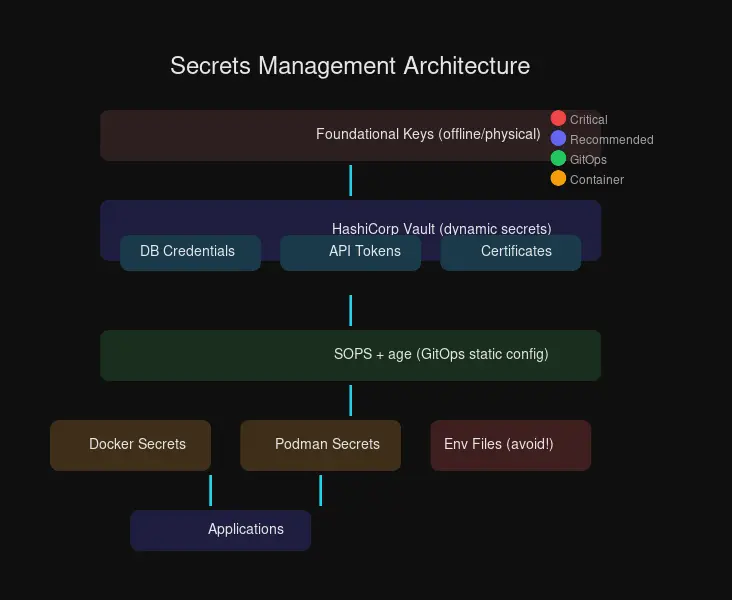
The layered approach below shows how different secrets management solutions fit together, from foundational offline keys to application-level secret injection.
Small Homelab (1-3 servers)
Use: SOPS + age for static secrets
# Structure
homelab/
├── inventory/
│   ├── group_vars/
│   │   └── all/
│   │       ├── vars.yml          # Public config
│   │       └── vars.encrypted.yml # SOPS-encrypted secrets
├── playbooks/
└── age.key # NEVER commit this!Workflow:
- Encrypt secrets with SOPS before committing
- Ansible
community.sopsdecrypts automatically during deployment - Keep age private key in password manager or offline storage
Medium Homelab (5-15 services)
Use: Docker Secrets (if Swarm) or SOPS + age + Ansible
For Docker Compose users without Swarm:
# compose.yml
services:
  app:
    image: myapp
    environment:
      - APP_CONFIG_FILE=/run/secrets/app_config
    secrets:
      - app_config

secrets:
  app_config:
    file: ./secrets/app_config.json
Large Homelab (15+ services, multi-server)
Use: HashiCorp Vault + SOPS hybrid
| Secret Type | Solution | Why |
|---|---|---|
| Database passwords | Vault dynamic secrets | Auto-rotation, short-lived |
| API keys (long-lived) | Vault KV | Centralized, audited access |
| Config files in Git | SOPS + age | GitOps workflow |
| TLS certificates | Vault PKI | Auto-generation, renewal |
| CI/CD secrets | Vault AppRole | Service-to-service auth |
# Typical workflow
# 1. Static config in Git (SOPS-encrypted)
git clone homelab-config
sops -d config/secrets.yaml > secrets.decrypted.yaml

# 2. Dynamic secrets from Vault
export VAULT_TOKEN=$(vaultkv get secrets/ci/token)
ansible-playbook deploy.yml

# 3. Applications fetch secrets at runtime
# Using Vault Agent sidecar or direct API calls
Security Best Practices
Principle of Least Privilege: Applications should only access secrets they need. Vault policies let you scope access precisely.
# Policy example - read only specific path
path "homelab/data/prometheus/*" {
  capabilities = ["read"]
}
Audit Everything: Vault’s audit log tracks every secret access:
vault audit enable file file_path=/var/log/vault/audit.log
# Or syslog for remote logging
vault audit enable syslog facility=LOCAL0 tag="vault"
Automated Rotation: Vault dynamic secrets and Kubernetes external-secrets-operator keep credentials rotating:
# Kubernetes ExternalSecrets example
apiVersion: external-secrets.io/v1beta1
kind: ExternalSecret
metadata:
  name: database-credentials
spec:
  refreshInterval: 1h
  secretStoreRef:
    name: vault-backend
    kind: SecretStore
  target:
    name: db-credentials
  data:
    - secretKey: password
      remoteRef:
        key: homelab/database
        property: password
Plan for Disaster Recovery:
# Always backup Vault
vault operator raft snapshot save backup-$(date +%Y%m%d).snap

# Store unseal keys and root token separately
# Option 1: Shamir's Secret Sharing (split keys across locations)
# Option 2: HSM or cloud KMS for auto-unseal

# Test restore periodically
vault operator raft snapshot restore backup.snap
Never Commit Plain Text: Use pre-commit hooks to catch leaks:
# .pre-commit-config.yaml
repos:
  - repo: https://github.com/Yelp/detect-secrets
    rev: v1.4.0
    hooks:
      - id: detect-secrets
        args: ['--baseline', '.secrets.baseline']
Comparison Summary
| Feature | Docker Secrets | Podman Secrets | SOPS + age | HashiCorp Vault |
|---|---|---|---|---|
| Encryption at Rest | ✅ Swarm only | ⚠️ Host FS | ✅ age | ✅ AES-256 |
| Dynamic Secrets | ❌ | ❌ | ❌ | ✅ |
| Git-friendly | ❌ | ❌ | ✅ Perfect | ⚠️ Indirect |
| Access Control | Service-level | FS permissions | Key-based | Policy-based |
| Audit Logging | ❌ | ❌ | Git history | ✅ Comprehensive |
| Learning Curve | Low | Low | Medium | High |
| Infrastructure | Swarm required | None | None | Server needed |
| Cost | Free | Free | Free | Free (OSS) |
Getting Started
Step 1 - Audit Current State:
# Find exposed secrets
grep -r "password=" . --include="*.env" --include="*.yaml" --include="*.yml"
grep -r "api_key=" . --include="*.env" --include="*.yaml"

# Check process environment leaks
ps aux | grep -E "password|key|secret"
Step 2 - Choose Your Level:
- Simple: Start with SOPS + age for GitOps
- Medium: Add Docker Secrets for Compose/Swarm
- Advanced: Deploy Vault for dynamic secrets
Step 3 - Implement Systematically:
# 1. Generate age key
age-keygen -o ~/.config/sops/age.txt

# 2. Create .sops.yaml for auto-encryption
cat > .sops.yaml <<EOF
creation_rules:
  - age: age1yoursecretkey...
    path_regex: secrets/.*\.yaml$
EOF

# 3. Encrypt existing secrets files
sops --encrypt --inplace secrets/database.yaml

# 4. Commit to Git (now safe!)
git add secrets/database.yaml
git commit -m "Add encrypted database secrets"

# 5. Private key stored securely offline
# Never commit ~/.config/sops/age.txt!
Conclusion
Your homelab doesn’t need enterprise complexity, but it deserves enterprise security. Start with SOPS + age for GitOps-friendly secret management, then graduate to HashiCorp Vault as your infrastructure grows.
The jump from .env files to proper secrets management is surprisingly small — a few hours of setup saves you from potential data breaches, credential leaks, and sleepless nights wondering who has access to what.
Security is a journey, not a destination. Your future self will thank you for starting today.
Have questions about implementing secrets management? Drop them in the comments or join the discussion in our community channels.


Comments
Powered by GitHub Discussions