Building a Self-Hosted AI Memory Stack
A complete guide to setting up persistent AI memory with vector databases, embedding models, and open-source tools for truly private, self-hosted intelligent assistants.

Table of Contents
- Why AI Memory Matters
- The Building Blocks
- 1. Embedding Models
- 2. Vector Databases
- 3. Memory Management Framework
- Choosing a Vector Database
- Qdrant: The Homelab Champion
- Milvus vs Qdrant vs Weaviate Comparison
- Setting Up Embeddings
- Running Local Embedding Models
- Python Integration
- Building the Memory System
- Architecture Overview
- Implementation with LangChain + Qdrant
- Memory Types Implementation
- RAG Architecture for Memory
- Chunking Strategies
- Hybrid Search Implementation
- Reranking for Better Results
- Production Deployment
- Complete Docker Stack
- Hardware Requirements
- Monitoring Setup
- Real-World Example: Personal AI Assistant
- Testing Your Memory Stack
- Verification Checklist
- Common Issues and Fixes
- Conclusion
- Resources
Building a Self-Hosted AI Memory Stack
Every conversation with ChatGPT starts blank. Ask about your project, and it forgets by the next chat. This isn’t a bug—it’s a fundamental limitation of stateless AI systems.
But what if your AI assistant actually remembered? What if it knew your preferences, recalled previous conversations, and built knowledge over time—all without sending your data to third-party servers?
That’s the promise of a self-hosted AI memory stack. In this guide, we’ll build one from scratch.
Why AI Memory Matters
Modern AI assistants suffer from amnesia. Every session is a fresh start because:
- Context windows are limited: Even large models forget after a few hours of conversation
- Stateless by design: APIs don’t persist anything between calls
- Privacy vs. convenience tradeoff: Cloud memory services require trusting providers with your data
A self-hosted memory stack solves these problems by giving your AI:
- Long-term memory: Store and retrieve information across sessions
- Semantic understanding: Find relevant memories even with different wording
- Privacy control: Your data never leaves your infrastructure
- Customization: Tune memory retrieval for your specific use case
The Building Blocks
A complete AI memory stack consists of three core components:
┌──────────────┐     ┌──────────────┐     ┌──────────────┐
│   Documents  │ ──> │   Embeddings  │ ──> │  Vector DB   │
│   (Memory)   │     │   (Meaning)   │     │  (Storage)   │
└──────────────┘     └──────────────┘     └──────────────┘
                                                  │
                                                  ▼
┌──────────────┐     ┌──────────────┐     ┌──────────────┐
│   Response   │ <── │     LLM      │ <── │   Retrieval  │
│              │     │              │     │   (Search)   │
└──────────────┘     └──────────────┘     └──────────────┘
1. Embedding Models
Embeddings convert text into numerical vectors that capture semantic meaning. “I love pizza” and “Pizza is my favorite food” produce similar vectors because they mean similar things.
Popular Self-Hosted Options:
| Model | Dimensions | Size | Best For |
|---|---|---|---|
| all-MiniLM-L6-v2 | 384 | 80MB | Real-time apps, speed-critical |
| BGE-large-en | 1024 | 1.3GB | Quality semantic search |
| Nomic-embed-text | 768 | 274MB | Long documents (8K tokens) |
2. Vector Databases
Vector databases store and search embeddings efficiently. They power semantic search by finding the “nearest neighbors” to a query embedding.
Top Self-Hosted Options:
- Qdrant: Rust-based, memory-efficient, excellent for homelabs
- Milvus: Cloud-native, scales to billions of vectors
- Weaviate: Developer-friendly, built-in vectorization
We’ll use Qdrant—its single-binary deployment and efficient resource usage make it ideal for self-hosting.
3. Memory Management Framework
This layer handles:
- Extracting important information from conversations
- Storing memories with appropriate metadata
- Retrieving relevant context for new queries
Options include LangChain’s memory modules, LlamaIndex’s indices, or purpose-built tools like Mem0.
Choosing a Vector Database
Comparison of popular vector database architectures
Qdrant: The Homelab Champion
Why Qdrant wins for self-hosting:
# docker-compose.yml - That's literally it
version: '3.8'
services:
  qdrant:
    image: qdrant/qdrant:latest
    ports:
      - "6333:6333"
    volumes:
- ./data:/qdrant/storage- Single binary: No complex dependencies
- Memory efficient: Rust’s memory safety and efficiency
- Rich filtering: Combine semantic search with metadata filters
- Built-in UI: Visualize your data at
http://localhost:6333/dashboard
Milvus vs Qdrant vs Weaviate Comparison
| Feature | Qdrant | Milvus | Weaviate |
|---|---|---|---|
| Best For | Self-hosted, efficiency | Enterprise scale | Developer experience |
| Complexity | Low | Medium-High | Low-Medium |
| Memory Use | Very efficient | Higher (distributed) | Moderate |
| Hybrid Search | Via filtering patterns | Built-in (v2.5+) | Native (best-in-class) |
| Scale | Millions efficiently | Billions | ~50M efficiently |
Recommendation: Start with Qdrant. It handles millions of vectors on modest hardware and requires minimal DevOps knowledge.
Setting Up Embeddings
Running Local Embedding Models
The easiest way to run embeddings locally is with Ollama:
# Install Ollama
curl -fsSL https://ollama.com/install.sh | sh

# Pull an embedding model
ollama pull nomic-embed-text

# Generate embeddings
ollama run nomic-embed-text "Your text here"
Python Integration
from langchain_community.embeddings import OllamaEmbeddings

# Initialize local embeddings
embeddings = OllamaEmbeddings(
    model="nomic-embed-text",
    base_url="http://localhost:11434"
)

# Generate embedding for text
text = "Building a self-hosted AI memory stack"
vector = embeddings.embed_query(text)

print(f"Embedding dimension: {len(vector)}")
# Output: Embedding dimension: 768
Building the Memory System
Architecture Overview
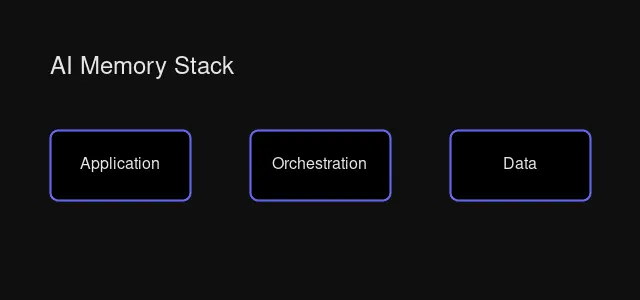 Memory system architecture: how components interact
Our memory system needs to handle:
- Storing memories: Save conversation facts, user preferences, learned information
- Semantic retrieval: Find relevant memories regardless of exact wording
- Context assembly: Build a relevant context window for the AI
- Memory decay: Forget irrelevant or outdated information
Implementation with LangChain + Qdrant
from langchain_community.vectorstores import Qdrant
from langchain_community.embeddings import OllamaEmbeddings
from qdrant_client import QdrantClient
from datetime import datetime

class MemorySystem:
    def __init__(self, qdrant_url="http://localhost:6333"):
        self.client = QdrantClient(url=qdrant_url)
        self.embeddings = OllamaEmbeddings(model="nomic-embed-text")
        self.vectorstore = Qdrant(
            client=self.client,
            collection_name="memories",
            embeddings=self.embeddings,
        )

    def remember(self, content: str, speaker: str = "system"):
        """Store a memory with metadata."""
        metadata = {
            "timestamp": datetime.now().isoformat(),
            "speaker": speaker,
            "importance": 0.5,  # Can be adjusted based on content
        }
        self.vectorstore.add_texts(
            texts=[content],
            metadatas=[metadata]
        )

    def recall(self, query: str, k: int = 5):
        """Retrieve relevant memories."""
        results = self.vectorstore.similarity_search(
            query=query,
            k=k
        )
        return results

    def build_context(self, query: str, max_tokens: int = 2000):
        """Build a context string from relevant memories."""
        memories = self.recall(query)
        context = "Relevant memories:\n\n"

        for mem in memories:
            context += f"- {mem.page_content}\n"
            if len(context.split()) > max_tokens:
                break

        return context

# Usage
memory = MemorySystem()
memory.remember("User prefers dark mode in all applications")
memory.remember("User's timezone is EST (America/New_York)")
memory.remember("User is working on a homelab with Proxmox")

# Later, when asked about preferences...
context = memory.build_context("What settings should I use?")
print(context)
# Output:
# Relevant memories:
# - User prefers dark mode in all applications
# - User's timezone is EST (America/New_York)
# - User is working on a homelab with Proxmox
Memory Types Implementation
Different memories serve different purposes:
from enum import Enum
from typing import Optional

class MemoryType(Enum):
    SEMANTIC = "semantic"      # Facts, concepts (persistent)
    EPISODIC = "episodic"      # Events, conversations (time-decay)
    WORKING = "working"        # Current context (temporary)

class TypedMemorySystem(MemorySystem):
    def remember(
        self,
        content: str,
        memory_type: MemoryType = MemoryType.SEMANTIC,
        speaker: str = "user",
        importance: float = 0.5
    ):
        """Store a typed memory."""
        metadata = {
            "timestamp": datetime.now().isoformat(),
            "speaker": speaker,
            "memory_type": memory_type.value,
            "importance": importance,
        }

        self.vectorstore.add_texts(
            texts=[content],
            metadatas=[metadata]
        )

    def recall_by_type(
        self,
        query: str,
        memory_type: MemoryType,
        k: int = 5
    ):
        """Retrieve memories of a specific type."""
        from qdrant_client.http.models import Filter, FieldCondition, MatchValue

        results = self.vectorstore.similarity_search(
            query=query,
            k=k,
            filter=Filter(
                must=[
                    FieldCondition(
                        key="memory_type",
                        match=MatchValue(value=memory_type.value)
                    )
                ]
            )
        )
        return results

# Usage
memory = TypedMemorySystem()

# Store semantic memory (facts)
memory.remember(
    "User's favorite programming language is Python",
    memory_type=MemoryType.SEMANTIC,
    importance=0.8
)

# Store episodic memory (events)
memory.remember(
    "User deployed their first Kubernetes cluster yesterday",
    memory_type=MemoryType.EPISODIC,
    importance=0.6
)

# Recall only facts
facts = memory.recall_by_type(
    "What do I know about this user?",
    memory_type=MemoryType.SEMANTIC
)
RAG Architecture for Memory
Retrieval-Augmented Generation (RAG) is the foundation of AI memory. Here’s how to build an effective RAG pipeline.
Chunking Strategies
The way you split documents directly impacts retrieval quality:
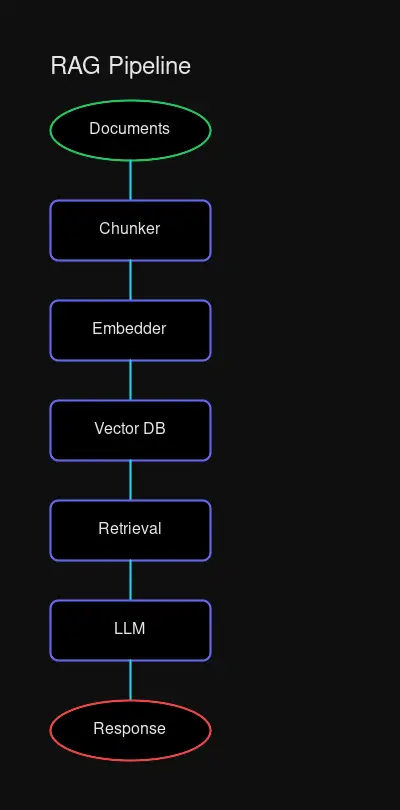 Rimplified RAG pipeline flowchart
from langchain.text_splitter import (
    RecursiveCharacterTextSplitter,
    MarkdownHeaderTextSplitter,
)

# Strategy 1: Recursive chunking (best for structured docs)
recursive_splitter = RecursiveCharacterTextSplitter(
    chunk_size=512,
    chunk_overlap=50,  # 10% overlap for context continuity
)

# Strategy 2: Markdown-aware chunking
markdown_splitter = MarkdownHeaderTextSplitter(
    headers_to_split_on=[
        ("#", "Header 1"),
        ("##", "Header 2"),
        ("###", "Header 3"),
    ]
)

# For conversation memory, use larger chunks to preserve context
conversation_splitter = RecursiveCharacterTextSplitter(
    chunk_size=1024,  # Larger for conversation segments
    chunk_overlap=100,
)
Hybrid Search Implementation
Combine semantic + keyword search for better retrieval:
from qdrant_client.http.models import (
    SparseVector,
    SearchRequest,
    Query,
    FusionQuery,
)

class HybridSearchMemory(MemorySystem):
    def hybrid_search(
        self,
        query: str,
        k: int = 5,
        semantic_weight: float = 0.7
    ):
        """Combine vector similarity with keyword matching."""

        # Get embedding for query
        query_vector = self.embeddings.embed_query(query)

        # Hybrid search using Qdrant's fusion
        results = self.client.search(
            collection_name="memories",
            query_vector=query_vector,
            query=Query(
                fusion=FusionQuery(
                    queries=[
                        Query.NearestVector(vector=query_vector),
                        Query.Keyword(keyword=query),
                    ],
                    weights=[semantic_weight, 1 - semantic_weight]
                )
            ),
            limit=k
        )

        return results
Reranking for Better Results
from langchain.retrievers import ContextualCompressionRetriever
from langchain.retrievers.document_compressors import FlashrankRerank

# Add reranking to improve relevance
reranker = FlashrankRerank(top_n=3)
compression_retriever = ContextualCompressionRetriever(
    base_compressor=reranker,
    base_retriever=self.vectorstore.as_retriever(search_kwargs={"k": 10})
)

# Rerank the top candidates
relevant_docs = compression_retriever.get_relevant_documents(query)
Production Deployment
Complete Docker Stack
# docker-compose.yml
version: '3.8'

services:
  qdrant:
    image: qdrant/qdrant:latest
    ports:
      - "6333:6333"
      - "6334:6334"
    volumes:
      - qdrant_data:/qdrant/storage
    environment:
      - QDRANT__LOG_LEVEL=INFO
    restart: unless-stopped

  ollama:
    image: ollama/ollama:latest
    ports:
      - "11434:11434"
    volumes:
      - ollama_data:/root/.ollama
    deploy:
      resources:
        reservations:
          devices:
            - driver: nvidia
              count: all
              capabilities: [gpu]
    restart: unless-stopped

  redis:
    image: redis:alpine
    ports:
      - "6379:6379"
    volumes:
      - redis_data:/data
    restart: unless-stopped

volumes:
  qdrant_data:
  ollama_data:
  redis_data:
Hardware Requirements
| Scale | CPU | RAM | Storage | Use Case |
|---|---|---|---|---|
| Development | 4 cores | 16GB | 100GB SSD | Testing, prototypes |
| Production (Small) | 8 cores | 32GB | 500GB NVMe | <1M vectors, personal use |
| Production (Medium) | 16 cores | 64GB | 1TB NVMe | 1-10M vectors, team use |
| Enterprise | 32+ cores | 128GB+ | Multiple TB | 10M+ vectors, organization |
Monitoring Setup
# Prometheus scrape config
scrape_configs:
  - job_name: 'qdrant'
    static_configs:
      - targets: ['qdrant:6333']

  - job_name: 'ollama'
    static_configs:
      - targets: ['ollama:11434']
Key metrics to monitor:
- Query latency (p50, p95, p99)
- Index size and memory usage
- Embedding generation throughput
- Retrieval recall accuracy
Real-World Example: Personal AI Assistant
Let’s build a practical memory system for a personal assistant:
from datetime import datetime
from typing import List, Dict, Any

class PersonalAssistantMemory:
    """
    A practical AI memory system for a personal assistant.

    Handles:
    - User preferences (semantic memory)
    - Conversation history (episodic memory)
    - Tasks and reminders
    - Learned facts about the user
    """

    def __init__(self, qdrant_url: str = "http://localhost:6333"):
        from qdrant_client import QdrantClient
        from langchain_community.embeddings import OllamaEmbeddings
        from langchain_community.vectorstores import Qdrant

        self.client = QdrantClient(url=qdrant_url)
        self.embeddings = OllamaEmbeddings(model="nomic-embed-text")

        # Create collections for different memory types
        self._init_collections()

        self.preferences = Qdrant(
            client=self.client,
            collection_name="preferences",
            embeddings=self.embeddings,
        )

        self.conversations = Qdrant(
            client=self.client,
            collection_name="conversations",
            embeddings=self.embeddings,
        )

        self.knowledge = Qdrant(
            client=self.client,
            collection_name="knowledge",
            embeddings=self.embeddings,
        )

    def _init_collections(self):
        """Initialize Qdrant collections."""
        from qdrant_client.http.models import Distance, VectorParams

        collections = ["preferences", "conversations", "knowledge"]
        for name in collections:
            if not self.client.collection_exists(name):
                self.client.create_collection(
                    collection_name=name,
                    vectors_config=VectorParams(
                        size=768,  # nomic-embed-text dimension
                        distance=Distance.COSINE
                    )
                )

    def learn_preference(self, preference: str, category: str = "general"):
        """Store a user preference."""
        self.preferences.add_texts(
            texts=[preference],
            metadatas=[{
                "type": "preference",
                "category": category,
                "learned_at": datetime.now().isoformat()
            }]
        )

    def store_conversation(self, exchange: List[Dict[str, str]]):
        """Store a conversation exchange."""
        for turn in exchange:
            self.conversations.add_texts(
                texts=[f"{turn['speaker']}: {turn['content']}"],
                metadatas=[{
                    "speaker": turn['speaker'],
                    "timestamp": datetime.now().isoformat()
                }]
            )

    def add_knowledge(self, fact: str, source: str = "user"):
        """Store a learned fact."""
        self.knowledge.add_texts(
            texts=[fact],
            metadatas=[{
                "type": "fact",
                "source": source,
                "learned_at": datetime.now().isoformat()
            }]
        )

    def get_context_for_query(self, query: str) -> str:
        """Build a comprehensive context for answering a query."""
        # Retrieve from each collection
        prefs = self.preferences.similarity_search(query, k=3)
        convs = self.conversations.similarity_search(query, k=5)
        facts = self.knowledge.similarity_search(query, k=3)

        # Build context
        context = []

        if prefs:
            context.append("User preferences:")
            for p in prefs:
                context.append(f"  - {p.page_content}")

        if facts:
            context.append("\nKnown facts:")
            for f in facts:
                context.append(f"  - {f.page_content}")

        if convs:
            context.append("\nRelevant conversation history:")
            for c in convs[:2]:  # Limit to 2 most relevant
                context.append(f"  {c.page_content}")

        return "\n".join(context)

    def build_prompt_with_memory(
        self,
        query: str,
        system_prompt: str = ""
    ) -> str:
        """Build a complete prompt with memory context."""
        memory_context = self.get_context_for_query(query)

        return f"""{system_prompt}

{memory_context}

User query: {query}

Provide a response that takes into account the user's preferences, past conversations, and known facts about them.
"""

    def summarize_and_forget(self, days_old: int = 30):
        """Summarize old conversations and clean up."""
        # In production, implement a summarization pipeline
        # that consolidates old conversations into key facts
        pass


# Example usage
def main():
    memory = PersonalAssistantMemory()

    # Learn about the user
    memory.learn_preference("User prefers dark mode interfaces", "ui")
    memory.learn_preference("User's timezone is EST (America/New_York)", "settings")
    memory.learn_preference("User works as a software engineer", "profile")

    # Store conversation
    memory.store_conversation([
        {"speaker": "user", "content": "I'm setting up a new homelab server"},
        {"speaker": "assistant", "content": "What kind of workloads do you plan to run?"},
        {"speaker": "user", "content": "Mostly Docker containers and maybe some VMs for testing"},
    ])

    # Add learned knowledge
    memory.add_knowledge("User has a Proxmox homelab with 3 nodes", "conversation")
    memory.add_knowledge("User prefers Python for scripting", "observation")

    # Later, when answering a new question...
    query = "What's the best way to automate my server management?"
    prompt = memory.build_prompt_with_memory(
        query,
        system_prompt="You are a helpful assistant with knowledge of the user."
    )

    print(prompt)
    # Output includes user preferences, relevant conversation history, and known facts


if __name__ == "__main__":
    main()
Testing Your Memory Stack
Verification Checklist
-
Embedding Generation Works
curl http://localhost:11434/api/embeddings \ -d '{"model": "nomic-embed-text", "prompt": "test"}' -
Qdrant is Running
curl http://localhost:6333/collections -
Memory Storage Test
memory.remember("Test memory storage") results = memory.recall("Test") assert len(results) > 0 -
End-to-End Retrieval
- Store multiple related memories
- Query with slightly different wording
- Verify semantic retrieval works
Common Issues and Fixes
| Issue | Cause | Solution |
|---|---|---|
| Slow retrieval | Large index size | Add quantization, increase HNSW ef |
| Poor recall | Bad embeddings | Try larger model (BGE-large) |
| Memory leaks | Connection pooling | Implement connection manager |
| Out of memory | Index too large | Add disk-based index or sharding |
Conclusion
Building a self-hosted AI memory stack transforms your AI assistant from a forgetful chatbot into a genuinely helpful companion that remembers your preferences, learns from conversations, and respects your privacy.
The key components—Qdrant for vector storage, Ollama for local embeddings, and LangChain for orchestration—are all production-ready and mature. Start simple with a basic implementation, then add advanced features like hybrid search, reranking, and memory decay as your needs grow.
Your AI should remember. Now it can.
Resources

Comments
Powered by GitHub Discussions