SearXNG: Self-Host Your Own Privacy-First Search Engine
Stop feeding your search queries to Google. SearXNG aggregates results from 243 search engines while keeping your searches completely private. Here's how to deploy it in your homelab with Docker.

Table of Contents
- What Is SearXNG?
- Why This Matters
- Why Self-Host Instead of Using Public Instances?
- Architecture Overview
- Quick Start: Docker Compose
- Complete Docker Compose Configuration
- Caddyfile
- Configuration Deep Dive
- Essential Settings
- Key Settings Explained
- Rate Limiting Configuration
- Reverse Proxy Alternatives
- Traefik (Kubernetes/Docker Swarm)
- Nginx
- The JSON API: Power User Features
- Basic API Usage
- API Parameters
- Example: AI Agent Search Integration
- Example: Monitoring Script
- Customizing Search Engines
- Enabling Additional Engines
- Disabling Engines
- Using Bang Commands
- Performance Tuning
- Caching Strategy
- Query Timeout Tuning
- Resource Limits
- Security Hardening
- For Private Instances (Homelab)
- For Public Instances
- Tor Integration (Advanced)
- Maintenance
- Updates
- Backups
- Monitoring Logs
- Health Check
- Troubleshooting
- Common Issues
- Debug Mode
- Homelab Integration Ideas
- 1. Default Browser Search
- 2. AI Agent Integration
- 3. Monitoring Dashboards
- 4. Family Privacy
- 5. Development Testing
- Comparison to Alternatives
- Cost and Resource Requirements
- Summary
- Quick Reference Commands
Every search query you make tells a story. Your health concerns, your interests, your late-night questions. Google and Bing have built billion-dollar empires on that data. But what if you could search the web without becoming a product?
SearXNG is a privacy-focused metasearch engine that aggregates results from 243 search services—without tracking, profiling, or serving ads. Deploy it in your homelab and take back control of your searches.
What Is SearXNG?
SearXNG is a free, open-source metasearch engine. Instead of running its own index, it queries multiple search engines simultaneously and aggregates the results. Think of it as a search proxy that stands between you and the search giants.
Why This Matters
When you search Google directly:
- Your IP is logged
- Cookies track your session
- Your search history builds a profile
- Results are personalized (and filtered) based on that profile
- Ads follow you around the web
When you search through SearXNG:
- The search engine sees SearXNG’s IP, not yours
- No cookies sent to external engines
- Random browser profile for each request
- No tracking, no profiling, no ads
- Raw, unpersonalized results
Why Self-Host Instead of Using Public Instances?
SearXNG has public instances at searx.space. Why run your own?
| Concern | Public Instance | Self-Hosted |
|---|---|---|
| Who controls the server? | Unknown admin | You |
| Is my data logged? | Can’t know for sure | You decide |
| Customization | Limited | Full control |
| API access | Often disabled | Full access |
| Rate limiting | Shared with others | Dedicated |
| Integration with AI agents | Unreliable | Your rules |
| Network access | Public internet | VPN/local only |
The bottom line: Public instances are fine for casual use. But for a homelab—for privacy-critical work, AI integrations, or consistent API access—self-hosting is the only real option.
Architecture Overview
A production SearXNG deployment has three components:
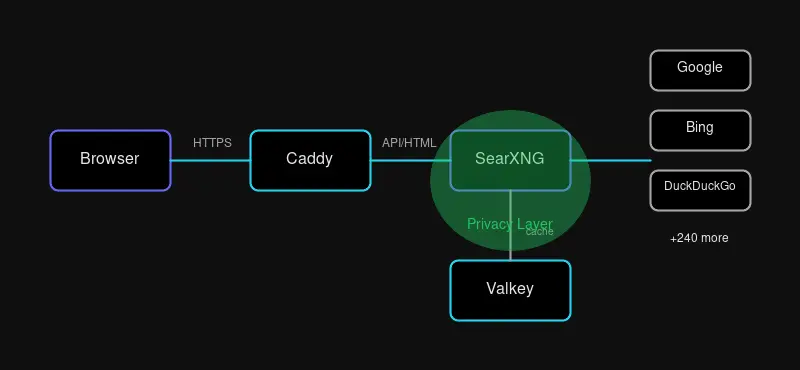
- SearXNG - The Python application that handles search queries
- Valkey - Redis-compatible cache for results and rate limiting
- Caddy - Reverse proxy with automatic HTTPS
Valkey (a Redis fork) is essential for:
- Caching search results (faster responses, fewer API calls)
- Rate limiting (prevent bot detection by search engines)
- Session storage
Quick Start: Docker Compose
The fastest way to get SearXNG running:
cd /opt
git clone https://github.com/searxng/searxng-docker.git
cd searxng-docker
Generate a secret key:
sed -i "s|ultrasecretkey|$(openssl rand -hex 32)|g" searxng/settings.ymlEdit the .env file with your domain:
SEARXNG_HOSTNAME=https://search.yourdomain.comStart the stack:
docker compose up -dYour instance is now live at https://search.yourdomain.com.
Complete Docker Compose Configuration
For a custom deployment, here’s a full docker-compose.yml:
version: "3.8"

services:
  caddy:
    image: caddy:2-alpine
    container_name: caddy
    restart: unless-stopped
    ports:
      - "80:80"
      - "443:443"
    volumes:
      - ./Caddyfile:/etc/caddy/Caddyfile:ro
      - caddy-data:/data
      - caddy-config:/config
    networks:
      - searxng-net
    depends_on:
      - searxng

  searxng:
    image: searxng/searxng:latest
    container_name: searxng
    restart: unless-stopped
    environment:
      - SEARXNG_BASE_URL=https://search.yourdomain.com
      - SEARXNG_SECRET=${SEARXNG_SECRET}
      - BIND_ADDRESS=0.0.0.0:8080
    volumes:
      - ./searxng:/etc/searxng:rw
    networks:
      - searxng-net
    depends_on:
      - redis
    cap_drop:
      - ALL
    cap_add:
      - CHOWN
      - SETGID
      - SETUID

  redis:
    image: valkey/valkey:8-alpine
    container_name: searxng-redis
    restart: unless-stopped
    command: valkey-server --save 60 1 --loglevel warning
    volumes:
      - valkey-data:/data
    networks:
      - searxng-net

volumes:
  caddy-data:
  caddy-config:
  valkey-data:

networks:
  searxng-net:
    driver: bridge
Caddyfile
search.yourdomain.com {
    encode gzip zstd

    header {
        # Security headers
        Strict-Transport-Security "max-age=31536000; includeSubDomains; preload"
        X-Content-Type-Options "nosniff"
        X-Frame-Options "SAMEORIGIN"
        X-XSS-Protection "1; mode=block"
        Referrer-Policy "no-referrer"
        Content-Security-Policy "default-src 'self'; img-src * data:; style-src 'self' 'unsafe-inline'; script-src 'self'"
    }

    @static {
        path /static/*
    }

    header @static {
        Cache-Control "public, max-age=31536000"
    }

    reverse_proxy searxng:8080 {
        header_up X-Forwarded-For {remote_host}
        header_up X-Real-IP {remote_host}
    }
}
Configuration Deep Dive
Essential Settings
Create searxng/settings.yml:
use_default_settings: true

general:
  instance_name: "My Private Search"
  debug: false
  enable_metrics: false

server:
  base_url: https://search.yourdomain.com
  secret_key: "your-secret-key-here"  # Generated earlier
  limiter: true
  public_instance: false
  image_proxy: true
  method: "POST"
  default_http_headers:
    X-Content-Type-Options: nosniff
    X-Download-Options: noopen
    X-Robots-Tag: noindex, nofollow
    Referrer-Policy: no-referrer

valkey:
  url: valkey://redis:6379/0

search:
  safe_search: 0
  autocomplete: "duckduckgo"
  default_lang: "en"
  formats:
    - html
    - json
    - csv
    - rss

ui:
  static_use_hash: true
  default_locale: "en"
  query_in_title: true
  infinite_scroll: true
  center_alignment: true
  default_theme: simple
  theme_args:
    simple_style: auto

outgoing:
  request_timeout: 10.0
  max_request_timeout: 15.0
  pool_connections: 100
  pool_maxsize: 20
Key Settings Explained
| Setting | Purpose |
|---|---|
limiter: true | Enables rate limiting and bot protection |
public_instance: false | Disables public instance features |
image_proxy: true | Proxies images through SearXNG for privacy |
method: "POST" | Hides queries from browser history |
formats: [json, csv, rss] | Enables API access |
infinite_scroll: true | Auto-loads more results |
Rate Limiting Configuration
Edit searxng/limiter.toml:
[botdetection]
ipv4_prefix = 32
ipv6_prefix = 48

trusted_proxies = [
    '127.0.0.0/8',
    '::1',
    '172.16.0.0/12',  # Docker networks
]

[botdetection.ip_limit]
filter_link_local = false
link_token = true  # Enable for public instances

[botdetection.ip_lists]
block_ip = []

# Allow your local network unrestricted access
pass_ip = [
    '192.168.0.0/16',
    '10.0.0.0/8',
]
Reverse Proxy Alternatives
Traefik (Kubernetes/Docker Swarm)
labels:
  - "traefik.enable=true"
  - "traefik.http.routers.searxng.rule=Host(`search.yourdomain.com`)"
  - "traefik.http.routers.searxng.entrypoints=websecure"
  - "traefik.http.routers.searxng.tls.certresolver=letsencrypt"
  - "traefik.http.services.searxng.loadbalancer.server.port=8080"
  - "traefik.http.middlewares.searxng-headers.headers.customRequestHeaders.X-Forwarded-For=true"
Nginx
server {
    listen 443 ssl http2;
    server_name search.yourdomain.com;

    ssl_certificate /etc/letsencrypt/live/search.yourdomain.com/fullchain.pem;
    ssl_certificate_key /etc/letsencrypt/live/search.yourdomain.com/privkey.pem;
    ssl_protocols TLSv1.2 TLSv1.3;
    ssl_ciphers ECDHE-ECDSA-AES128-GCM-SHA256:ECDHE-RSA-AES128-GCM-SHA256;
    ssl_prefer_server_ciphers off;

    add_header Strict-Transport-Security "max-age=31536000" always;
    add_header X-Content-Type-Options "nosniff";
    add_header X-Frame-Options "SAMEORIGIN";
    add_header X-XSS-Protection "1; mode=block";
    add_header Referrer-Policy "no-referrer";

    location / {
        proxy_pass http://127.0.0.1:8888;
        proxy_set_header Host $host;
        proxy_set_header X-Real-IP $remote_addr;
        proxy_set_header X-Forwarded-For $proxy_add_x_forwarded_for;
        proxy_set_header X-Forwarded-Proto $scheme;
        proxy_buffering off;
    }
}
The JSON API: Power User Features
SearXNG’s API makes it perfect for automation and AI integration.
Basic API Usage
# JSON output
curl 'https://search.yourdomain.com/search?q=docker+tips&format=json'

# CSV for data processing
curl 'https://search.yourdomain.com/search?q=homelab&format=csv'

# RSS feed for monitoring
curl 'https://search.yourdomain.com/search?q=open+source&format=rss'
API Parameters
| Parameter | Description | Example |
|---|---|---|
q | Search query | q=linux+kubernetes |
format | Output format | json, csv, rss |
engines | Specific engines | engines=google,duckduckgo |
categories | Category filter | categories=images,videos |
language | Language code | language=en |
pageno | Page number | pageno=2 |
time_range | Time filter | day, month, year |
safesearch | Filter level | 0, 1, 2 |
Example: AI Agent Search Integration
import requests

def search_web(query, engines="google,duckduckgo,brave"):
    """Search the web via SearXNG API"""
    response = requests.get(
        "https://search.yourdomain.com/search",
        params={
            "q": query,
            "format": "json",
            "engines": engines,
        },
        timeout=10
    )

    if response.status_code == 200:
        data = response.json()
        return [
            {
                "title": r.get("title"),
                "url": r.get("url"),
                "content": r.get("content"),
                "engine": r.get("engine"),
            }
            for r in data.get("results", [])
        ]
    return []

# Usage
results = search_web("best practices for kubernetes security")
for r in results[:5]:
    print(f"[{r['engine']}] {r['title']}")
    print(f"  {r['url']}")
Example: Monitoring Script
#!/bin/bash
# Monitor for new releases of a project

QUERY="searxng release announcement"
LAST_SEEN_FILE="/tmp/last-seen-searxng.txt"

current=$(curl -s "https://search.yourdomain.com/search?q=$QUERY&format=json" | \
    jq -r '.results[0].url')

if [[ -f "$LAST_SEEN_FILE" ]]; then
    last=$(cat "$LAST_SEEN_FILE")
    if [[ "$current" != "$last" ]]; then
        echo "New release detected: $current"
        # Send notification...
    fi
fi

echo "$current" > "$LAST_SEEN_FILE"
Customizing Search Engines
SearXNG supports 243 search engines across categories:
Enabling Additional Engines
Add to settings.yml:
engines:
  - name: github
    engine: github
    shortcut: gh

  - name: stackoverflow
    engine: stackoverflow
    shortcut: st

  - name: reddit
    engine: reddit
    shortcut: re

  - name: youtube
    engine: youtube_noapi
    shortcut: yt

  - name: pinterest
    engine: pinterest
    shortcut: pin
    disabled: true  # Disabled by default
Disabling Engines
engines:
  - name: google
    engine: google
    disabled: true

  - name: bing
    engine: bing
    disabled: true
Using Bang Commands
SearXNG supports DuckDuckGo-style bang commands:
| Bang | Engine | Example |
|---|---|---|
!g | !g docker compose | |
!bi | Bing | !bi kubernetes tutorial |
!ddg | DuckDuckGo | !ddg privacy tools |
!gh | GitHub | !gh open source search |
!wp | Wikipedia | !wp docker software |
!yt | YouTube | !yt homelab tour |
Performance Tuning
Caching Strategy
Valkey caches are crucial for performance:
# In settings.yml
valkey:
  url: valkey://redis:6379/0

# Redis configuration (for larger deployments)
# maxmemory 256mb
# maxmemory-policy allkeys-lru
Query Timeout Tuning
outgoing:
  request_timeout: 10.0      # Per-engine timeout
  max_request_timeout: 15.0  # Maximum allowed
  pool_connections: 100      # Connection pool size
  pool_maxsize: 20           # Max connections per pool
Resource Limits
# docker-compose.yml
services:
  searxng:
    deploy:
      resources:
        limits:
          cpus: '1.0'
          memory: 512M
        reservations:
          cpus: '0.25'
          memory: 128M
Security Hardening
For Private Instances (Homelab)
- No rate limiting needed for small user base
- Network isolation - Run on internal network only
- VPN access - Require WireGuard/Tailscale to reach instance
- HTTP Basic Auth - Add authentication layer
Add HTTP Basic Auth with Caddy:
search.yourdomain.com {
    basicauth {
        admin $2a$14$hashed-password-here
    }

    encode gzip
    reverse_proxy searxng:8080
}
Generate password hash:
caddy hash-password --plaintext 'your-password'For Public Instances
- Enable limiter with Valkey
- Configure Tor support for anonymous access
- Monitor logs for abuse patterns
- Set up alerting for CAPTCHA blocks
- Use Cloudflare for DDoS protection
Tor Integration (Advanced)
For maximum privacy, route searches through Tor:
outgoing:
  proxies:
    - socks5://tor:9050

  # Use only search engines that support Tor
  # This requires running a Tor container
Add Tor to docker-compose:
  tor:
    image: dperson/torproxy
    container_name: tor
    restart: unless-stopped
    environment:
      - TOR_NewCircuitPeriod=600
    networks:
      - searxng-net
Maintenance
Updates
cd /opt/searxng-docker
git pull
docker compose pull
docker compose up -d
Backups
# Backup configuration
tar -czf searxng-backup-$(date +%Y%m%d).tar.gz \
    searxng/ \
    Caddyfile \
    .env
Monitoring Logs
# All services
docker compose logs -f

# Just SearXNG
docker compose logs -f searxng

# Check for errors
docker compose logs searxng | grep -i error
Health Check
curl -s https://search.yourdomain.com/healthz

# Or check the search API
curl -s 'https://search.yourdomain.com/search?q=test&format=json' | jq '.results | length'
Troubleshooting
Common Issues
Issue: “Too Many Requests” from Google
Solution: Google is rate-limiting your IP. Enable the limiter with Valkey, or reduce request frequency:
[botdetection.ip_limit]
link_token = true
Issue: Blank search results
Check that engines aren’t blocked:
docker compose logs searxng | grep -i "engine\|block\|error"Issue: Slow performance
- Ensure Valkey is running
- Check network connectivity
- Reduce timeout values:
outgoing:
  request_timeout: 5.0
Issue: Can’t access from local network
Check firewall rules and Docker networking:
docker compose logs caddy
docker compose logs searxng
Debug Mode
Enable debug logging temporarily:
general:
  debug: true
Then check logs:
docker compose logs -f searxngTurn off debug mode when done—it logs query details.
Homelab Integration Ideas
1. Default Browser Search
Set SearXNG as your browser’s default search engine:
https://search.yourdomain.com/search?q=%s2. AI Agent Integration
Use the JSON API for AI-powered research:
- RAG (Retrieval-Augmented Generation) systems
- Chat bot knowledge retrieval
- Automated research pipelines
3. Monitoring Dashboards
Create Grafana dashboards showing:
- Search query trends
- Popular engines
- Response times
4. Family Privacy
Block ads and trackers for your entire household:
- Configure DNS to block tracking domains
- Set SearXNG as family search default
- No Google account required
5. Development Testing
SEO professionals use SearXNG to:
- Check rankings without personalization bias
- Test international results with
languageparameter - Compare results across engines
Comparison to Alternatives
| Feature | SearXNG | Whoogle | Presearch | Jive |
|---|---|---|---|---|
| Self-hostable | ✅ | ✅ | ❌ | ✅ |
| Engine count | 243 | 1 (Google) | Decentralized | ~20 |
| Privacy focus | ✅ | ✅ | ✅ | ✅ |
| API access | ✅ | Limited | ✅ | ❌ |
| Active development | ✅ | Moderate | ✅ | Low |
| Docker support | ✅ | ✅ | N/A | ✅ |
| Customization | High | Low | Medium | Low |
Choose SearXNG when: You want maximum privacy, customization, and engine diversity.
Choose Whoogle when: You only need Google results with a simpler setup.
Choose Presearch when: You want decentralized search and don’t need self-hosting.
Cost and Resource Requirements
| Resource | Minimum | Recommended |
|---|---|---|
| CPU | 1 core | 2 cores |
| RAM | 256MB | 512MB |
| Storage | 1GB | 2GB |
| Network | Any | Static IP helpful |
SearXNG runs great on:
- Raspberry Pi 4
- $5/month VPS
- Existing homelab server
Summary
SearXNG gives you search without the surveillance. In your homelab, it becomes:
- A privacy shield between you and tracking empires
- An API endpoint for AI agents and automation
- A customization engine for search preferences
- A teaching tool about how search works
Set it up once, forget about it. Your searches stay yours.
Quick Reference Commands
# Install
git clone https://github.com/searxng/searxng-docker.git
cd searxng-docker
sed -i "s|ultrasecretkey|$(openssl rand -hex 32)|g" searxng/settings.yml

# Start
docker compose up -d

# Update
git pull && docker compose pull && docker compose up -d

# Logs
docker compose logs -f searxng

# Test API
curl 'http://localhost:8888/search?q=test&format=json' | jq '.results | length'
Your searches. Your rules. Your SearXNG instance.


Comments
Powered by GitHub Discussions