RVC Web UI: Real-Time Voice Conversion in Your Homelab
Set up retrieval-based voice conversion for real-time audio transformation, voice cloning, and AI assistant integration

Table of Contents
- What Is RVC?
- How RVC Actually Works
- The Three-Part Architecture
- Why Retrieval Beats Direct Mapping
- Web UI Options: Making RVC Accessible
- Applio (Recommended)
- Original RVC WebUI
- Hardware Requirements
- For Inference (Voice Conversion)
- For Training (Creating Voice Models)
- Cloud Alternatives
- Why Self-Host?
- Privacy
- No Recurring Costs
- Custom Models
- Integration Freedom
- RVC vs. Other Voice Cloning Methods
- Integrating RVC with AI Assistants
- Pattern 1: Output Transformation
- Pattern 2: Input Anonymization
- Pattern 3: End-to-End Pipeline
- Technical Requirements
- Getting Started
- The Bottom Line
Ever wanted to sound like someone else in real-time? Not the robotic text-to-speech from a decade ago, but actual voice conversion that preserves your emotion, cadence, and personality — just with a different voiceprint?
That’s exactly what Retrieval-Based Voice Conversion (RVC) delivers. And thanks to open-source web UIs like Applio, you can run this technology yourself without sending your voice to some cloud service you don’t control.
Let’s dive into what RVC is, how it actually works, and why self-hosting it might be the best decision you make for your audio workflow.
What Is RVC?
Think of RVC as a voice transformer that works on actual speech, not text. You feed it audio of someone speaking, and it converts that voice to sound like a target speaker — preserving everything about how they said it (emotion, pacing, emphasis) while changing who it sounds like.
Unlike text-to-speech systems that synthesize speech from scratch, RVC takes existing audio and transforms it. This matters because:
- Emotion stays intact. Sarcasm, excitement, whispering — the nuances survive the transformation.
- Real-time is possible. With proper GPU acceleration, you can hit latencies around 90ms. That’s usable for live streaming, voice calls, or gaming.
- Training is lightweight. Need only 5-10 minutes of clean audio to create a voice model. Not hours.
This is why RVC has exploded in popularity among streamers, content creators, and privacy-conscious users. It’s voice cloning that actually works in real-world conditions.
How RVC Actually Works
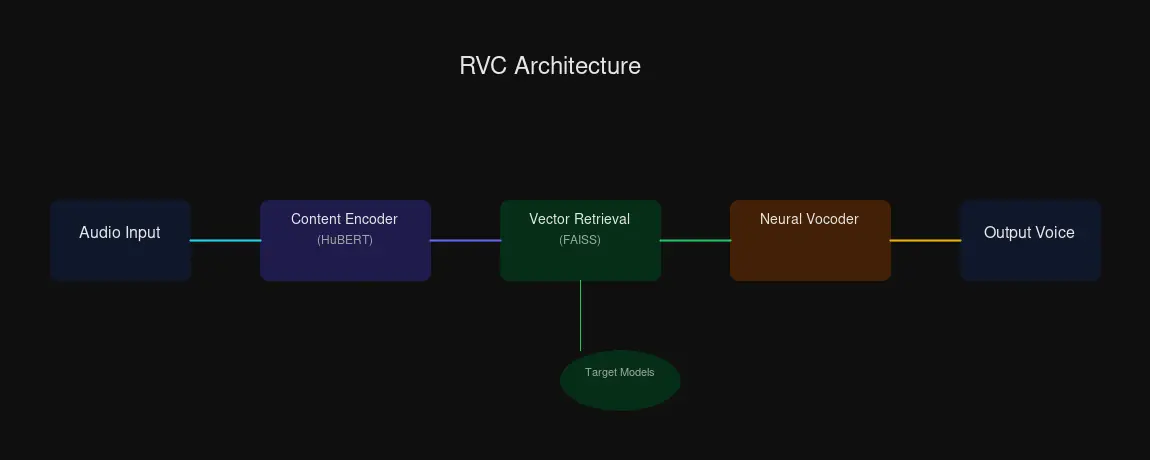
The “retrieval-based” part isn’t marketing fluff — it’s the key innovation that separates RVC from other voice cloning methods. Here’s what’s happening under the hood:
The Three-Part Architecture
1. Content Feature Extractor
RVC uses HuBERT (a self-supervised speech model) or a Phonetic Posteriorgram encoder to pull out the linguistic content from your input speech. Think of this as separating “what you said” from “how you said it.”
2. Vector Retrieval Module
Instead of directly mapping input to output (which causes that robotic oversmoothing), RVC searches a database of the target voice’s speech samples. It uses FAISS — Facebook AI Similarity Search — to find matching acoustic features at high speed.
3. Neural Vocoder
The retrieved representations get synthesized into actual audio by a neural vocoder. This is where the waveform gets built.
Why Retrieval Beats Direct Mapping
Traditional neural TTS approaches use direct statistical mapping. Input goes in, statistics determine the most likely output. The problem? Averaged output sounds averaged — robotic, lifeless, missing the natural variation in human speech.
RVC’s retrieval approach is different. It doesn’t predict the “average” sound for a given input. It finds actual examples from the target voice that match what you’re trying to say, then uses those real samples to build the output. The result preserves natural variation, expressiveness, and that ineffable “human” quality.
Web UI Options: Making RVC Accessible
You don’t need to be a machine learning engineer to use RVC. Two excellent web interfaces handle the complexity:
Applio (Recommended)
If you’re setting up RVC for the first time, start with Applio. It’s a fork of the original RVC WebUI with a cleaner interface and thoughtful additions:
- Real-time voice conversion tab — plug in a microphone and hear yourself transformed live
- Built-in TTS integration — combine text-to-speech with RVC for full voice pipelines
- Audio analyzer tools — inspect your models and training data
- Autotune and formant shifting — fine-tune output for specific use cases
- Plugin support — extend functionality as needed
Applio’s documentation lives at docs.applio.org, and it’s genuinely helpful — a refreshing change from sparse open-source docs.
Original RVC WebUI
The original project is still actively maintained and works great. One-click installers for Windows, Linux, and macOS make setup straightforward. Features include training, inference, vocal separation (via UVR5), and model fusion.
Both use Gradio under the hood, so you get a web interface accessible from any browser on your network — perfect for homelab deployment.
Hardware Requirements
Here’s where self-hosting gets real. RVC needs GPU acceleration for acceptable performance.
For Inference (Voice Conversion)
| GPU Tier | VRAM | What You Can Do |
|---|---|---|
| Minimum | 8-12 GB | Basic inference, short audio clips |
| Recommended | 12-24 GB | Real-time conversion, model switching |
| Optimal | 24-48 GB | Professional use, instant model loads |
A used RTX 3060 12GB ($250-300) hits the recommended tier. That’s enough for real-time voice conversion with acceptable latency. An RTX 3090 or 4090 moves you into “instant” territory — model loading becomes trivial, and you can run multiple models simultaneously.
For Training (Creating Voice Models)
Training voice models requires more VRAM:
| GPU VRAM | Training Experience |
|---|---|
| 8 GB | Challenging — small batch sizes, slow |
| 12 GB | Baseline — stable training, batch size 6-8 |
| 24 GB | Excellent — faster epochs, larger batches |
| 48 GB | Professional — production workloads |
An RTX 3060 12GB can train voice models. It won’t be fast, but it works. If you’re training frequently, consider upgrading to a 24GB card.
Cloud Alternatives
No GPU? Cloud options work for experimentation:
- Google Colab — Free tier handles inference, training works on paid tiers
- RunPod — $0.20-0.80/hour for GPU rental
- Kaggle — Applio maintains Kaggle notebooks
But if you’re using RVC regularly, self-hosting wins on cost and privacy. Which brings us to…
Why Self-Host?
Privacy
Every time you send audio to a cloud service, someone else has your voice data. Maybe they’re trustworthy. Maybe they’re not. Maybe their servers get breached. Maybe their business model changes.
Self-hosting means your voice stays on your hardware. For streamers, podcasters, or anyone handling sensitive conversations, that matters.
No Recurring Costs
Cloud GPU time adds up. RunPod rates may seem low per hour, but regular use quickly exceeds the cost of a used GPU. Self-hosted RVC costs $0 per month after hardware investment.
Custom Models
Train voice models from your own data. Want a custom narrator voice for your videos? A character voice for roleplay? A voice model of yourself for when you’re sick? All possible when you control the pipeline.
Integration Freedom
Self-hosted RVC can integrate with your existing homelab:
- OBS Studio / Voicemeeter — route audio through RVC for live streaming
- Local LLMs — pair with tools like Ollama for voice-enabled AI assistants
- API Endpoints — expose RVC for automation scripts
RVC vs. Other Voice Cloning Methods
| Method | Training Data | Real-time? | Quality | Use Case |
|---|---|---|---|---|
| RVC | 5-10 min | Yes (90ms) | High | General speech, preserves emotion |
| so-vits-svc | More needed | Typically offline | Good | Singing voice conversion |
| Diff-SVC | High-quality datasets | No (GPU intensive) | Best naturalness | Studio-quality singing |
RVC’s sweet spot is real-time speech. If you need singing conversion, so-vits-svc or Diff-SVC may produce better results — but at the cost of real-time capability. For streaming, voice calls, or AI assistant integration, RVC is the practical choice.
Integrating RVC with AI Assistants
This is where things get interesting for homelab operators. RVC can transform how your AI assistant sounds:
Pattern 1: Output Transformation
AI Assistant TTS → RVC Conversion → Custom Voice OutputYour AI speaks normally, but listeners hear a custom voice. Perfect for character-based AI or brand-consistent voice assistants.
Pattern 2: Input Anonymization
User Speech → RVC Conversion → AI Assistant STTPrivacy-focused: your voice gets converted before reaching the AI. Useful when you don’t want your actual voiceprint in cloud systems.
Pattern 3: End-to-End Pipeline
User Speech → [RVC Input] → AI Assistant → [RVC Output] → UserBoth sides transformed. Maximum flexibility, but higher latency. Works best with local AI to keep round-trip time reasonable.
Technical Requirements
- WebSocket or WebRTC for real-time audio streaming
- Buffer management to handle audio chunks smoothly
- Latency budget: RVC (90ms) + Network + AI Processing needs to stay under your tolerance threshold
If your homelab already runs services like Ollama or ComfyUI, adding RVC follows a similar pattern: Docker container, GPU passthrough, Gradio interface.
Getting Started
- Hardware Check: Verify you have a CUDA-capable NVIDIA GPU with 8GB+ VRAM
- Choose Your UI: Download Applio from GitHub or use the original RVC WebUI
- Find Models: Browse HuggingFace RVC models or train your own
- Test Inference: Start with real-time voice conversion before tackling training
- Integrate: Connect to OBS, your AI assistant, or other workflows
The Bottom Line
RVC brings real-time voice cloning within reach of anyone with a gaming GPU. The retrieval-based approach avoids robotic output, web UIs like Applio make it accessible, and self-hosting keeps your voice data private.
For homelab operators, this is another GPU-accelerated service you can run alongside existing AI workloads. The use cases are genuinely useful — not just novelty. Streaming with custom voices, privacy-preserving AI interactions, character voice work for content creation.
The technology is mature enough for production use. The only question is whether your homelab has the GPU headroom for it.


Comments
Powered by GitHub Discussions