Building a Multi-Agent AI Voice Assistant Stack: Per-Agent Memory, Multi-Channel Voice, and Isolated LLM Contexts
Learn how to build a production-ready multi-agent AI voice system with isolated memory, per-agent voice cloning, and multi-channel Discord integration using Ollama, Qdrant, and OpenClaw.
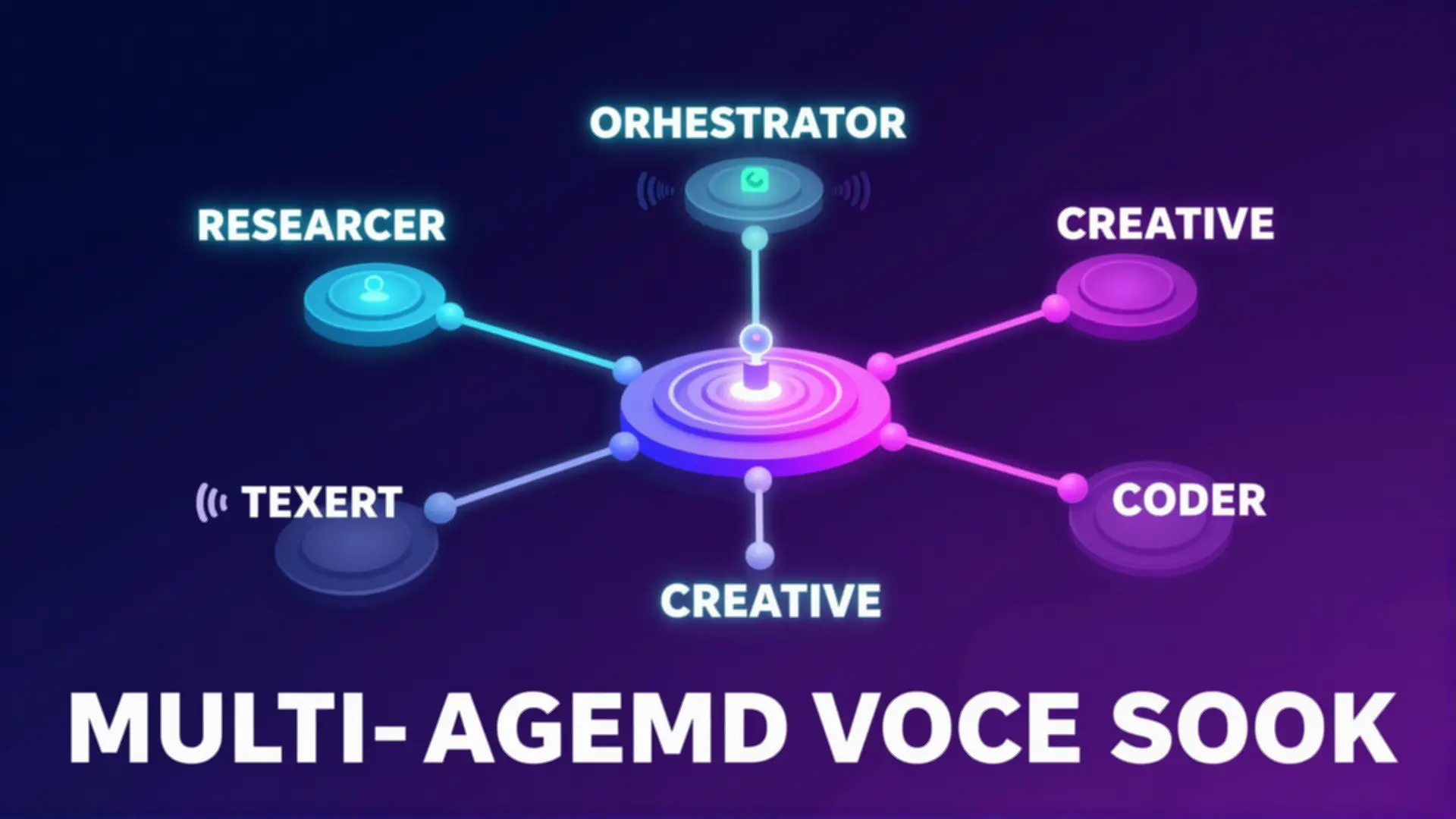
Table of Contents
- Why Multi-Agent?
- Architecture Overview
- Per-Agent Memory Isolation with Qdrant
- Option 1: Separate Collections (Recommended)
- Option 2: Payload-Based Multitenancy
- Memory Retrieval and Context Injection
- LLM Isolation with Ollama
- Strategy A: Port-Per-Agent (Process Isolation)
- Strategy B: Kubernetes + vCluster (Enterprise)
- Multi-Channel Discord Architecture
- Per-Agent Voice Cloning with VibeVoice
- Voice Assignment
- Voice Generation
- Training Custom Voices
- Complete Docker Compose Stack
- Deployment Considerations
- Hardware Requirements
- Security Best Practices
- Performance Optimization
- Monitoring and Debugging
- Key Metrics
- Debugging Multi-Agent Systems
- Conclusion
Building a Multi-Agent AI Voice Assistant Stack
Most AI assistants today are lonely creatures — single agents trying to do everything. But the real magic happens when you build a team of specialized agents, each with their own personality, memory, and voice. In this article, we’ll architect a complete multi-agent voice assistant stack that runs entirely on your own hardware.
Why Multi-Agent?
The single-agent approach hits a wall fast. One agent can’t simultaneously be a coding expert, a research assistant, and a creative writer without losing coherence. Worse, when that one agent hallucinates or gets stuck, your entire system fails.
Multi-agent systems distribute responsibility. Each agent specializes. They collaborate. They fail independently. According to research from Cemri et al., 36.9% of multi-agent failures stem from inter-agent misalignment — agents stepping on each other’s work or contradicting each other. The solution isn’t better models — it’s better architecture.
Architecture Overview
Our stack combines:
- Ollama for local LLM inference with per-agent isolation
- Qdrant for vector memory with collection-based separation
- VibeVoice for TTS with voice cloning per agent
- Discord as our multi-channel interface
- OpenClaw for agent orchestration
┌─────────────────┐
│ Discord Users │
└────────┬────────┘
│
v
┌─────────────────────────────────────────────────────┐
│ Discord Gateway │
│ (Routes messages by channel/agent) │
└─────────────────────────────────────────────────────┘
│
┌────────────────────┼────────────────────┐
v v v
┌──────────────┐ ┌──────────────┐ ┌──────────────┐
│ Agent One │ │ Agent Two │ │ Agent Three │
│ (Researcher) │ │ (Creative) │ │ (Coder) │
└──────┬───────┘ └──────┬───────┘ └──────┬───────┘
│ │ │
v v v
┌──────────────┐ ┌──────────────┐ ┌──────────────┐
│ Ollama-1 │ │ Ollama-2 │ │ Ollama-3 │
│ (Isolated) │ │ (Isolated) │ │ (Isolated) │
└──────┬───────┘ └──────┬───────┘ └──────┬───────┘
│ │ │
└───────────────────┼───────────────────┘
v
┌─────────────────┐
│ Qdrant │
│ (Per-Collection │
│ Memory Store) │
└─────────────────┘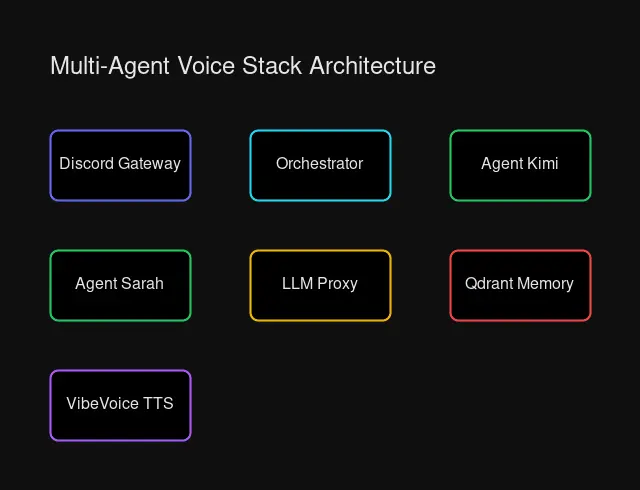 System architecture showing Discord gateway, agent containers, LLM proxy, and memory layers
Per-Agent Memory Isolation with Qdrant
Memory is where most multi-agent systems fall apart. If all agents share the same memory pool, they overwrite each other’s context. A research agent’s notes about quantum computing shouldn’t pollute a creative agent’s story ideas.
Qdrant provides two approaches to isolation:
Option 1: Separate Collections (Recommended)
Each agent gets its own dedicated collection:
from qdrant_client import QdrantClient
from qdrant_client.models import Distance, VectorParams

client = QdrantClient("http://192.168.1.100:6333")

# Create isolated collections per agent
agents = ["agent-researcher", "agent-creative", "agent-coder"]

for agent_id in agents:
    client.create_collection(
        collection_name=f"memories_{agent_id}",
        vectors_config=VectorParams(
            size=1536,  # embedding dimensions
            distance=Distance.COSINE
        )
    )
Pros: True isolation, different schemas per agent, simple permissions Cons: ~30MB overhead per collection (acceptable for small teams)
Option 2: Payload-Based Multitenancy
Single collection with agent ID filtering:
# Store with agent metadata
client.upsert(
    collection_name="memories",
    points=[{
        "id": memory_id,
        "vector": embedding,
        "payload": {
            "agent_id": "agent-researcher",
            "user_id": "user-123",
            "text": "User prefers detailed explanations",
            "timestamp": "2026-03-28T10:30:00Z"
        }
    }]
)

# Retrieve with filter
results = client.search(
    collection_name="memories",
    query_vector=query_embedding,
    query_filter=Filter(
        must=[
            FieldCondition(
                key="agent_id",
                match=MatchValue(value="agent-researcher")
            )
        ]
    ),
    limit=5
)
Pros: Efficient, single schema, good for 100+ agents Cons: Less isolation, filter complexity
Memory Retrieval and Context Injection
When a user messages an agent, we retrieve relevant memories and inject them into the system prompt:
async def build_agent_context(agent_id: str, user_message: str) -> str:
    # Embed the user message
    embedding = await embed_text(user_message)

    # Retrieve from agent's private collection
    memories = qdrant_client.search(
        collection_name=f"memories_{agent_id}",
        query_vector=embedding,
        limit=5
    )

    # Format for context
    memory_context = "\n".join([
        f"- {m.payload['text']}" for m in memories
    ])

    # Build system prompt with injected memories
    return f"""You are {agent_id}, a specialized AI assistant.

Relevant context from previous conversations:
{memory_context}

Respond naturally, incorporating this context where appropriate."""
LLM Isolation with Ollama
Running multiple agents on one Ollama instance creates contention. Agent one’s large context window blocks agent two’s request. Worse, if one agent crashes the model, everyone goes down.
We have three isolation strategies:
Strategy A: Port-Per-Agent (Process Isolation)
# docker-compose.yml
services:
  ollama-researcher:
    image: ollama/ollama
    ports:
      - "11434:11434"  # Agent One
    volumes:
      - ollama-researcher:/root/.ollama
    deploy:
      resources:
        reservations:
          devices:
            - driver: nvidia
              count: 1
              capabilities: [gpu]

  ollama-creative:
    image: ollama/ollama
    ports:
      - "11435:11434"  # Agent Two
    volumes:
      - ollama-creative:/root/.ollama
    # Shares same GPU with time-slicing

  ollama-coder:
    image: ollama/ollama
    ports:
      - "11436:11434"  # Agent Three
    volumes:
      - ollama-coder:/root/.ollama
Each agent connects to its own Ollama endpoint:
OLLAMA_ENDPOINTS = {
    "agent-researcher": "http://192.168.1.100:11434",
    "agent-creative": "http://192.168.1.100:11435",
    "agent-coder": "http://192.168.1.100:11436"
}

async def generate(agent_id: str, prompt: str):
    endpoint = OLLAMA_ENDPOINTS[agent_id]
    async with aiohttp.ClientSession() as session:
        async with session.post(
            f"{endpoint}/api/generate",
            json={
                "model": "llama3.1:8b",
                "prompt": prompt,
                "stream": False
            }
        ) as resp:
            return await resp.json()
Strategy B: Kubernetes + vCluster (Enterprise)
For production scale, use vCluster to give each agent its own virtual Kubernetes cluster:
# vcluster.yaml
apiVersion: v1
kind: ConfigMap
metadata:
  name: vcluster-config
data:
  values.yaml: |
    isolation:
      enabled: true
      networkPolicy:
        enabled: true
    sync:
      pods:
        enabled: true
This provides hard multi-tenancy — each agent’s Ollama runs in its own virtual cluster with network isolation, but shares the underlying GPU nodes.
Multi-Channel Discord Architecture
Discord serves as our user-facing interface. Different channels route to different agents:
AGENT_ROUTES = {
    "#research": "agent-researcher",
    "#creative": "agent-creative",
    "#coding": "agent-coder",
    "#general": "agent-default"
}

@bot.event
async def on_message(message):
    # Skip bot messages
    if message.author.bot:
        return

    # Determine which agent handles this channel
    channel_name = message.channel.name
    agent_id = AGENT_ROUTES.get(f"#{channel_name}", "agent-default")

    # Build context with agent's private memories
    context = await build_agent_context(agent_id, message.content)

    # Generate response
    response = await generate(agent_id, context + "\n\nUser: " + message.content)

    # Convert to voice if in voice channel
    if message.author.voice:
        audio = await generate_tts(agent_id, response)
        await play_in_voice_channel(message.guild, audio)
    else:
        await message.channel.send(response)
Per-Agent Voice Cloning with VibeVoice
Each agent gets its own voice. Users hear the difference immediately — the researcher speaks with measured precision, the creative with expressive warmth.
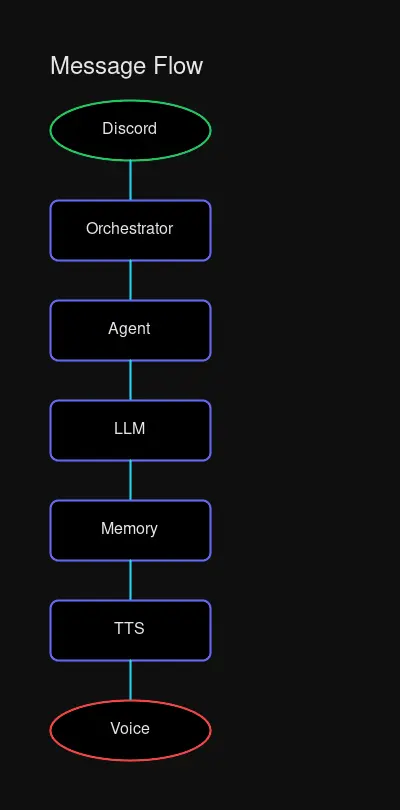 Flow: Discord message → Gateway → Agent → Memory retrieval → LLM → TTS → Response
Voice Assignment
VOICE_CONFIGS = {
    "agent-researcher": {
        "voice_id": "voice-analytical-1",
        "speed": 0.95,
        "pitch": -0.1,
        "personality": "precise and thorough"
    },
    "agent-creative": {
        "voice_id": "voice-expressive-1",
        "speed": 1.05,
        "pitch": 0.1,
        "personality": "warm and imaginative"
    },
    "agent-coder": {
        "voice_id": "voice-technical-1",
        "speed": 1.0,
        "pitch": 0.0,
        "personality": "concise and direct"
    }
}
Voice Generation
import requests

async def generate_tts(agent_id: str, text: str) -> bytes:
    config = VOICE_CONFIGS[agent_id]

    response = requests.post(
        "http://192.168.1.100:7860/generate",
        json={
            "text": text,
            "voice": config["voice_id"],
            "speed": config["speed"],
            "pitch": config["pitch"]
        }
    )

    return response.content
Training Custom Voices
- Record 30-60 seconds of clean speech per voice persona
- Upload to your TTS service (VibeVoice, ElevenLabs, etc.)
- Note the returned voice_id
- Map to agent configuration
The result: three agents, three distinct voices, one seamless experience.
Complete Docker Compose Stack
Here’s a production-ready configuration:
version: "3.8"

services:
  # Vector Database - All agents share, collections isolate
  qdrant:
    image: qdrant/qdrant:latest
    ports:
      - "6333:6333"
    volumes:
      - qdrant-storage:/qdrant/storage
    environment:
      - QDRANT__SERVICE__HTTP_PORT=6333
    restart: unless-stopped

  # LLM Backends - One per agent for isolation
  ollama-researcher:
    image: ollama/ollama:latest
    ports:
      - "11434:11434"
    volumes:
      - ollama-researcher:/root/.ollama
    environment:
      - OLLAMA_HOST=0.0.0.0
    deploy:
      resources:
        reservations:
          devices:
            - driver: nvidia
              count: 1
              capabilities: [gpu]
    restart: unless-stopped

  ollama-creative:
    image: ollama/ollama:latest
    ports:
      - "11435:11434"
    volumes:
      - ollama-creative:/root/.ollama
    environment:
      - OLLAMA_HOST=0.0.0.0
    deploy:
      resources:
        reservations:
          devices:
            - driver: nvidia
              count: 1
              capabilities: [gpu]
    restart: unless-stopped

  ollama-coder:
    image: ollama/ollama:latest
    ports:
      - "11436:11434"
    volumes:
      - ollama-coder:/root/.ollama
    environment:
      - OLLAMA_HOST=0.0.0.0
    deploy:
      resources:
        reservations:
          devices:
            - driver: nvidia
              count: 1
              capabilities: [gpu]
    restart: unless-stopped

  # TTS Service - Shared, voice_id isolates
  vibevoice:
    image: vibevoice/tts:latest
    ports:
      - "7860:7860"
    volumes:
      - vibevoice-voices:/app/voices
    deploy:
      resources:
        reservations:
          devices:
            - driver: nvidia
              count: 1
              capabilities: [gpu]
    restart: unless-stopped

  # Agent Orchestrator - Routes and manages agents
  orchestrator:
    build: ./orchestrator
    environment:
      - QDRANT_URL=http://qdrant:6333
      - RESEARCHER_OLLAMA=http://ollama-researcher:11434
      - CREATIVE_OLLAMA=http://ollama-creative:11435
      - CODER_OLLAMA=http://ollama-coder:11436
      - TTS_URL=http://vibevoice:7860
      - DISCORD_TOKEN=${DISCORD_TOKEN}
    depends_on:
      - qdrant
      - ollama-researcher
      - ollama-creative
      - ollama-coder
      - vibevoice
    restart: unless-stopped

volumes:
  qdrant-storage:
  ollama-researcher:
  ollama-creative:
  ollama-coder:
  vibevoice-voices:
Deployment Considerations
Hardware Requirements
| Component | Minimum | Recommended |
|---|---|---|
| GPU VRAM | 12GB | 24GB+ (for concurrent agents) |
| RAM | 16GB | 32GB |
| Storage | 100GB SSD | 500GB NVMe |
| Network | 1Gbps | 10Gbps (for remote workers) |
Security Best Practices
- Network Isolation: Each Ollama instance should only accept connections from the orchestrator
- API Key Rotation: Per-agent Discord tokens, rotate monthly
- Memory Encryption: Enable Qdrant TLS for memory at rest
- Audit Logging: Log all agent-to-agent communication for debugging
Performance Optimization
- GPU Time-Slicing: NVIDIA MPS allows multiple Ollama instances to share one GPU
- Embedding Cache: Cache common embeddings to reduce compute
- Lazy Loading: Load models only when first requested
- Connection Pooling: Reuse Qdrant connections across requests
Monitoring and Debugging
Key Metrics
# Track per-agent performance
METRICS = {
    "agent-researcher": {
        "requests_total": Counter(),
        "latency_seconds": Histogram(),
        "memory_hits": Counter(),
        "tokens_generated": Counter()
    },
    # ... per agent
}
Debugging Multi-Agent Systems
When agents conflict:
- Check memory isolation:
GET /collectionsin Qdrant - Verify Ollama endpoints respond independently
- Review agent routing logs
- Inspect voice ID mapping
Conclusion
Building a multi-agent voice stack isn’t about adding complexity — it’s about building resilience. When your research agent goes down, your creative agent keeps working. When your coder hallucinates, your researcher provides grounding.
The architecture we’ve built here gives you:
- Isolation: Per-agent memory and LLM contexts
- Voice: Distinct personalities through TTS cloning
- Scale: Add agents without rearchitecting
- Control: Full ownership of your data and models
Start with two agents. Add a third when you’re comfortable. The stack grows with you.
Want to discuss multi-agent architectures? Join the conversation on Discord or check out the source code.


Comments
Powered by GitHub Discussions