Matter Over Thread: The Future of Smart Home Interoperability in 2026
Discover how Matter and Thread are revolutionizing smart homes with local control, better security, and true interoperability across brands
Table of Contents
- What is Thread?
- What is Matter?
- How They Work Together: The Matter Over Thread Stack
- Benefits for Homelabers
- Local Control, No Cloud Required
- True Interoperability
- Better Security
- Energy Efficiency
- Mesh Reliability
- Device Landscape in 2026
- Matter-Certified Devices
- Thread Border Routers
- Setting Up Matter Over Thread in Your Homelab
- Step 1: Get a Thread Border Router
- Step 2: Install the Matter Integration
- Step 3: Commission New Devices
- Step 4: Configure Your Thread Network
- Step 5: Verify Your Setup
- Thread Network Planning Tips
- DIY Thread Border Router Options
- Raspberry Pi + Radio Module
- Home Assistant SkyConnect (Recommended)
- OTBR Docker Container
- Best Devices and Recommendations
- Best Overall: Eve Ecosystem
- Best Lights: Nanoleaf Essentials
- Best Budget: Aqara (via Matter Bridge)
- Best DIY Route: Home Assistant SkyConnect
- Conclusion
If you’ve been in the smart home game for more than a minute, you know the pain: your Philips Hue lights won’t talk to your Google Home without a bridge, your Aqara sensors need their own hub, and don’t even get me started on trying to get everything working in one app. It’s the Fragmentation Problem™, and it’s been the thorn in every homelaber’s side for years.
Enter Matter and Thread—the dynamic duo that’s finally delivering on the promise of a truly interoperable smart home. In 2026, these protocols aren’t just hype anymore. They’re the foundation of a smarter, less frustrating home automation experience. Let’s break it down.
What is Thread?
Thread is a mesh networking protocol designed from the ground up for smart home devices. Think of it as the nervous system of your smart home—a low-power, self-healing mesh that keeps devices connected without relying on Wi-Fi or your router.
Here’s why Thread matters:
- Mesh networking: Every Thread device acts as a repeater, extending your network’s range. Add a light bulb in the garage? It’s now helping your kitchen sensor reach the border router.
- Low power consumption: Thread devices sip power, making them perfect for battery-powered sensors that last years instead of months.
- IPv6 native: Thread speaks IP natively (using 6LoWPAN), which means devices get real IP addresses and can communicate directly with your network.
- Self-healing: If one node drops offline, the mesh finds another route. No more dead zones eating your automations.
Tip: Thread operates on the 2.4 GHz band (same as many Wi-Fi networks), but because it’s a separate mesh protocol, it doesn’t compete with your Wi-Fi bandwidth for device communication.
What is Matter?
If Thread is the transport layer, Matter is the language your devices speak. Developed by the Connectivity Standards Alliance (CSA)—the same folks behind Zigbee—Matter is a unified application protocol that defines how smart home devices communicate, regardless of who made them.
Matter’s big promise: one protocol to rule them all. Okay, maybe not “rule,” but at least “work with.” Matter devices work with Apple HomeKit, Google Home, Amazon Alexa, and Samsung SmartThings without vendor-specific bridges or proprietary apps.
Key highlights:
- Cross-ecosystem compatibility: Buy a Matter-certified light bulb, and it works with Apple, Google, Amazon, and Samsung from day one. No more checking compatibility lists.
- Local control: Matter devices communicate locally. No cloud dependency means your automations keep running even when your internet goes down.
- Security first: Matter requires encrypted communication at the application layer. Combined with Thread’s network-level encryption, you get defense in depth.
- Simplified commissioning: QR codes and NFC tap-to-setup make onboarding new devices painless.
How They Work Together: The Matter Over Thread Stack
Here’s where the magic happens. Matter isn’t tied to any specific transport—it can run over Wi-Fi, Ethernet, or Thread. But when you combine Matter over Thread, you get the best of both worlds:
- Matter provides the unified protocol and device compatibility
- Thread provides the reliable, low-power mesh network
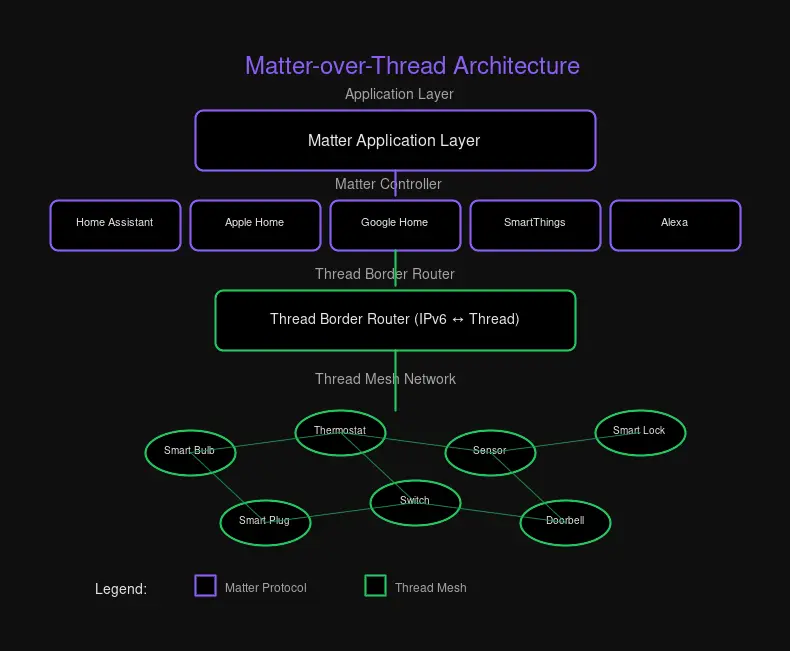
The result? Devices that work across ecosystems, run on minimal power, and don’t need a dozen hubs cluttering your network closet.
Benefits for Homelabers
If you’re the type who runs Home Assistant on a dedicated server and has strong opinions about VLANs, Matter over Thread is basically built for you.
Local Control, No Cloud Required
This is the big one. Matter devices communicate directly with your controller—no round-trip to a manufacturer’s cloud. Your automations run locally, respond faster, and keep working when your ISP has an outage.
For Home Assistant users, this is the holy grail: fully local devices that don’t require cloud subscriptions or proprietary bridges.
True Interoperability
The dream of “buy any device, use any platform” is finally real. A Matter-certified smart lock from Yale works with Apple Home, Google Home, and Home Assistant without any special configuration. No more hunting for “HomeKit compatible” labels or wondering if that Zigbee sensor will work with your Z-Wave hub.
Better Security
Thread networks are encrypted by default. Matter adds another layer of application-level encryption. Your smart door lock isn’t just talking to your hub—it’s doing so over an encrypted mesh network with authenticated devices.
Energy Efficiency
Thread’s low-power design means battery-powered sensors last significantly longer. We’re talking years on a single coin cell for some sensors, compared to months for Wi-Fi-based alternatives.
Mesh Reliability
Every Thread device extends your network. Dead spots become less of an issue as you add more devices. The mesh routes around obstacles and interference automatically.
How the mesh works in practice: When you add a smart plug in your garage, it doesn’t just connect to your network—it becomes part of the network. That outdoor sensor in your garden now has a path through the garage plug, then through a smart bulb in the hallway, before reaching your border router. Each hop is encrypted, and the mesh automatically finds the optimal route.
Compare this to Wi-Fi devices that need direct line-of-sight to your router, or Zigbee devices that need a hub within range. Thread’s mesh architecture means you can blanket your entire property with reliable coverage simply by adding more devices.
Device Landscape in 2026
As of 2026, the ecosystem has matured significantly. Here’s what’s available:
Matter-Certified Devices
Over 1,100 Matter-certified devices are now available across categories. That number has grown dramatically from just a few dozen at launch, and it continues to climb as manufacturers adopt the standard. Major brands that were holdouts have now embraced Matter:
- Lighting: Nanoleaf Essentials, Philips Hue (via Matter bridge), Eve Flora, LIFX, Sengled
- Sensors: Aqara motion, door/window, temperature/humidity sensors, Eve Motion, Eve Door & Window
- Smart plugs: Eve Energy, TP-Link Kasa Matter plugs, Belkin Wemo Matter
- Thermostats: Ecobee Smart Thermostat (Matter-native), Nest Learning Thermostat (via Matter)
- Locks: Yale Assure Lock 2, August Wi-Fi Smart Lock, Schlage Encode Plus
Thread Border Routers
You need a Thread border router to connect your Thread mesh to your IP network. Popular options:
- Apple: HomePod Mini, Apple TV 4K
- Google: Nest Hub (2nd gen), Nest WiFi Pro
- Amazon: Echo (4th gen), Echo Studio
- Samsung: SmartThings Station, SmartThings Hub v3
- Home Assistant: SkyConnect USB stick + OpenThread Border Router add-on
Note: Thread border routers can coexist on the same network. If you have an Apple HomePod Mini and a Google Nest Hub, they’ll both connect to the same Thread mesh and share border router duties.
Setting Up Matter Over Thread in Your Homelab
Let’s walk through setting up Matter over Thread with Home Assistant, the homelaber’s platform of choice.
Step 1: Get a Thread Border Router
The Home Assistant SkyConnect USB stick is the most flexible option for homelabs:
# SkyConnect includes both Zigbee and Thread radios
# Plug it into your Home Assistant server
# The Thread add-on handles the border router functionality
Alternatively, if you already have a commercial border router (HomePod Mini, Nest Hub), you can use that instead—your Home Assistant instance will discover it automatically.
Step 2: Install the Matter Integration
- Go to Settings → Devices & Services
- Click Add Integration
- Search for “Matter” and click it
- Follow the setup wizard
Home Assistant will automatically discover Matter controllers on your network.
Step 3: Commission New Devices
For each new Matter device:
- Open the Home Assistant mobile app (required for commissioning)
- Go to Settings → Devices & Services → Matter
- Click Add Device
- Scan the device’s QR code or enter the setup code manually
- Home Assistant will commission the device to your Thread network
Step 4: Configure Your Thread Network
# Example Home Assistant configuration.yaml
# Thread network credentials (auto-generated, but can be set manually)
thread:
  dataset:
    channel: 15
    network_name: "HomeThread"
    pan_id: 0xABCD
    ext_pan_id: "deadbeefcafebabe"
network_key: "00112233445566778899aabbccddeeff"Tip: Keep your Thread network credentials safe! You’ll need them to add new border routers or recover devices. Home Assistant stores these automatically, but exporting a backup is wise.
Step 5: Verify Your Setup
Once everything is connected, verify your Thread network is healthy:
- Open Settings → Devices & Services → Thread
- Check the network status—look for “connected” status
- View connected devices and their signal strength
- Test responsiveness with automations or manual control
A healthy Thread network shows:
- Multiple routers (devices with stable power that extend the mesh)
- Low latency (responses under 100ms)
- All devices showing as “connected”
Thread Network Planning Tips
- Place powered devices strategically: Mains-powered devices (smart plugs, bulbs) become routers that extend your mesh. Space them throughout your home.
- Avoid interference: Thread uses 2.4 GHz, so keep devices away from microwaves and congested Wi-Fi areas.
- Border router placement: Put your border router near the center of your home for best mesh coverage.
- Battery devices are end devices: They sleep to save power and don’t route traffic. Plan your mesh assuming they won’t help extend range.
DIY Thread Border Router Options
For the true DIY homelaber, building your own Thread border router is a rite of passage.
Raspberry Pi + Radio Module
The most common DIY approach uses a Raspberry Pi with a Thread-capable radio:
- Qorvo GP712: A popular USB Thread radio
- nRF52840 dongle: Nordic Semiconductor’s development board with Thread support
# Basic OpenThread Border Router setup on Raspberry Pi
sudo apt install otbr-agent
sudo otbr-agent -I wpan0 spinel+hdlc+uart:///dev/ttyUSB0

# Verify Thread network is up
sudo ot-ctl state
# Expected output: leader
Home Assistant SkyConnect (Recommended)
For most homelabers, the SkyConnect is the path of least resistance:
- Plug-and-play USB stick
- Built-in Zigbee and Thread radios
- Native Home Assistant integration
- Active community support
OTBR Docker Container
If you prefer containerization:
# docker-compose.yml for OpenThread Border Router
version: "3.8"
services:
  otbr:
    image: openthread/otbr-agent
    devices:
      - /dev/ttyUSB0:/dev/ttyUSB0
    network_mode: host
    privileged: true
    environment:
      - OTBR_AGENT_RADIO_URL=spinel+hdlc+uart:///dev/ttyUSB0
Best Devices and Recommendations
After testing dozens of Matter over Thread devices, here are my top picks for 2026:
Best Overall: Eve Ecosystem
Eve went all-in on Thread early, and it shows. Their devices are Thread-native, Matter-certified, and work beautifully without any bridges.
Favorites:
- Eve Energy (Smart Plug): Local control, energy monitoring, Thread-native
- Eve Motion (Motion Sensor): Years of battery life, instant response
- Eve Door & Window: Reliable contact sensing, Thread mesh extension
Best Lights: Nanoleaf Essentials
Nanoleaf’s Essentials line supports Matter over Thread natively. No proprietary bridge needed.
- Nanoleaf Bulb: Thread-native smart bulb with excellent color accuracy
- Nanoleaf Light Strip: Addressable LED strips with local control
Best Budget: Aqara (via Matter Bridge)
Aqara’s sensors are affordable and reliable. While they primarily use Zigbee, the Aqara M3 hub now acts as a Matter bridge, exposing all your Aqara devices to Matter controllers.
Warning: Bridge devices add latency compared to native Thread devices. If responsiveness matters (like motion sensors), consider native Thread alternatives.
Best DIY Route: Home Assistant SkyConnect
Building your own smart home platform? SkyConnect is the foundation you need:
- Get SkyConnect for Thread + Zigbee in one USB stick
- Install the Matter and Zigbee integrations in Home Assistant
- Add Thread border router add-on for full Thread support
- Commission Matter devices using the Home Assistant app
Conclusion
Matter over Thread represents the smart home maturity we’ve been waiting for. No more choosing devices based on ecosystem compatibility. No more proprietary bridges for every manufacturer. No more cloud dependency for basic functionality.
For homelabers running Home Assistant, this is the golden age. Local control, cross-ecosystem compatibility, secure communication, and reliable mesh networking—all working together without vendor lock-in.
The ecosystem is mature enough in 2026 that you can confidently build a Matter over Thread smart home and trust it’ll work. The devices are available, the standards are stable, and the major players are committed.
If you’ve been on the fence about smart home tech—or burned by the fragmentation of the past—now’s the time to jump in. Matter over Thread delivers on the promises that Zigbee, Z-Wave, and proprietary protocols made but never quite fulfilled.
Your future self, enjoying automations that “just work” across every platform, will thank you.
Have questions about setting up Matter over Thread in your homelab? Drop by the comments or reach out on Twitter—I’m always happy to help fellow tinkerers get their smart homes running smoothly.

Comments
Powered by GitHub Discussions