LTX 2 Cinematic Video Generation with ComfyUI
Create cinematic videos with LTX-2 in ComfyUI. Learn prompt engineering, workflow setup, and techniques for professional-looking video generation.
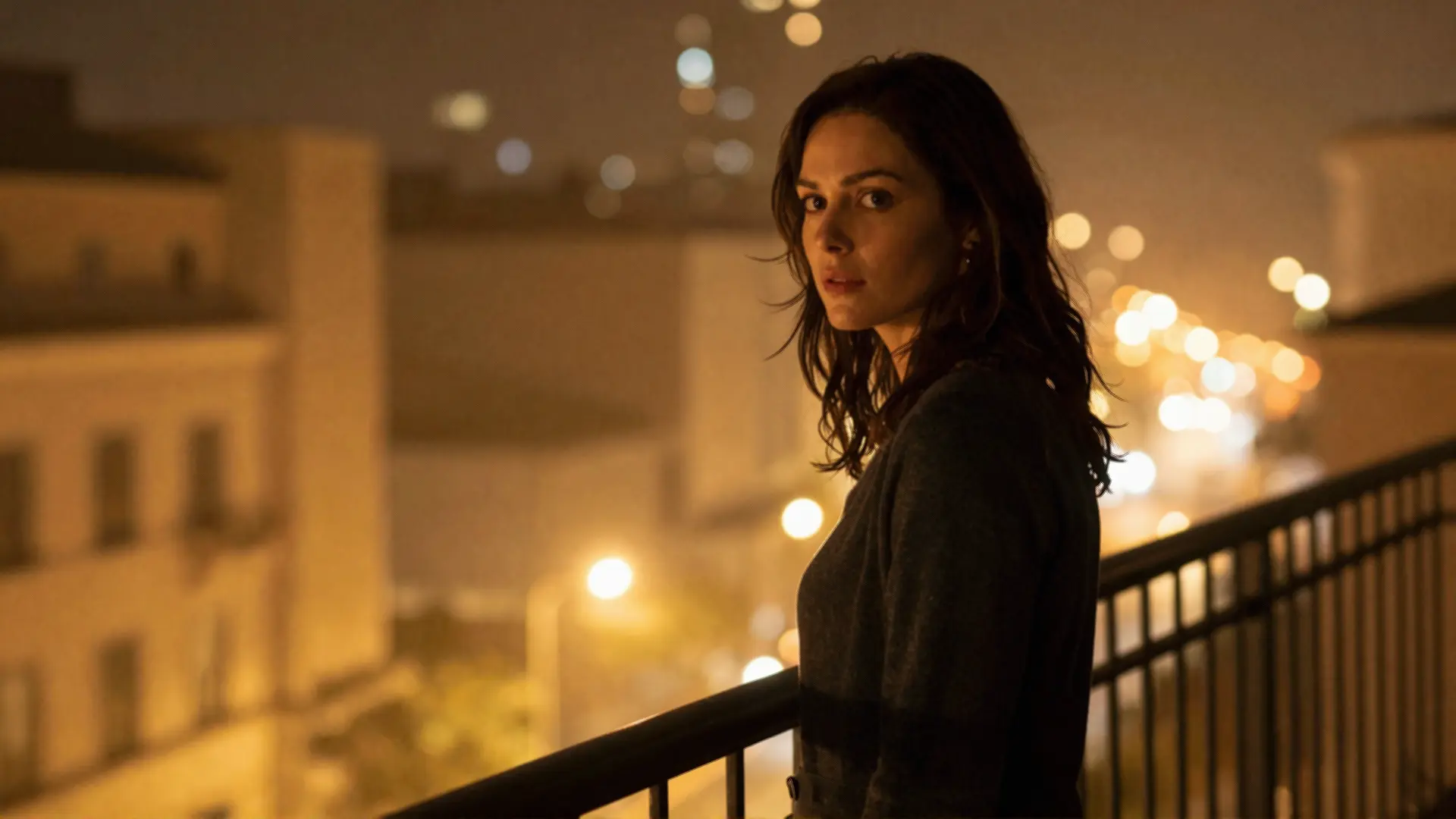
Table of Contents
- What Makes LTX-2 Different
- Setting Up LTX-2 in ComfyUI
- Installation
- Choosing the Right Model
- The Cinematic Prompting Framework
- The Anatomy of a Cinematic Prompt
- Essential Camera Movement Keywords
- Things to Avoid at High Frame Rates
- Cinematic Scene Types
- Product Showcase
- Tutorial and Educational Content
- Dramatic Narrative
- Resolution and Frame Rate Considerations
- Configuration Matrix
- Why 25 FPS Often Looks More Cinematic
- Advanced Techniques
- Multiscale Rendering
- Control Models (IC-LoRAs)
- Multi-Keyframe Conditioning
- Post-Processing Workflow
- Practical Workflow Example
- Tips for Consistent Results
- Conclusion
LTX 2 Cinematic Video Generation with ComfyUI
The landscape of AI video generation has evolved dramatically. With LTX-2’s release as open source, creators now have access to a professional-grade video generation model that delivers synchronized audio and video in a single pass. Let’s explore how to harness its cinematic capabilities through ComfyUI.
What Makes LTX-2 Different
LTX-2 isn’t just another video model—it’s the first DiT-based foundation model to generate audio and video simultaneously. This matters because motion, dialogue, ambience, and music flow together naturally, eliminating the tedious process of manually synchronizing separate audio tracks.
Key capabilities:
- Native 4K at 50 FPS — Sharp textures and clean motion for production-ready output
- Synchronized audio — Audio generated with video, not layered on after
- Multiple duration options — 6, 8, or 10 second clips (15 seconds coming soon)
- Three performance tiers — Fast for concepting, Pro for reviews, Ultra for delivery
- ComfyUI native integration — Built directly into ComfyUI for seamless workflows
Setting Up LTX-2 in ComfyUI
Installation
LTX-2 is integrated into ComfyUI through the LTXVideo custom nodes. To get started:
# Clone the custom nodes repository
cd ComfyUI/custom_nodes
git clone https://github.com/Lightricks/ComfyUI-LTXVideo.git
The model weights are available on HuggingFace:
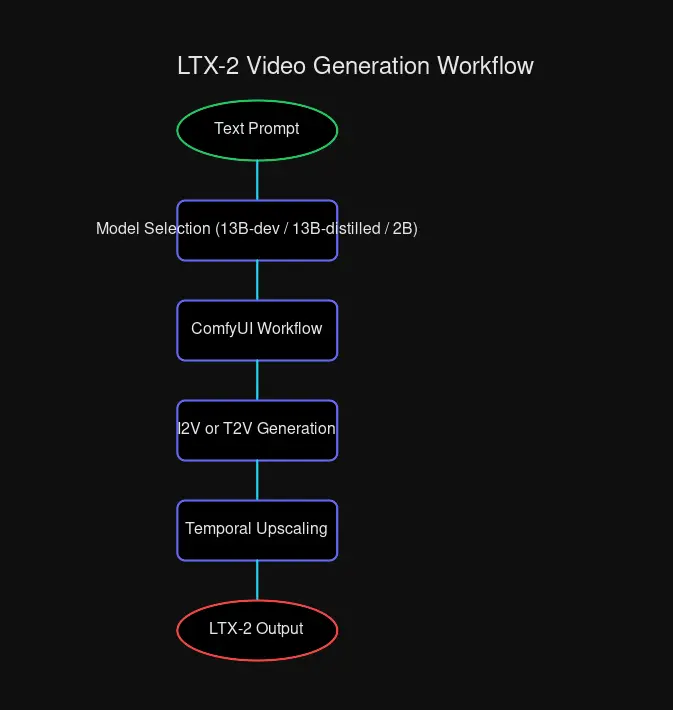
ltxv-13b-0.9.8-dev— Highest quality, more VRAMltxv-13b-0.9.8-distilled— Balanced quality and speedltxv-2b-0.9.8-distilled— Fastest, lowest VRAM
Choosing the Right Model
| Model | Quality | Speed | VRAM Required | Best For |
|---|---|---|---|---|
| 13B-dev | Highest | Slower | High | Final delivery |
| 13B-distilled | Good | Fast | Medium | Iteration |
| 2B-distilled | Good | Fastest | Low | Rapid prototyping |
For cinematic work, I recommend the 13B-dev model when quality is paramount, and the 13B-distilled model for faster iteration during concept development.
The Cinematic Prompting Framework
LTX-2 responds exceptionally well to structured prompts. The key is thinking like a cinematographer rather than a casual user.
The Anatomy of a Cinematic Prompt
A well-crafted cinematic prompt follows this structure:
[Scene Description] + [Lighting & Atmosphere] + [Camera Movement] + [Character Action] + [Audio Elements] + [Technical Specs]Let’s break this down with a real example:
A woman stands alone on a balcony late at night as warm yellow city glow and
scattered neon reflections fall across her shoulders and the metal railing.
The camera begins with a wide shot from a distance, slowly pushing forward
through the cool night air. A gentle breeze moves strands of her hair while
distant city lights blur softly. As the camera approaches, the framing
transitions into a medium close-up, revealing her three-quarter profile.
Color grading is slightly desaturated with teal shadows and warm highlights,
inspired by Kodak 2383 print film emulation. Shot with a 50mm anamorphic
equivalent lens at f2.0, natural film grain, 180 degree shutter.
Why this works:
- Atmospheric foundation — Sets mood before action
- Explicit camera path — Describes movement progression
- Color science reference — Guides aesthetic direction
- Technical specs — Locks in professional look
Essential Camera Movement Keywords
| Keyword | Effect | Use Case |
|---|---|---|
stable dolly movement | Smooth tracking | Product reveals |
tripod locked stability | Static control | Interviews |
smooth gimbal tracking | Fluid following | Action sequences |
constant speed pan | Even horizontal | Landscape reveals |
natural motion blur | Realistic motion | Cinematic look |
180 degree shutter | Film-style blur | Narrative content |
controlled slow dolly | Dramatic tension | Emotional scenes |
Things to Avoid at High Frame Rates
When generating at 50 FPS, avoid these terms:
chaotic handheld motion— introduces distortionshaky camera movement— amplifies jitterirregular speed changes— breaks temporal consistency
Cinematic Scene Types
Product Showcase
For e-commerce and brand content:
An ultra-thin aluminum mechanical keyboard rests on a minimalist white marble
surface. Soft morning light enters from a window on the left, creating subtle
shadows across the brushed metal frame. The camera begins with an extreme macro
shot of the keycaps, revealing their matte texture. As the backlight illuminates
beneath the keys, the camera pulls back into a medium shot. A hand enters from
the right, fingers hovering before touching the keys. Ambient audio includes
soft tactile keyboard clicks and quiet room atmosphere. Shot on a 50mm lens,
f/2.8 aperture, shallow depth of field, smooth gimbal stabilization.
Pro tip: Lock the seed across multiple shots for consistent lighting throughout a campaign.
Tutorial and Educational Content
For instructional videos with clarity:
A history lecturer stands in a bright modern classroom in front of a
high-resolution interactive digital whiteboard. The camera frames him in a
stable medium shot at chest height as he gestures toward ancient map images
displayed on the screen. As he speaks, his right hand moves deliberately toward
the screen and pauses mid-air to emphasize a key point. The camera slowly pushes
in, keeping both his face and visual content in frame. Soft overhead lighting
blends with the cool white glow of the display. Ambient audio includes quiet
classroom atmosphere, faint page turning sounds, and clear speech with natural
room echo. Tripod locked, 35mm equivalent lens, paced for educational clarity.
Dramatic Narrative
For film-quality storytelling:
A figure emerges from dense forest fog at dawn. Golden-hour light filters
through ancient trees, creating volumetric rays that catch mist particles.
The camera tracks laterally, matching their steady pace as they navigate
moss-covered roots. Their silhouette gradually sharpens against the warming
sky. No dialogue—only wind through branches, distantbird calls, and
footsteps on wet leaves. Color grading emphasizes warm highlights cutting
through cool morning haze. Anamorphic lens flare catches the sun, shot at
24fps with authentic film grain, gradual atmospheric shift.
Resolution and Frame Rate Considerations
Configuration Matrix
| Configuration | Best For | Considerations |
|---|---|---|
| 4K @ 50 FPS | Final delivery, VFX | Highest quality, longer render times |
| 4K @ 25 FPS | Cinematic narrative | Natural film motion blur, faster than 50fps |
| 1080p @ 50 FPS | Social media | Smooth motion, rapid iteration |
| 1080p @ 25 FPS | Concept testing | Fastest rendering, draft quality |
Why 25 FPS Often Looks More Cinematic
Film traditionally uses 24fps, which creates natural motion blur. At 50fps, everything is sharper—but that can actually reduce cinematic quality. For narrative content, 4K @ 25 FPS often yields better results than 4K @ 50 FPS because the motion blur mimics traditional film.
Advanced Techniques
Multiscale Rendering
LTX-2 supports multiscale pipelines that can render faster by:
- Generating a low-quality draft
- Iteratively adding detail layers
- Upscaling to final resolution
This approach can be 30x faster than single-pass 4K generation.
Control Models (IC-LoRAs)
LTX-2 supports several control models for precise generation:
- Depth Control — Use depth maps to guide spatial structure
- Pose Control — Transfer poses from reference images
- Canny Control — Control generation with edge detection
- Detailer — Enhance fine details in upscaled outputs
Multi-Keyframe Conditioning
For precise scene control, provide multiple keyframes:
Start frame: close-up on subject's eyes
Mid frame: pull back to reveal environment
End frame: wide establishing shot of location
The model interpolates smoothly between these visual anchors.
Post-Processing Workflow
After generation, consider these enhancements:
- Temporal Upscaling — Use LTX temporal upscaler for smoother motion
- Spatial Upscaling — Enhance resolution with spatial upscaler models
- Seed Consistency — Lock seeds across shots for unified color grading
- Audio Separation — Toggle audio generation per project needs
Practical Workflow Example
Here’s a complete Cinematic Product Reveal workflow:
Step 1: Concept Development
- Define the mood, lighting, and camera path
- Write a structured prompt using the framework above
Step 2: Model Selection
- Start with 13B-distilled for iteration
- Switch to 13B-dev for final output
Step 3: Generation
- Generate at 1080p @ 25 FPS for quick review
- Refine prompt based on output
- Lock seed when satisfied with lighting
Step 4: Upscale
- Apply spatial upscaler for 4K output
- Run detailer model for fine textures
Step 5: Audio (if needed)
- Use LTX-2’s native audio generation
- Or generate silent and add audio separately
Tips for Consistent Results
Lock Your Seeds When you find lighting you like, lock the seed across multiple shots to maintain visual consistency throughout a sequence.
Reference Film Stocks
Mentioning Kodak 2383, ARRI Alexa, or Fuji Pro 400H guides the model toward specific color science looks.
Specify Technical Camera Settings
Including depth of field (f/2.0), shutter angle (180 degree), and lens type (50mm anamorphic) helps lock in professional aesthetics.
Use Negative Prompts Sparingly LTX-2’s prompt understanding is strong—focus on what you want rather than what you don’t.
Conclusion
LTX-2 represents a significant leap forward for AI video generation. With synchronized audio, native 4K output, and deep ComfyUI integration, it enables creators to produce genuinely professional content without the traditional barriers of video production.
The key to cinematic results lies in structured prompting that thinks like a cinematographer. By combining atmospheric description, explicit camera movement, and technical specifications, you can guide the model toward outputs that rival traditional production.
Ready to start generating? The model weights and workflows are available on HuggingFace and GitHub—open source and ready for your next project.

Comments
Powered by GitHub Discussions