GitOps for Homelabs: Your Infrastructure as Code in 2026
Transform your homelab into a reproducible, version-controlled infrastructure with GitOps principles. Learn how Flux, ArgoCD, Ansible, and Terraform bring enterprise-grade practices to your home setup.
Table of Contents
- What GitOps Actually Means for Your Homelab
- The Core Tools: Your GitOps Toolbox
- Flux: The Lightweight Option
- ArgoCD: The Dashboard Experience
- Ansible: The Universal Adapter
- Terraform: The Provisioner
- Picking Your Stack
- Small Homelab (1-5 services)
- Medium Homelab (5-20 services, maybe a small cluster)
- Large Homelab (Kubernetes cluster, 20+ services)
- Enterprise-aspiring Homelab
- Real World: GitOps Saved My Weekend
- The “Homelab as Code” Mindset
- Secrets: The One Thing You (Must) Keep Out of Git
- Option 1: SOPS (Secrets OPerationS)
- Option 2: Sealed Secrets
- Option 3: External Secrets Operator
- Your First GitOps Project: 30-Minute Setup
- Step 1: Create Your Repository
- Step 2: Bootstrap Flux
- Step 3: Deploy Your First App
- Step 4: Watch the Magic
- The Hidden Benefits Nobody Mentions
- Common Pitfalls (How to Avoid Them)
- Where to Go From Here
Your homelab shouldn’t be a house of cards. One wrong click, one corrupted config file, one power outage that takes out your database of manual configurations — and you’re spending your weekend rebuilding from memory and scattered notes.
There’s a better way. The same practices that keep Google, Netflix, and countless enterprises running smoothly can fit in your basement, closet, or rack. It’s called GitOps, and it’s transforming how homelabbers think about their infrastructure.
GitOps treats your entire infrastructure as code stored in Git — every server config, every container definition, every network setting — all version-controlled, reviewed, and automatically deployed.
Your git revert becomes your disaster recovery plan. Your pull request becomes your change management process. Your repository becomes living documentation that never goes stale.
What GitOps Actually Means for Your Homelab
GitOps isn’t just another buzzword. It’s a practical operational model built on four principles defined by the OpenGitOps working group:
- Declarative: Your infrastructure is described as code, not commands
- Versioned and Immutable: Every change is tracked with a complete history
- Pulled Automatically: Software agents sync your real infrastructure with your declared state
- Continuously Reconciled: If drift occurs, it’s automatically corrected
For homelabbers, this translates to reproducibility — the ability to rebuild your entire setup from nothing but a Git repository.
:::note[Before GitOps] Server dies. You scramble through Slack messages, old Notion docs, and terminal history trying to remember what was running on it. Three hours of frustration later, you’ve got most things running… maybe. Did you forget the Postgres connection pool settings? Who knows. :::
:::note[After GitOps] Server dies. You provision a new one, point Flux at your repo, and 5 minutes later everything is running exactly as configured. You grab a coffee instead of panicking. :::
The Core Tools: Your GitOps Toolbox
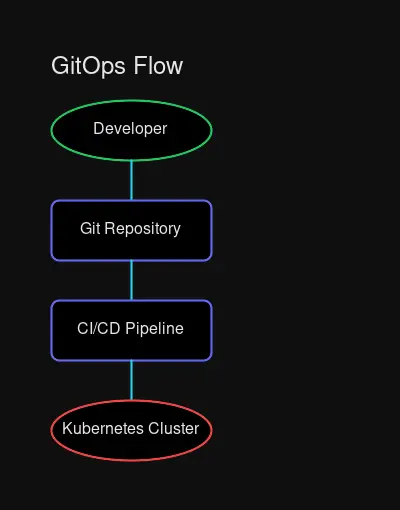 The GitOps pipeline: Your Git repository becomes the single source of truth for everything
Let’s meet the players. You don’t need all of them — pick what matches your homelab’s complexity.
Flux: The Lightweight Option
Best for: Kubernetes workloads, minimal resource usage, getting started
Flux follows the “push” model where your cluster pulls configurations from your Git repository. It’s lightweight, opinionated in helpful ways, and gets out of your way.
# A Flux GitRepository - tells Flux where to find your configs
apiVersion: source.toolkit.fluxcd.io/v1beta2
kind: GitRepository
metadata:
  name: homelab-apps
  namespace: flux-system
spec:
  interval: 1m  # Check for updates every minute
  url: https://github.com/yourusername/homelab-gitops
  ref:
    branch: main
Every minute, Flux checks your repo. New commit? Changes automatically apply to your cluster.
Why homelabbers love it: Bootstrap in 5 minutes, minimal resource footprint, works on single-node clusters without breaking a sweat.
ArgoCD: The Dashboard Experience
Best for: Visual learners, complex multi-app setups, wanting a UI
ArgoCD gives you a web dashboard showing every application’s sync status, health, and history. Click “Sync” to deploy. Click “Rollback” to undo. Click through your entire infrastructure visually.
:::tip[ArgoCD vs Flux] Both get the job done. Choose Flux if you prefer CLI and want minimal overhead. Choose ArgoCD if you want a visual interface and don’t mind the extra memory footprint (~500MB vs Flux’s ~100MB). :::
The killer feature: Visual diff. Before applying changes, see exactly what will change in your cluster.
Ansible: The Universal Adapter
Best for: VMs, bare metal, network devices, non-Kubernetes infrastructure
Not everything runs in Kubernetes. Ansible handles the rest — configuring your Proxmox hosts, setting up networking equipment, managing Docker containers on standalone VMs, installing packages across your fleet.
# A simple Ansible playbook for homelab servers
---
- hosts: homelab_servers
  become: true
  tasks:
    - name: Install Docker
      ansible.builtin.apt:
        name:
          - docker.io
          - docker-compose-plugin
        state: present
        update_cache: true

    - name: Deploy monitoring stack
      ansible.builtin.shell:
        cmd: docker compose up -d
        chdir: /opt/monitoring
Why it works with GitOps: Store playbooks in Git. When you need to apply changes, pull the latest and run ansible-playbook. Version history = change history.
Terraform: The Provisioner
Best for: Spinning up cloud resources, provisioning VMs, creating infrastructure
Terraform’s job is creating things — VMs, DNS records, cloud resources. It’s not for running applications (that’s what Kubernetes/Ansible are for), but for building the foundation.
# Provision a VM on Proxmox with Terraform
resource "proxmox_vm_qemu" "k3s_node" {
  name        = "k3s-worker-01"
  target_node = "pve"
  clone       = "ubuntu-22.04-template"
  cores       = 4
  memory      = 8192

  network {
    model  = "virtio"
    bridge = "vmbr0"
  }

  # Tags help organize infrastructure
  tags = ["kubernetes", "worker", "gitops-managed"]
}
GitOps pattern: Run terraform plan as a CI check. Require approval before terraform apply. Your Terraform state file is your infrastructure’s source of truth.
Picking Your Stack
Your homelab is unique. Here’s how to match tools to scale:
Small Homelab (1-5 services)
Stack: Ansible + Git
You’re running a handful of Docker containers or a single VM. Keep it simple. Write Ansible playbooks, store them in Git, and run them manually when needed. No Kubernetes necessary.
# Your entire workflow
git pull
ansible-playbook site.yml --check  # Dry run first
ansible-playbook site.yml           # Apply changes
git commit -m "Add Home Assistant"
git push
Medium Homelab (5-20 services, maybe a small cluster)
Stack: Docker Compose + Git (or single-node K3s + Flux)
Still don’t need Kubernetes? Docker Compose with Git is incredibly powerful. Store your docker-compose.yml in a repo, and use a simple git pull + compose up.
But if you’ve started eyeing K3s, it’s the perfect entry point for “real” GitOps with Flux. Single node, lightweight, and you’re learning the same tools enterprises use.
Large Homelab (Kubernetes cluster, 20+ services)
Stack: Flux/ArgoCD + Kustomize + SOPS (for secrets)
You’ve got a cluster, multiple namespaces, and services that depend on each other. GitOps becomes essential for sanity.
Directory structure:
homelab-gitops/
├── clusters/
│   └── production/
│       ├── flux-system/      # Flux itself
│       └── apps.yaml         # App definitions
├── apps/
│   ├── hajimaki/
│   ├── home-assistant/
│   └── prometheus/
└── infrastructure/
    ├── cert-manager/
    └── nginx-ingress/
Enterprise-aspiring Homelab
Stack: ArgoCD + Kustomize + Terraform + External Secrets Operator
You want dashboards, multi-cluster management, and enterprise patterns. This is homelab flex territory — learning skills that directly translate to a DevOps career.
Real World: GitOps Saved My Weekend
Let me paint you a picture from a homelabber’s reality (okay, my reality):
:::warning[The Incident] Sunday morning. Coffee in hand. I decide to upgrade my NAS. Simple enough — it’s just TrueNAS Scale. Except the upgrade corrupts my boot drive. Now my entire media stack is down: Plex, *arr stack, Audiobookshelf. :::
Before GitOps: I’d be digging through forum posts, scattered notes, and Docker Hub docs trying to remember every container env variable. Three hours minimum.
With GitOps: I grab my backup boot drive, install TrueNAS fresh, import my storage pools, then run:
# Clone my infrastructure repo
git clone https://github.com/myusername/homelab-gitops
cd homelab-gitops/apps/media-stack

# Ansible applies every config
ansible-playbook deploy.yml
10 minutes. Media stack fully restored with every container, volume mapping, and network configuration exactly as it was.
The repository became my disaster recovery plan. No notes. No documentation rot. Just git log to see exactly what changed and when.
The “Homelab as Code” Mindset
This is the cultural shift. GitOps isn’t just tooling — it’s treating your homelab as a software project:
Every change is intentional
No more “I SSH’d in and edited a config file.” Changes go through pull requests. Even if you’re the only reviewer, you’re creating a permanent record of why a change was made.
Rollbacks are instant
Bad deploy? git revert + auto-sync = instant recovery. Your infrastructure can be at any point in its history in seconds.
Documentation is automated
Your Git repo is living documentation. New service added? It’s right there in the commit history. Configuration change? There’s the PR explaining why.
Reproducibility by default
Spin up a new cluster, point Flux at your repo, and watch everything deploy. Your Git repo is a script to recreate your entire infrastructure from scratch.
Secrets: The One Thing You (Must) Keep Out of Git
GitOps has one iron rule: Never commit secrets to Git.
Not in plaintext. Not base64 encoded (that’s not encryption). Not even “just for a minute.”
The solution? Encrypt secrets before committing, or use external secret management:
Option 1: SOPS (Secrets OPerationS)
SOPS encrypts specific values in your YAML files using age or GPG keys:
# Before SOPS (NEVER COMMIT THIS)
database:
  password: super-secret-password-123

# After SOPS (safe to commit)
database:
  password: ENC[AES256_GCM,data:encrypted-blob...]
Option 2: Sealed Secrets
For Kubernetes, Sealed Secrets encrypts your secrets with the cluster’s public key. Only the cluster can decrypt:
# Create a secret locally
kubectl create secret generic db-creds --from-literal=password=secret -o yaml --dry-run=client > secret.yaml

# Seal it for the cluster
kubeseal -f secret.yaml -w sealed-secret.yaml

# Now safe to commit sealed-secret.yaml
git add sealed-secret.yaml
Option 3: External Secrets Operator
Reference secrets from HashiCorp Vault, AWS Secrets Manager, or 1Password Connect:
apiVersion: external-secrets.io/v1beta1
kind: ExternalSecret
metadata:
  name: database-credentials
spec:
  secretStoreRef:
    name: vault-backend
    kind: ClusterSecretStore
  target:
    name: db-creds
  data:
    - secretKey: password
      remoteRef:
        key: homelab/database
        property: password
Your First GitOps Project: 30-Minute Setup
Ready to start? Here’s the fastest path to GitOps with Flux on a single K3s node:
Step 1: Create Your Repository
mkdir homelab-gitops && cd homelab-gitops
git init
mkdir -p clusters/production apps
Step 2: Bootstrap Flux
# Install Flux CLI
curl -s https://fluxcd.io/install.sh | sudo bash

# Bootstrap (creates repo if needed, installs Flux)
flux bootstrap github \
  --owner=$GITHUB_USER \
  --repository=homelab-gitops \
  --path=clusters/production \
  --personal
Flux will:
- Create your repo (if it doesn’t exist)
- Install itself on your cluster
- Set up automatic sync from Git → Cluster
Step 3: Deploy Your First App
Create apps/podinfo.yaml:
apiVersion: source.toolkit.fluxcd.io/v1beta2
kind: GitRepository
metadata:
  name: podinfo
  namespace: flux-system
spec:
  interval: 1m
  url: https://github.com/stefanprodan/podinfo
---
apiVersion: kustomize.toolkit.fluxcd.io/v1beta2
kind: Kustomization
metadata:
  name: podinfo
  namespace: flux-system
spec:
  interval: 5m
  path: ./kustomize
  sourceRef:
    kind: GitRepository
    name: podinfo
Commit and push:
git add .
git commit -m "Deploy podinfo via Flux"
git push
Step 4: Watch the Magic
# Check Flux status
flux get kustomizations

# Watch the deployment
kubectl get pods -n default -w
Within a minute, Flux pulls your changes and deploys podinfo.
You just deployed via GitOps.
The Hidden Benefits Nobody Mentions
Beyond disaster recovery and reproducibility, GitOps delivers:
Career skills — These are the same tools used at scale in enterprise. Your homelab becomes a portfolio piece.
Community contribution — Your configs can be shared, improved, and used by others. GitHub stars feel good when it’s your infrastructure.
Testing confidence — Create a staging branch, deploy changes there first, then merge to production. Your main branch is always deployable.
Change history — “Who changed this and why?” is answered by git log. No more mystery configuration changes.
Infrastructure as documentation — Never outdated docs. The code describes exactly what’s running.
Common Pitfalls (How to Avoid Them)
Overengineering from day one
Start with a single service on Flux. Add complexity as you need it. You don’t need multi-cluster federation on day one.
Committing secrets
It happens. Use git-secrets or trunk.io to scan repos before commits. Rotate immediately if it happens.
Skipping the basics
Learn Git properly. Learn YAML syntax. These foundations matter more than any specific tool.
No branches, just main
Use feature branches. Even if you’re solo. PRs = change documentation. You’ll thank yourself in six months.
Where to Go From Here
Your homelab deserves GitOps. Start small:
- Pick one service you want under GitOps
- Write its configuration as code (YAML, Ansible playbook, or Terraform)
- Store it in Git
- Set up automated apply (Flux bootstrap for K8s, or simple git pull + ansible playbook for Ansible)
- Break something (intentionally) and recover from Git
If you can recover from a fresh install by cloning one repo and running one command, you’ve achieved GitOps.
The transformation is real: from “hopefully I remember what I did” to “it’s all in the repo.” From weekend-long rebuilds to git clone && apply. From scattered config files to a single source of truth.
Your infrastructure deserves the same care you put into your code.
What will you put under GitOps first? Drop a comment or reach out — I’d love to hear about your homelab journey.
Related: Building a Kubernetes Homelab • Docker Compose for Homelabs • Homelab Hardware Guide 2026


Comments
Powered by GitHub Discussions