DragonflyDB: The Redis Alternative for Homelabs
Replace Redis with DragonflyDB for better performance and memory efficiency. Learn installation, migration, and homelab use cases.

Table of Contents
- Why Redis Needs a Successor
- What Makes DragonflyDB Different
- Memory Efficiency
- Drop-In Redis Compatibility
- Installing DragonflyDB in Your Homelab
- Quick Start
- Production-Ready with Docker Compose
- Enabling Persistence
- Migrating from Redis
- Method 1: Snapshot and Restore (Simplest)
- Method 2: Replication (Minimal Downtime)
- Method 3: Sentinel Promotion (Zero Downtime)
- Homelab Use Cases
- Caching Layer
- Session Storage for Multi-Instance Apps
- Message Queues
- Self-Hosted Application Stack
- Configuration Tips for Production
- Tune for Your Hardware
- Enable Monitoring
- Set Appropriate Limits
- When to Stick with Redis
- Getting Started Checklist
- The Bottom Line
- Resources
If you’re running a homelab, chances are you’ve got Redis running somewhere. It’s the go-to for caching, session storage, and message queues—the invisible workhorse behind everything from Nextcloud to self-hosted AI agents. But Redis has a dirty secret: it’s single-threaded. In an era of 16-core CPUs, that’s leaving performance on the table.
Enter DragonflyDB—a modern, multi-threaded, Redis-compatible in-memory data store that can deliver up to 25x the throughput while using a fraction of the memory. Let’s explore why it might be time to switch.
Why Redis Needs a Successor
Redis has been the king of in-memory databases for over a decade. It’s reliable, well-supported, and virtually every framework has a Redis adapter. But its architecture shows its age.
Redis runs on a single thread. Every command—every GET, SET, and PUBSUB—queues up behind the last one. On a single-core machine, this doesn’t matter much. But on modern hardware with 8, 16, or 32 cores? You’re paying for cores you’ll never use.
This becomes painfully obvious when you scale. Want to handle more requests? Add more Redis instances. Want persistence? Configure replication. Want high availability? Set up Redis Cluster with its complexity of hash slots and manual resharding.
DragonflyDB takes a different approach: use all the cores you have, right from the start.
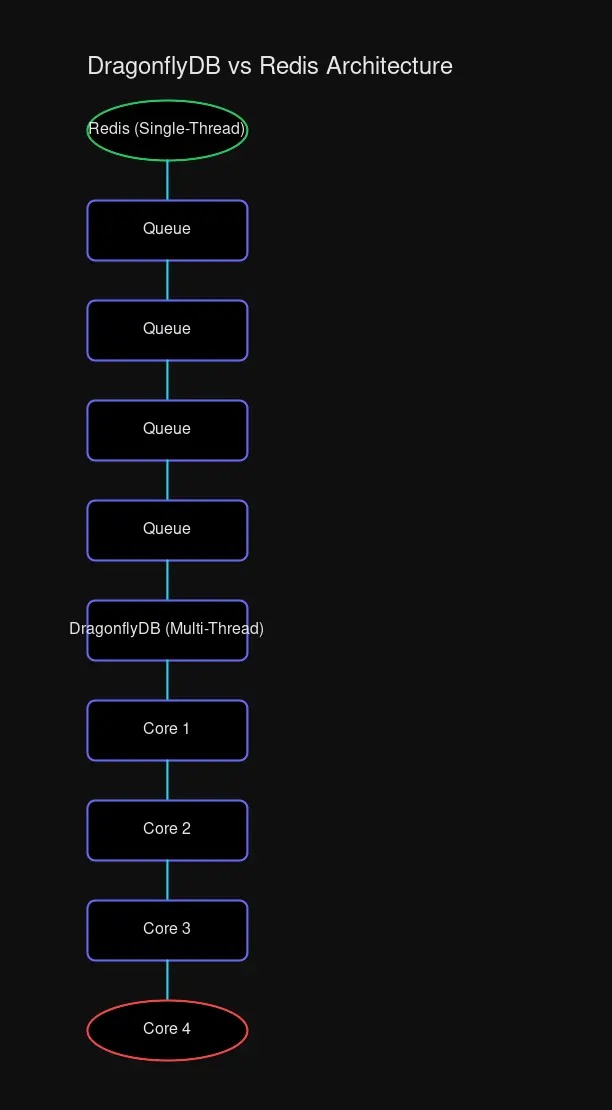 Redis queues all commands through a single thread, while DragonflyDB distributes work across all available cores.
What Makes DragonflyDB Different
DragonflyDB was built from the ground up for modern multi-core systems. Instead of a single event loop, it uses a shared-nothing architecture where each CPU core manages its own slice of data. No locks, no contention, just parallel execution.
The results speak for themselves:
| Workload | Redis QPS | DragonflyDB QPS | Improvement |
|---|---|---|---|
| Write-heavy | 125K | 3.1M | 25x |
| Read-heavy | 240K | 4.2M | 17x |
| Mixed (80/20) | 185K | 3.7M | 20x |
On a 32-core machine, DragonflyDB can push 2-4 million operations per second. Redis tops out around 200K. That’s not incremental improvement—that’s a different league.
Memory Efficiency
DragonflyDB also shines in memory utilization. Its custom allocator and compressed data structures mean it can store 2-4x more data in the same amount of RAM. A 64GB server running DragonflyDB can hold roughly 128-256GB of Redis-equivalent data.
This matters in homelabs where every gigabyte counts. Instead of upgrading your server, you might just switch your database.
Drop-In Redis Compatibility
Here’s the best part: DragonflyDB speaks Redis. Not “kind of” or “mostly”—it implements the Redis wire protocol and supports 250+ commands. Your existing code probably works without a single change.
# Same Redis CLI, different database
redis-cli -h dragonfly-host PING
# PONG
This includes:
- All major data types (strings, lists, sets, hashes, sorted sets)
- Pub/Sub messaging
- Transactions
- Lua scripting support
- RDB file loading for seamless migration
The only caveat: DragonflyDB’s module ecosystem is newer. If you rely on RedisJSON, RediSearch, or other modules, verify compatibility. But for core Redis workloads? Zero changes needed.
Installing DragonflyDB in Your Homelab
The fastest way to get started is Docker. DragonflyDB maintains an official image that’s drop-in compatible with Redis.
Quick Start
docker run -d \
  --name dragonfly \
  -p 6379:6379 \
  --ulimit memlock=-1 \
  docker.dragonflydb.io/dragonflydb/dragonfly:latest
That’s it. Point your existing Redis clients at port 6379 and they’ll work.
Production-Ready with Docker Compose
For a homelab setup, you’ll want persistence and authentication:
version: '3.8'
services:
  dragonfly:
    image: docker.dragonflydb.io/dragonflydb/dragonfly:latest
    container_name: dragonfly
    ports:
      - "6379:6379"
    volumes:
      - dragonfly_data:/data
    ulimits:
      memlock:
        soft: -1
        hard: -1
    command: [
      "--requirepass", "${DRAGONFLY_PASSWORD}",
      "--maxmemory", "4gb",
      "--cache_mode",
      "--dir", "/data",
      "--dbfilename", "dragonfly.rdb",
      "--snapshot_cron", "*/5 * * * *"
    ]
    environment:
      - DFLY_PROACTOR_THREADS=4

volumes:
  dragonfly_data:
Key configuration notes:
| Flag | Purpose |
|---|---|
--requirepass | Authentication (use a strong password!) |
--maxmemory | Hard memory limit |
--cache_mode | Optimized eviction for caching workloads |
--snapshot_cron | Automatic persistence every 5 minutes |
DFLY_PROACTOR_THREADS | Number of CPU threads to use |
Enabling Persistence
By default, DragonflyDB is pure in-memory. For a homelab, you’ll want data to survive restarts:
# Enable periodic snapshots
dragonfly --dir /data \
  --dbfilename dragonfly-snapshot \
  --snapshot_cron "*/5 * * * *"
Every 5 minutes, DragonflyDB writes an RDB snapshot to disk. Mount the /data directory to persistent storage and you’re covered.
Migrating from Redis
DragonflyDB offers three migration paths, depending on your downtime tolerance.
Method 1: Snapshot and Restore (Simplest)
Stop Redis, copy its RDB file, and start DragonflyDB:
# On Redis server
redis-cli BGSAVE
cp /var/lib/redis/dump.rdb /backup/redis-dump.rdb

# Start DragonflyDB with the dump
docker run -d \
  --name dragonfly \
  -p 6379:6379 \
  -v /backup:/data \
  docker.dragonflydb.io/dragonflydb/dragonfly:latest \
  --dir /data --dbfilename redis-dump.rdb
Takes minutes, but requires downtime during the switch.
Method 2: Replication (Minimal Downtime)
Configure DragonflyDB as a replica of your Redis instance:
# Connect to DragonflyDB
redis-cli -h dragonfly-host

# Start replicating from Redis
REPLICAOF your-redis-host 6379

# Wait for sync to complete...
INFO replication  # Check sync status

# Promote to primary when ready
REPLICAOF NO ONE
Update your application to point at DragonflyDB. Done with minimal disruption.
Method 3: Sentinel Promotion (Zero Downtime)
For production environments, use Redis Sentinel for seamless failover:
- Set up Redis Sentinel monitoring your Redis master
- Configure DragonflyDB as a replica
- Let Sentinel detect the new “master”
- Sentinel automatically promotes DragonflyDB
This is the most complex but requires no application changes during migration.
Homelab Use Cases
DragonflyDB shines in typical homelab scenarios:
Caching Layer
If you’re running web applications, caching database queries or API responses dramatically reduces load:
# Set a cached value with TTL
SET api:users:123 '{"name":"Alice"}' EX 3600

# Retrieve it
GET api:users:123
DragonflyDB’s higher throughput means more cache hits, fewer backend calls.
Session Storage for Multi-Instance Apps
Running multiple instances of an application? File-based sessions don’t work—you need shared storage. DragonflyDB handles millions of sessions with sub-millisecond latency:
# Store session data
SET session:abc123 '{"user_id":456,"preferences":{...}}' EX 86400

# Retrieve on next request
GET session:abc123
This is crucial for projects like OpenClaw or other self-hosted AI agents that need persistent session state across multiple instances.
Message Queues
DragonflyDB works with popular queue libraries like Bull and BullMQ:
const Queue = require('bullmq').Queue;
const queue = new Queue('my-queue', {
  connection: { host: 'dragonfly-host', port: 6379 }
});
The multi-threaded architecture means better throughput for job processing.
Self-Hosted Application Stack
Common homelab applications that benefit from DragonflyDB:
| Application | Use Case |
|---|---|
| Nextcloud | File locking, caching |
| Plausible Analytics | Event buffering |
| Grafana | Dashboard caching |
| Discourse | Session store |
| OpenClaw | Memory buffer, session management |
For OpenClaw specifically, the integration is straightforward—just change your Redis connection string to point at DragonflyDB. The 100% protocol compatibility means zero code changes.
Configuration Tips for Production
Tune for Your Hardware
environment:
  - DFLY_PROACTOR_THREADS=8  # Match your CPU cores
command: ["--maxmemory", "16gb", "--cache_mode"]
Enable Monitoring
DragonflyDB exposes Prometheus metrics:
# Add to your prometheus.yml scrape config
- targets: ['dragonfly:6379']
Import the official Grafana dashboard to monitor:
- Memory usage
- Operations per second
- Connection count
- Eviction rate
Set Appropriate Limits
# Don't let DragonflyDB consume all RAM
--maxmemory 4gb

# Enable smart eviction
--cache_mode
The cache_mode flag enables DragonflyDB’s novel eviction algorithm that achieves higher hit rates than Redis’s LRU.
When to Stick with Redis
DragonflyDB isn’t a universal replacement—yet. Consider staying with Redis if:
- You need Redis modules like RediSearch, RedisTimeSeries, or RedisGraph
- You rely on Redis Cluster for horizontal scaling across many nodes
- AOF persistence is critical (DragonflyDB’s AOF is still in development)
- Your workload is tiny and performance doesn’t matter
For most homelab use cases—caching, sessions, queues—DragonflyDB is a compelling upgrade.
Getting Started Checklist
- Pull the Docker image:
docker pull dragonflydb/dragonfly - Start a test instance:
docker run -p 6379:6379 dragonflydb/dragonfly - Test with your existing Redis client: Point it at port 6379
- Add persistence: Mount a volume to
/data - Set authentication:
--requirepassin production - Configure monitoring: Add to Prometheus/Grafana
- Migrate: Use snapshot replication for minimal disruption
The Bottom Line
DragonflyDB represents the next evolution of in-memory databases. By leveraging modern multi-core hardware, it delivers dramatically better performance without requiring application changes. For homelab operators, this means:
- More capacity from existing hardware
- Better performance for cached workloads
- Simpler architecture (single instance vs. cluster)
- Lower costs (less RAM, fewer instances)
If Redis is the workhorse that’s been carrying your homelab, DragonflyDB is the upgrade that actually uses all those CPU cores you paid for. Give it a spin—your cache hit rate will thank you.
Resources


Comments
Powered by GitHub Discussions