Aider: AI Pair Programming in Your Terminal
Master terminal-based AI coding with Aider. Learn how to boost productivity, integrate with any LLM, and why it's the go-to tool for vibe coding in 2026.
Table of Contents
- What is Aider?
- Why Terminal-Based AI Coding Matters
- Getting Started with Aider
- Quick Install (Mac/Linux)
- Windows Installation
- Python Package Managers
- Core Features That Set Aider Apart
- Intelligent Codebase Understanding
- Automatic Git Commits
- Multi-LLM Flexibility
- Voice Control and Multimodal Input
- The Vibe Coding Philosophy
- Vibe Coding Principles
- Aider vs Cursor vs Windsurf vs Claude Code
- Aider
- Cursor
- Windsurf
- Claude Code
- Productivity Gains in Practice
- Before Aider
- After Aider
- Advanced Workflow Tips
- IDE Integration from Terminal
- Working with Context Files
- Lint and Test Integration
- Using Local Models
- When to Choose Aider
- Getting Help and Community
- Conclusion
If you’ve spent any time coding lately, you’ve probably felt the pressure to adopt AI tools. But here’s the thing – most AI coding assistants want to pull you out of your workflow. They want you to switch to a new IDE, adapt to their way of thinking, or pay recurring subscription fees for features you might not need.
Aider takes a different approach. It meets you where you already are: the terminal.
What is Aider?
Aider is an open-source AI pair programming tool that lives entirely in your terminal. Instead of asking you to abandon your setup, it enhances what you already have. You describe what you want in plain English, and Aider edits your files directly, manages your git commits, and works with virtually any LLM you want – from Claude to DeepSeek to local models running on your hardware.
The tool has become the gold standard for “vibe coding” – a development philosophy where you focus on intent while AI handles implementation. Aider didn’t just adopt this concept; it pioneered it.
Why Terminal-Based AI Coding Matters
Before diving into features, let’s address the elephant in the room: why the terminal?
- Your workflow stays intact – No switching between IDEs or learning new interfaces
- Git-native from day one – Every AI suggestion becomes a trackable, revertable commit
- LLM freedom – Use Claude, GPT-4, DeepSeek, or run models locally. Your choice
- Privacy and control – Your code stays on your machine unless you explicitly share it
- Works with any editor – Vim? Neovim? VS Code? Aider doesn’t care
For developers who’ve built their workflow around the terminal, these aren’t just nice-to-haves. They’re requirements.
Getting Started with Aider
Installation is straightforward across all platforms. Pick the method that matches your setup:
Quick Install (Mac/Linux)
curl -LsSf https://aider.chat/install.sh | shWindows Installation
powershell -ExecutionPolicy ByPass -c "irm https://aider.chat/install.ps1 | iex"Python Package Managers
If you prefer pip, pipx, or uv:
# Using pip
python -m pip install aider-install
aider-install

# Using pipx
pipx install aider-chat

# Using uv (recommended for speed)
uv tool install --force --python python3.12 --with pip aider-chat@latest
Once installed, navigate to your project and launch Aider with your preferred model:
cd ~/projects/my-app
aider --model sonnet --api-key anthropic=YOUR_KEY
That’s it. No IDE plugin installation. No account creation. Just go.
Core Features That Set Aider Apart
Intelligent Codebase Understanding
Aider doesn’t just read the file you’re editing. It builds a map of your entire project – the repository map or “repomap” – which gives it context about functions, classes, and their relationships across your codebase. This matters enormously for larger projects where understanding context drives good suggestions.
# Aider automatically creates and maintains this map
# You can view it with:
aider> /map
The repomap is why Aider understands that changing a function in utils.py might affect imports in three other files – and suggests those changes too.
Automatic Git Commits
Every change Aider makes gets committed with a sensible commit message. Not “updated file” or “changes” – actual descriptions like “Add error handling to payment processor” or “Fix null pointer in user validation.”
# Aider commits look like this:
git log --oneline -5
# a1b2c3d Fix null pointer in user validation
# e4f5g6h Add error handling to payment processor
# i7j8k9l Update config for new auth flow
This isn’t just convenience. It’s safety. Every AI change is traceable, reviewable, and reversible. Made a mistake? A simple git revert brings you back.
Multi-LLM Flexibility
Aider works with virtually any LLM:
- Anthropic Claude (3.7 Sonnet, 3.5 Sonnet, 3 Haiku)
- OpenAI (GPT-4o, o1, o3-mini)
- DeepSeek (R1, Chat V3)
- Local Models (via Ollama or LM Studio)
- Google Gemini
- And many more
# Switch models mid-session
aider --model deepseek --api-key deepseek=YOUR_KEY
aider --model o3-mini --api-key openai=YOUR_KEY
aider --model sonnet --api-key anthropic=YOUR_KEY
This flexibility means you can use a cheaper model for initial drafts and a stronger model for refinement – all in the same session.
Voice Control and Multimodal Input
Want to describe a bug you’re seeing? Paste a screenshot. Need to implement a feature while walking? Use voice mode.
# Add images for context
aider> /add screenshot.png

# Voice mode for hands-free coding
aider> /voice
The voice feature is particularly powerful for accessibility and those moments when you need to think out loud without touching a keyboard.
The Vibe Coding Philosophy
Vibe coding isn’t just marketing speak. It’s a fundamentally different way to approach software development.
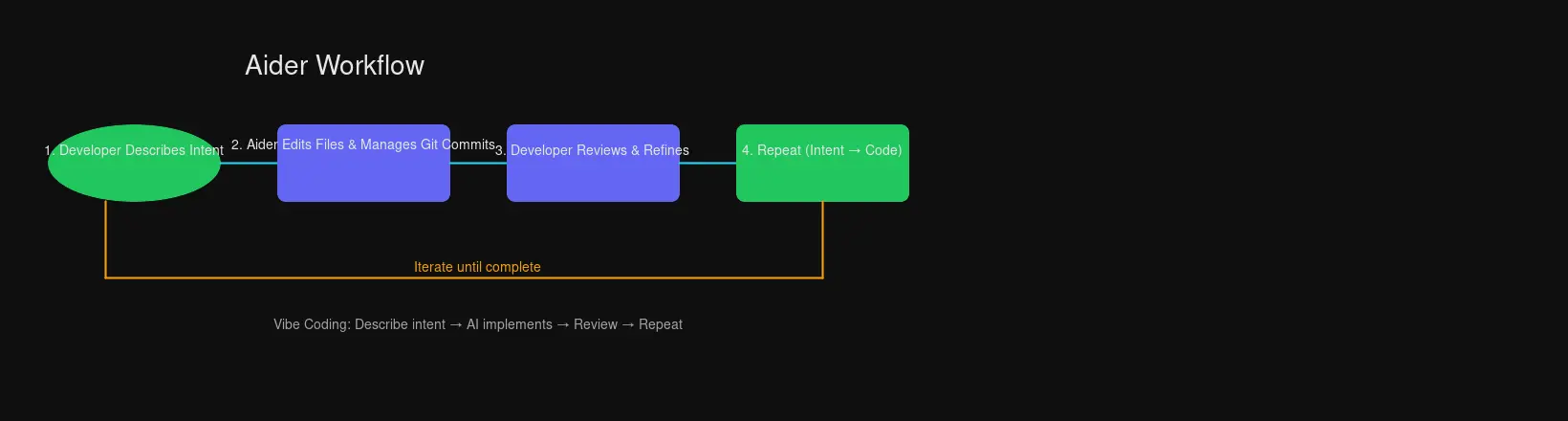
Traditional coding: Think through every detail, write each line, debug, repeat.
Vibe coding: Describe your intent, let AI generate, review and refine.
Here’s how it looks in practice:
You: Add a rate limiter to the API endpoints. Should allow 100 requests per minute per IP, return 429 when exceeded, and log every limit breach.

Aider: [Edits files, adds rate_limiter.py, updates middleware, modifies API routes]

Created:
- middleware/rate_limiter.py (new file)
- Updated: app.py, routes/api.py
Committed: "Add rate limiter with 100 req/min per IP, 429 responses, logging"
Notice you didn’t specify implementation details. You didn’t mention Redis or in-memory storage. You described the goal; Aider handled the how.
Vibe Coding Principles
- Trust but verify – Use git to review every change.
git diffis your friend - Iterate quickly – Don’t aim for perfection on the first ask. Refine with follow-up prompts
- Be specific about intent, flexible about implementation – “Sort users by last login” versus “Use quicksort algorithm to sort…”
- Let AI handle boilerplate – Focus your mental energy on architecture and business logic
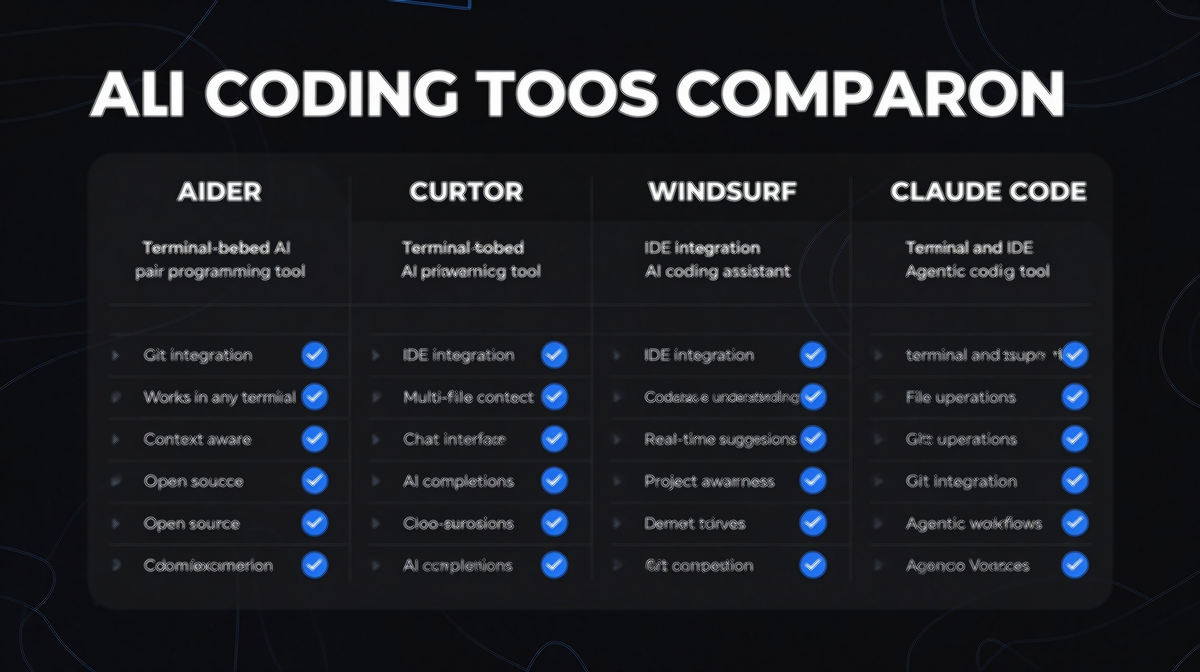
Aider vs Cursor vs Windsurf vs Claude Code
How does Aider stack up against the other AI coding tools you’ve heard about?
Aider
- Approach: Terminal-native, precise pair programmer
- Cost: Free and open-source
- Strengths:
- Best for git-native workflows
- Excellent context awareness via codebase mapping
- Works with ANY LLM (local or cloud)
- Writes 80% of its own code (serious dogfooding)
- No subscription fees
- Best For: Developers who want control, work in terminal, use git heavily
Cursor
- Approach: IDE-integrated, full agentic experience
- Cost: Subscription-based Pro tier
- Strengths:
- Best AI overall (often rated top for code quality)
- Seamless IDE integration
- No installation friction
- Agentic multi-file editing
- Best For: Developers wanting full AI automation in their IDE without terminal work
Windsurf
- Approach: AI-native IDE (entirely new editor)
- Cost: Usage-based credits
- Strengths:
- Slick visual interface
- Supercomplete and Cascade for automation
- Can generate UI from screenshots
- Considerations:
- Cost can add up (uses 2x credits for Claude thinking)
- New tool to learn
- Best For: Visual-focused developers wanting an AI-native IDE experience
Claude Code
- Approach: Anthropic’s official CLI for Claude
- Cost: Based on Claude API usage
- Strengths:
- Direct from Anthropic
- Excellent Claude integration
- Good for simple tasks
- Considerations:
- Limited to Claude models
- Less mature than Aider for complex codebases
- Best For: Claude enthusiasts wanting CLI access
Productivity Gains in Practice
The numbers aren’t just hype. Users consistently report dramatic improvements:
- “Quadrupled my coding productivity” – Hacker News
- “It’s really like having your senior developer live right in your Git repo” – rappster (GitHub)
- “Changed my daily coding workflows. It’s mind-blowing” – maledorak (Discord)
But what does that actually look like day-to-day?
Before Aider
- Think through the entire feature design
- Write boilerplate code
- Debug syntax errors
- Write tests
- Debug tests
- Commit with a generic message
After Aider
- Describe the feature intent to Aider
- Review the generated code and tests
- Refine with follow-up prompts
- Approve and push (commits are already written)
The time savings compound. Hours of boilerplate become minutes. Syntax errors during generation? Aider catches those automatically. Commit messages? Already written with context.
Advanced Workflow Tips
IDE Integration from Terminal
Even if you work in VS Code or Neovim, Aider works seamlessly. The /code command lets you specify file edits via comments in your editor:
# In your editor:
def process_payment(amount):
    # TODO: Aider, add validation for negative amounts and log all transactions
    pass
Aider picks up these comments and implements accordingly.
Working with Context Files
For complex features, add relevant files to the chat context:
aider> /add src/auth/*.py tests/test_auth.py
aider> Now add OAuth2 support for Google and GitHub
This ensures Aider understands your existing patterns before suggesting changes.
Lint and Test Integration
Aider can automatically run your test suite and fix failures:
aider> /test
# Aider runs tests, identifies failures, proposes fixes
Same for linting:
aider> /lint
# Detects and fixes lint errors automatically
Using Local Models
For privacy-sensitive projects or cost optimization, run local models:
# With Ollama installed
ollama pull deepseek-coder-v2
aider --model ollama_chat/deepseek-coder-v2
The quality won’t match Claude 3.7 Sonnet for complex reasoning, but for drafting and refactoring, local models work surprisingly well.
When to Choose Aider
Aider isn’t the right tool for everyone. Choose it when:
- You work primarily in the terminal
- Git is central to your workflow
- You want control over which LLM you use and when
- Privacy matters (code stays local unless you explicitly send it)
- You prefer open-source tools with active communities
- You want free (as in beer and speech) without subscription limits
Consider alternatives when:
- You want a fully AI-native IDE (try Windsurf)
- You prefer everything integrated in one application (try Cursor)
- You only use Claude and want Anthropic’s official tool (try Claude Code)
- You don’t use git or version control
Getting Help and Community
Aider has an active community:
- Discord: Real-time help and discussions
- GitHub Issues: Bug reports and feature requests
- Documentation: Comprehensive guides at aider.chat/docs
The fact that Aider writes 80% of its own code means the developers are serious users. Issues get fixed because the maintainers hit them too.
Conclusion
Aider represents something important in the AI coding assistant space: a tool that respects your existing workflow instead of demanding you adopt a new one. It meets developers where they are – in the terminal, using git, choosing their own LLMs – and enhances rather than replaces.
For developers who’ve built their careers on command-line workflows, Aider feels like the natural evolution. Not a departure to some new AI-native IDE, but the integration of AI intelligence into existing patterns.
The vibe coding philosophy it pioneered – describe intent, let AI implement, review and refine – has become standard practice. But Aider remains the most flexible, privacy-respecting, git-native implementation of that idea.
If you spend your days in the terminal and want an AI pair programmer that speaks your language (literally, in your shell), Aider is worth your time.
Ready to try it?
curl -LsSf https://aider.chat/install.sh | sh
cd your-project
aider --model sonnet
Your terminal already knows what to do. Now your AI assistant does too.
Have questions about getting started with Aider? Drop them in the comments or join the Aider Discord community for real-time help.

Comments
Powered by GitHub Discussions