Using Gemma 4 in OpenClaw: Free Local AI for Your Daily Workflow
Run Google's Gemma 4 locally with OpenClaw for privacy-first AI assistance. Learn setup, configuration, and when to use local vs. cloud models.
Table of Contents
- The Case for Local AI
- What is Gemma 4?
- The Model Family
- Technical Highlights
- Benchmarks Worth Noting
- Quick Start: Get Running in Minutes
- Configuration for Optimal Performance
- Context Window Settings
- Full Configuration Example
- Memory Requirements
- What Gemma 4 Handles Well
- Strengths
- Weaknesses
- The Hybrid Approach: Best of Both Worlds
- Configuration for Hybrid Workflow
- The Workflow Split
- Performance Tips
- Keep the Model Warm
- Close Competing Apps
- Update Ollama Regularly
- Context Window Tuning
- Troubleshooting Common Issues
- Model Loads Slowly or Crashes
- Tool Calls Fail
- Slow Generation
- Context Window Errors
- When to Stick with Cloud Models
- Privacy: The Hidden Benefit
- The Bottom Line
- Resources
The Case for Local AI
Every time you send code to a cloud API, you’re making a trade: convenience for cost, speed for privacy. The bills stack up. The data leaves your machine. And when the internet hiccups, your assistant vanishes.
Gemma 4 changes that equation.
Google DeepMind’s latest open model family, released March 31, 2026, brings serious capability to local hardware. For OpenClaw users, this means handling routine tasks—file reads, boilerplate, quick edits—without spending a dime on API calls.
The math is simple: If you’re running OpenClaw daily, Gemma 4 pays for itself within hours. The question isn’t whether to use it. It’s how to set it up right.
What is Gemma 4?
Gemma 4 is Google DeepMind’s newest open-weights model family, designed specifically for on-device deployment. Released April 2, 2026 with day-one Ollama support, it’s a significant leap forward for local AI.
The Model Family
| Model | Parameters | Context | Modalities | Sweet Spot |
|---|---|---|---|---|
| E2B | 2.3B effective | 128K | Text, Image, Audio | Edge deployment, mobile |
| E4B | 4.5B effective | 128K | Text, Image, Audio | Recommended for OpenClaw |
| 31B | 30.7B | 256K | Text, Image | Server-grade workloads |
| 26B A4B | 25.2B total / 3.8B active | 256K | Text, Image | High-throughput efficiency |
The E4B model hits the sweet spot for most OpenClaw users. It’s small enough to run on 16GB machines, powerful enough to handle real work, and fast enough to feel responsive.
Info: The “effective parameter” architecture (E2B, E4B) uses Per-Layer Embeddings for better efficiency. You get more capability per byte of VRAM.
Technical Highlights
- 128K context window on E4B (256K on larger models)
- Apache 2.0 license — use it anywhere, commercially or personally
- 140+ languages in pre-training, 35+ out-of-the-box
- Multimodal: accepts images and audio input
- Function calling built-in
- Thinking mode for complex reasoning tasks
Benchmarks Worth Noting
The numbers tell the story. Gemma 4 E4B scores:
- 52.0% on LiveCodeBench v6 — solid for code understanding
- 69.4% on MMLU Pro — general reasoning
- 59.5% on MATH-Vision — math with visual inputs
Is it GPT-4 level? No. But it handles 60-70% of typical coding work surprisingly well, and that’s the point.
Quick Start: Get Running in Minutes
The fastest path to Gemma 4 in OpenClaw:
# Pull the model
ollama pull gemma4

# Launch OpenClaw with Gemma 4
ollama launch openclaw

# Or switch mid-session
/model gemma4
Done. You’re running local AI.
Warning: First pull takes time. The E4B model is ~9GB. Plan accordingly for your first download.
Configuration for Optimal Performance
The default settings work, but a little tuning goes a long way.
Context Window Settings
OpenClaw needs breathing room. Gemma 4 supports 128K context, but you don’t want to max it out on every conversation. Recommended:
- 16GB RAM: Set
contextWindow: 32768 - 24GB+ RAM: Set
contextWindow: 131072
Full Configuration Example
Edit ~/.openclaw/openclaw.json:
{
  "models": {
    "providers": {
      "ollama": {
        "baseUrl": "http://localhost:11434/v1",
        "api": "openai-completions",
        "models": [
          {
            "id": "gemma4:latest",
            "name": "Gemma 4 E4B",
            "reasoning": false,
            "contextWindow": 131072,
            "maxTokens": 8192
          }
        ]
      }
    }
  },
  "agents": {
    "defaults": {
      "model": { "primary": "ollama/gemma4:latest" }
    }
  }
}
Important: Set
reasoning: false. Gemma 4 doesn’t support the thinking mode toggle that some cloud models use. This prevents tool call failures.
Memory Requirements
| Model | VRAM | Minimum RAM | Recommended RAM |
|---|---|---|---|
| E4B | ~9.6 GB | 16 GB | 24 GB+ |
| 31B | ~20 GB | 32 GB | 48 GB+ |
| 26B A4B | ~16 GB | 24 GB | 32 GB+ |
On Apple Silicon (M1/M2/M3/M4/M5), Ollama v0.19+ automatically uses MLX framework for GPU acceleration. You get near-native speeds.
What Gemma 4 Handles Well
Let’s be specific about use cases.
Strengths
Code Reading & Summarization
Ask Gemma 4 to explain a function you’ve never seen. It’ll walk through the logic, identify edge cases, and surface assumptions. Great for unfamiliar codebases.
# Example: Understanding legacy code
> What does the processOrder function in orders.ts actually do?
Boilerplate & Scaffolding
Config files. CRUD operations. Test templates. React components. Gemma 4 generates clean, idiomatic code for repetitive patterns.
> Generate a Next.js API route for user authentication with JWTFile Operations
Listing directories. Searching for patterns. Renaming files. These mechanical tasks are perfect for local AI—fast, private, free.
> Find all TypeScript files that import axios but don't have error handlingQuick Edits
Single-file changes. Typo fixes. Import updates. Refactoring variable names. Gemma 4 handles these reliably.
> Rename all instances of userId to accountId in this fileWeaknesses
Multi-file Refactors
Gemma 4 gets unreliable across 5+ files. The context window is generous, but coherence degrades when juggling many abstractions simultaneously.
Complex Debugging
If your bug spans multiple layers—API handler → service → database → cache—Gemma 4 will suggest surface-level fixes. It doesn’t trace dependency chains well enough.
Long Context (>32K tokens)
Quality degrades past 32K tokens on consumer hardware. The model stays responsive but reasoning quality drops.
The Hybrid Approach: Best of Both Worlds
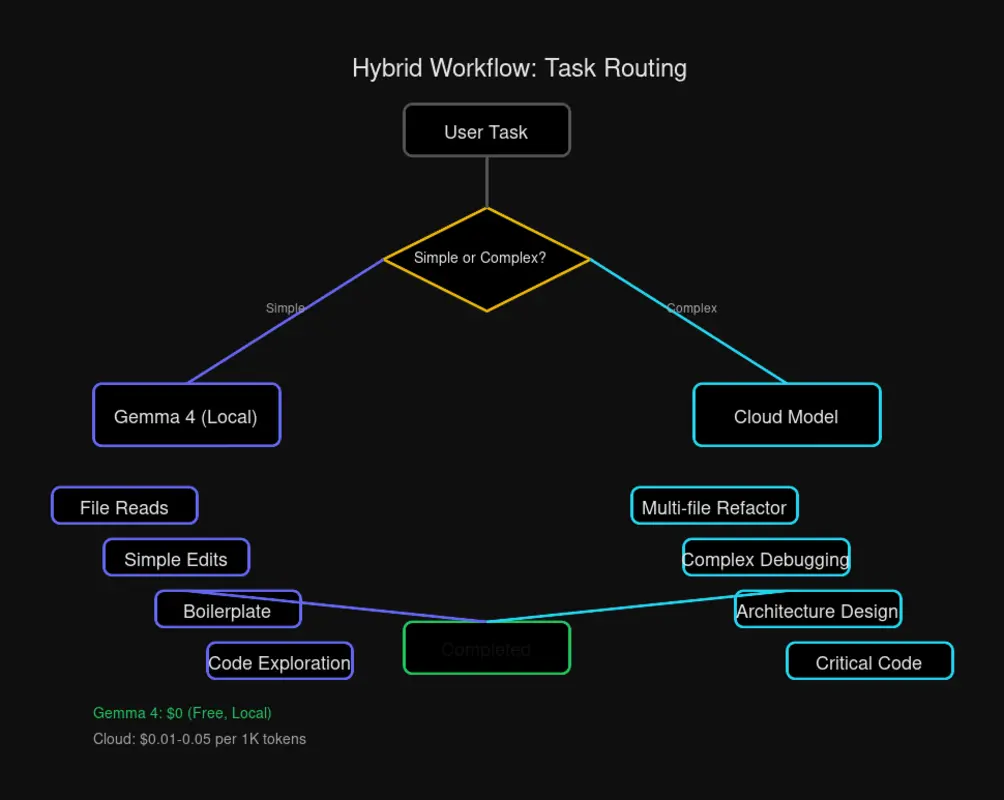
The smartest OpenClaw setup uses Gemma 4 for the bulk of work, then escalates to cloud models when needed.
Configuration for Hybrid Workflow
{
  "models": {
    "providers": {
      "ollama": {
        "baseUrl": "http://localhost:11434/v1",
        "api": "openai-completions",
        "models": [
          {
            "id": "gemma4:latest",
            "name": "Gemma 4 E4B",
            "reasoning": false,
            "contextWindow": 131072,
            "maxTokens": 8192
          }
        ]
      },
      "openai": {
        "baseUrl": "https://api.openai.com/v1",
        "apiKey": "$OPENAI_API_KEY",
        "api": "openai-completions",
        "models": [
          {
            "id": "gpt-4.1",
            "name": "GPT-4.1",
            "reasoning": true,
            "contextWindow": 128000,
            "maxTokens": 16384
          }
        ]
      }
    }
  },
  "agents": {
    "defaults": {
      "model": {
        "primary": "ollama/gemma4:latest",
        "thinking": "openai/gpt-4.1"
      }
    }
  }
}
The Workflow Split
| Task Type | Model | Why |
|---|---|---|
| File reads | Gemma 4 | Fast, free, no context needed |
| Simple edits | Gemma 4 | Reliable for single-file work |
| Boilerplate | Gemma 4 | Patterns are its strength |
| Codebase exploration | Gemma 4 | Good at summarization |
| Multi-file refactors | Cloud | Coherence across abstractions |
| Complex debugging | Cloud | Better at tracing dependencies |
| Architecture decisions | Cloud | More sophisticated reasoning |
Rule of thumb: Start with Gemma 4. Escalate to cloud when you’re stuck or working across many files.
Performance Tips
Keep the Model Warm
By default, Ollama unloads models after 5 minutes of inactivity. That means cold starts. Prevent it:
# Temporary (current session)
launchctl setenv OLLAMA_KEEP_ALIVE "-1"

# Permanent (add to ~/.zshrc or ~/.bashrc)
export OLLAMA_KEEP_ALIVE="-1"
The model stays loaded in memory. First response is instant.
Close Competing Apps
Gemma 4 needs ~10GB of RAM for comfortable operation. If you’re running Docker containers, Electron apps, or browser with 50 tabs—close what you don’t need. Memory pressure causes crashes and slowdowns.
Update Ollama Regularly
Ollama v0.19+ includes MLX backend for Apple Silicon. If you’re on an older version, you’re leaving performance on the table:
# Check version
ollama --version

# Update (macOS)
brew upgrade ollama

# Update (Linux)
curl -fsSL https://ollama.com/install.sh | sh
Context Window Tuning
If you’re hitting context limits or seeing degraded quality:
// Conservative for 16GB machines
"contextWindow": 32768

// Aggressive for 32GB+ machines
"contextWindow": 131072
Start conservative. Increase if you need it.
Troubleshooting Common Issues
Model Loads Slowly or Crashes
Cause: Memory pressure.
Fix: Close competing apps. Check Activity Monitor / Task Manager. You need at least 16GB free before loading the model.
Tool Calls Fail
Cause: reasoning flag set to true.
Fix: Set "reasoning": false in your model config. Gemma 4 doesn’t support the thinking mode interface that some cloud models use.
Slow Generation
Cause: Outdated Ollama version.
Fix: Update to Ollama v0.19+ for MLX acceleration on Apple Silicon. The difference is dramatic.
Context Window Errors
Cause: Exceeding available memory.
Fix: Reduce contextWindow to 32768 for 16GB machines, or 65536 for 24GB. The model will truncate older context automatically.
When to Stick with Cloud Models
Gemma 4 is impressive, but it’s not a full replacement. Keep cloud models for:
- Complex debugging — when bugs span multiple layers
- Multi-file refactors — changes touching 5+ files
- Architecture planning — system design decisions
- Long conversations — >32K tokens where quality matters
- Critical production code — when you need highest reliability
The hybrid approach isn’t a compromise. It’s strategic. Use local for volume, cloud for precision.
Privacy: The Hidden Benefit
Every request to a cloud API is data leaving your machine. Even with privacy promises, the data travels. Servers log. Retention policies apply.
Gemma 4 changes that calculus entirely:
- No data leaves your machine — everything runs locally
- No API keys to manage — no credentials to rotate or revoke
- No rate limits — use it as much as you want
- No internet dependency — works offline, in airgapped environments
For sensitive codebases, proprietary projects, or simply for peace of mind, local AI is the only option that’s truly private.
The Bottom Line
Gemma 4 makes local AI practical for daily OpenClaw use. Setup takes minutes. The model handles 60-70% of typical coding tasks well. And it’s free—indefinitely.
The recommendation:
- Install Gemma 4 E4B (
ollama pull gemma4) - Configure OpenClaw with proper context window settings
- Set
OLLAMA_KEEP_ALIVE="-1"for instant responses - Use Gemma 4 as your default, escalate to cloud when needed
You’ll cut API costs dramatically while keeping your workflow fast and your data private. That’s the promise of local AI, finally delivered.
Resources
- Gemma 4 Documentation — Official Google DeepMind docs
- Ollama Integration Guide — OpenClaw-specific setup
- OpenClaw GitHub — Source code and issues
- OpenClaw Official Site — Product information
Last updated: April 13, 2026

Comments
Powered by GitHub Discussions